
Idea Statica
  • Steel
  • Concrete
  • BIM & Workflows
  • Support & Learning
  • Pricing
  • Company
  • Steel overview
  • Connection design
  • Member design
  • Parametric design
  • Steel case studies
  • Concrete overview
  • Walls and D-regions
  • Anchoring design
  • Concrete case studies
  • BIM Overview
  • Supported integrations
  • Checkbot
  • Viewer
  • APIs
  • Support Center
  • E-learning & certification
  • Blog
  • Downloads & Licensing
  • Plans
  • Free community tool
  • Enterprise customers
  • Students & educators
  • How much will you save?
  • About us
  • Contact
  • Research & development
  • Authorized resellers
  • Meet our customers
  • Career
  • Steel
    Steel overviewConnection designMember designParametric designSteel case studies
  • Concrete
    Concrete overviewWalls and D-regionsAnchoring designConcrete case studies
  • BIM & Workflows
    BIM OverviewSupported integrationsCheckbotViewerAPIs
  • Support & Learning
    Support CenterE-learning & certificationBlogDownloads & Licensing
  • Pricing
    PlansFree community toolEnterprise customersStudents & educatorsHow much will you save?
  • Company
    About usContactResearch & developmentAuthorized resellersMeet our customersCareer
14-Day Trial
14-Day Trial
  • Steel
  • Concrete
  • BIM & Workflows
  • Support & Learning
  • Pricing
  • Company

Subscribe to our newsletter

Company

  • About us
  • Partners
  • Careers
  • Patent

Resources

  • Customer projects
  • Case studies
  • Connection Library
  • Verification books

Legal

  • EULA
  • Privacy policy
  • California Privacy
  • TOS Viewer
  • Licensing

Help

  • Contact
  • Quote request
  • Resellers
  • Downloads
FacebookInstagramLinkedInYouTube

ยฉ IDEA StatiCa 2009-2026

Trusted and used worldwide by engineers, fabricators & consultants.

Support CenterKnowledge Base ArticlesParametric design in Connection - all documentation
Parametric design for steel connections
Parametric design in Connection - all documentation
Parameters are useful for everyone
Setting up parametric design with Developer Tab
UX features in parametric design
Parametric templates in Connection Library
Parametric design options for IDEA StatiCa Connection
Parametric design in Connection - all documentation
SteelConnection designKnowledge baseConnectionParametric design

Parametric design in Connection - all documentation

This article is also available in
ENCZDEESFRITPTNLHUROKRPLTHTRVIZH

Parametric design transforms traditional engineering by introducing logic and variables into your workflow. It offers massive gains in flexibility, optimization, and speedโ€”making it a incredibly powerful approach for designing complex steel connections.

What is the Parametric Design/Developer tab?

The Developer tab is a hidden mode in IDEA StatiCa Connection that lets you attach parameters โ€” numbers, text, or equations โ€” to the properties of a connection model (plate thickness, bolt count, gaps, weld sizes, etc.). Once properties are linked to parameters, changing a single value can update multiple related items across the model at once, instead of editing each one manually. You turn it on in Preferences by checking the Developer mode.

The prepared parameters are then turned into a parametric template you publish to the Connection Library (design templates database), so it can be reused across projects and by other people.

Use the Developer tab if you:

  • Design the same connection type repeatedly (e.g., a standard splice or shear plate) across many projects, and want to stop re-modeling it each time
  • Need to enforce company or regional standards โ€” e.g., a warning if a user enters too few bolts, or a plate thickness that's always tied to member size
  • Want to build a reusable template that others in your office can pick up from the Connection Library, with the logic already built in

Note: For parametric workflows using the IDEA StatiCa Connection and Rhino/Grasshopper plugin, please navigate to our Rhino/Grasshopper page.
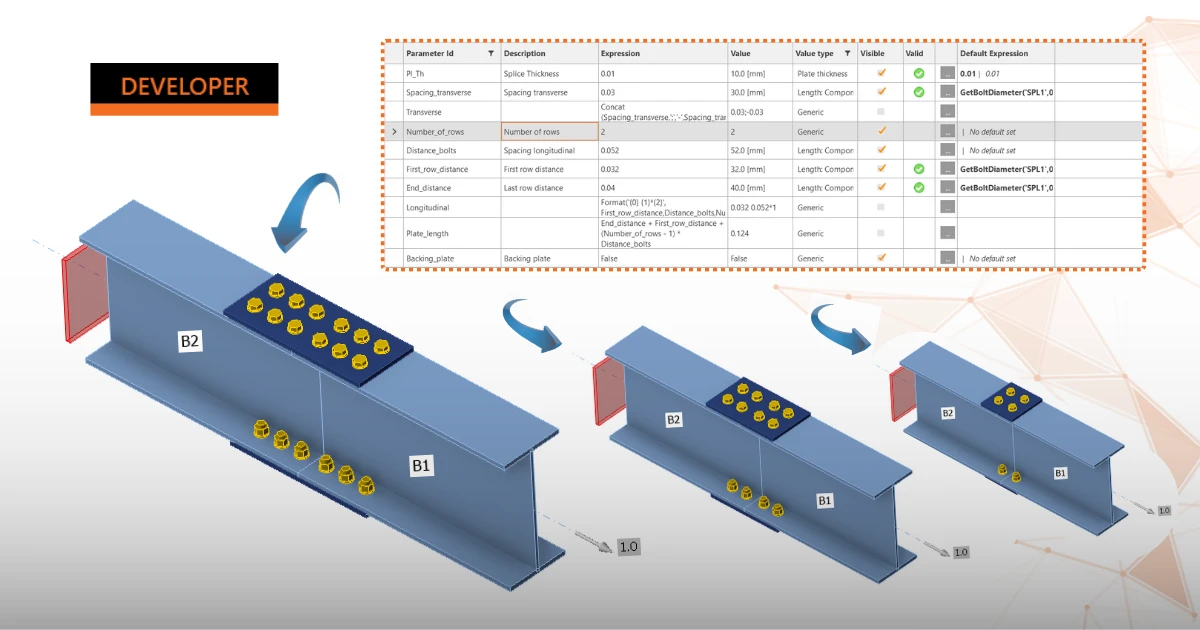
Where to start?

This article collects all the tutorials, documentation, and recordings you need to master parametric design natively within the IDEA StatiCa Connection app and its Developer tab.

Tutorials:

  • Parametric design in IDEA StatiCa Connection - Basics
  • Parametric design in IDEA StatiCa Connection - Advanced
  • Parametric design in IDEA StatiCa Connection - Tubular connection
  • Parametric design in IDEA StatiCa Connection - Single plate Shear connection
  • Flush moment end plate connections

Articles:

  • Setting up parametric design with Developer Tab
  • Expression Parameter Reference - technical documentation
  • Parametric design for steel connections
  • UX features in parametric design
  • Parametric templates in Connection Library

Webinars:

  • How to create your own parametric templates
  • Parametric modeling with IDEA StatiCa
  • Parametric Templates in IDEA StatiCa V25.0

Campus Course:

  • Basics in IDEA parametric design

Blog posts:

  • Design connections in just a few clicks!