Idea Statica
  • Steel
  • Concrete
  • BIM & Workflows
  • Support & Learning
  • Pricing
  • Company
  • Steel overview
  • Connection design
  • Member design
  • Parametric design
  • Steel case studies
  • Concrete overview
  • Walls and D-regions
  • Anchoring design
  • Concrete case studies
  • BIM Overview
  • Supported integrations
  • Checkbot
  • Viewer
  • APIs
  • Support Center
  • E-learning & certification
  • Blog
  • Downloads & Licensing
  • Plans
  • Free community tool
  • Enterprise customers
  • Students & educators
  • How much will you save?
  • About us
  • Contact
  • Research & development
  • Authorized resellers
  • Meet our customers
  • Career
  • Steel
    Steel overviewConnection designMember designParametric designSteel case studies
  • Concrete
    Concrete overviewWalls and D-regionsAnchoring designConcrete case studies
  • BIM & Workflows
    BIM OverviewSupported integrationsCheckbotViewerAPIs
  • Support & Learning
    Support CenterE-learning & certificationBlogDownloads & Licensing
  • Pricing
    PlansFree community toolEnterprise customersStudents & educatorsHow much will you save?
  • Company
    About usContactResearch & developmentAuthorized resellersMeet our customersCareer
14-Day Trial
14-Day Trial
  • Steel
  • Concrete
  • BIM & Workflows
  • Support & Learning
  • Pricing
  • Company

Subscribe to our newsletter

Company

  • About us
  • Partners
  • Careers
  • Patent

Resources

  • Customer projects
  • Case studies
  • Connection Library
  • Verification books

Legal

  • EULA
  • Privacy policy
  • California Privacy
  • TOS Viewer
  • Licensing

Help

  • Contact
  • Quote request
  • Resellers
  • Downloads
FacebookInstagramLinkedInYouTube

© IDEA StatiCa 2009-2026

Trusted and used worldwide by engineers, fabricators & consultants.

Support CenterKnowledge Base ArticlesSetting up parametric design with Developer Tab
Shared Preferences across the whole tool range
Project settings
How to change units in IDEA StatiCa
How to change the design code of Connection project
Keyboard shortcuts (hotkeys) in IDEA StatiCa apps
3D presentation: Scene options
Setting up parametric design with Developer Tab
The coherent icons and ribbon of IDEA StatiCa Connection
Codes and standards supported in IDEA StatiCa Steel
Decimal separator and date format according to Windows Regional Settings
Parametric design for steel connections
Parametric design in Connection - all documentation
Parameters are useful for everyone
Setting up parametric design with Developer Tab
UX features in parametric design
Parametric templates in Connection Library
Parametric design options for IDEA StatiCa Connection
Developer mode
SteelConnection designKnowledge baseIDEA Open Model (API)v23.0

Setting up parametric design with Developer Tab

This article is also available in
ENCZDEESFRITPTNLHUROKRPLTHTRVIZH

Many users prefer modeling and analyzing connections through parameters and commands instead of by manual input. It is easy to deal with parametric design in IDEA StatiCa, giving users greater freedom to explore additional functionality.

It is not necessary to manually modify the IdeaConnection.exe.config file in the root folder, which would be time-consuming and inconvenient. 

Thanks to the raising numbers of advanced users of IDEA tools, it is enough to just enable the Developer mode in Project tab/Preferences.
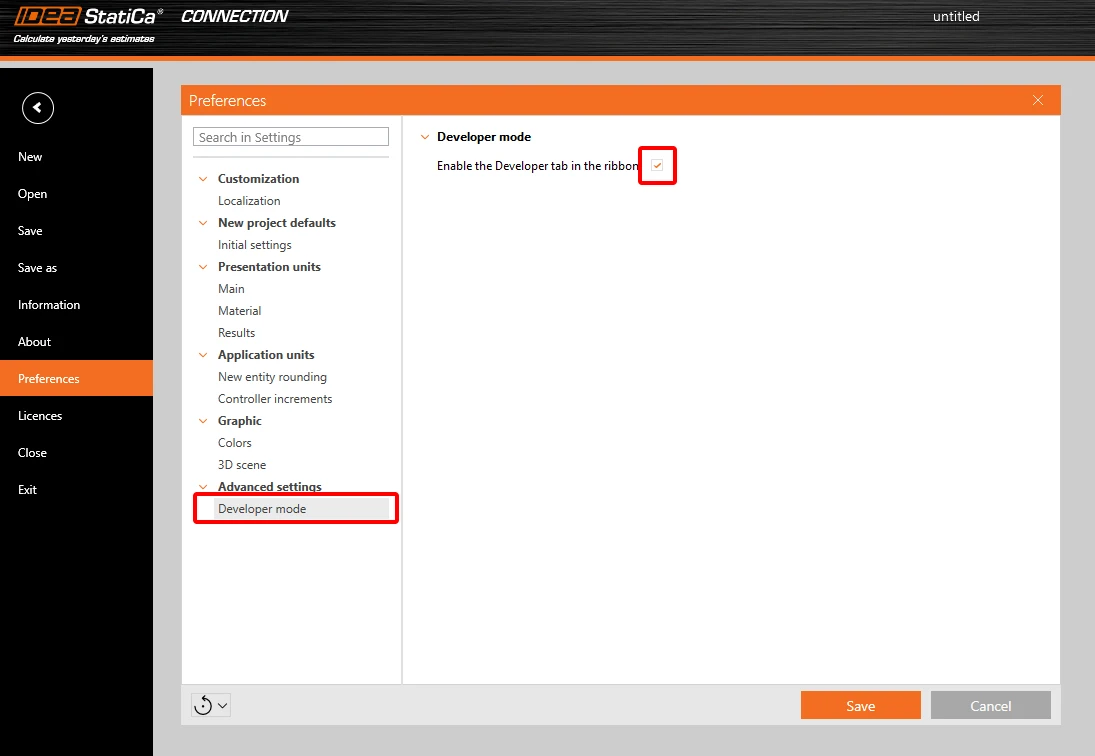
Set up

This brings the user a new tab in the main toolbar, with additional features.

Export IOM:

  • Model – export the model data through IOM (Idea Open Model) in .xml format
  • Conn Data – export the model data through IOM in .json format

Template:

  • Save as – the user can save the connection model properties in the Idea Template (.IdeaTemp) format 
  • Apply – the user can apply Idea Template format to the whole Connection model (all members are involved)
  • Simple – the user can apply Idea Template format to a selected part of the Connection model (only selected members are involved)

There is also a property grid window part-displayed with two separate tables:

Parameters table – this provides the user with the set of IOM parameters that are available to use for parametric design

Model parameters – this allows joining the specific IOM parameter with the specific Model parameter of the current Connection project

Other improvements are described in the UX Improvements of Parametric design article.

For more information about these features, please visit our GitHub page
https://github.com/idea-statica/ideastatica-public/wiki/Developer-Mode-Parameters#parameter-input
https://github.com/idea-statica/ideastatica-public/wiki/Reference-Guide-Expression-Parameters

This feature can be found in the applications Connection and Member.

Available in both Expert and Enhanced editions of IDEA StatiCa Steel.

Download the new version of IDEA StatiCa and try all the features

Download new version

Related articles

Release notes IDEA StatiCa 23.0
  • Concrete
  • Steel
  • Connection
  • Detail 2D
  • Member
  • Checkbot
  • Viewer
  • RCS
  • IDEA Open Model (API)
  • ACI (USA)
  • AISC (USA)
  • BIM link
  • EN (Eurocode)
  • v23.0
  • +14
  • Concrete
  • Steel
  • Connection
  • Detail 2D
  • Member
  • Checkbot
  • Viewer
  • RCS
  • IDEA Open Model (API)
  • ACI (USA)
  • AISC (USA)
  • BIM link
  • EN (Eurocode)
  • v23.0

Release notes

Release notes IDEA StatiCa 23.0

Read more
Design connection in just few clicks!
  • Steel
  • Connection
  • Parametric design
  • +3
  • Steel
  • Connection
  • Parametric design

Blog post

Design connections in just a few clicks!

Read more
UX features in parametric design
  • Steel
  • IDEA Open Model (API)
  • Connection
  • v23.1
  • v23.0
  • v26.1
  • +6
  • Steel
  • IDEA Open Model (API)
  • Connection
  • v23.1
  • v23.0
  • v26.1

Knowledge base

UX features in parametric design

Read more
Parametric templates in Connection Library
  • Steel
  • Connection
  • Connection Library
  • v24.0
  • Parametric design
  • v24.1
  • v25.1
  • +7
  • Steel
  • Connection
  • Connection Library
  • v24.0
  • Parametric design
  • v24.1
  • v25.1

Knowledge base

Parametric templates in Connection Library

Read more