Idea Statica
  • Steel
  • Concrete
  • BIM & Workflows
  • Support & Learning
  • Pricing
  • Company
  • Steel overview
  • Connection design
  • Member design
  • Parametric design
  • Steel case studies
  • Concrete overview
  • Walls and D-regions
  • Anchoring design
  • Concrete case studies
  • BIM Overview
  • Supported integrations
  • Checkbot
  • Viewer
  • APIs
  • Support Center
  • E-learning & certification
  • Blog
  • Downloads & Licensing
  • Plans
  • Free community tool
  • Enterprise customers
  • Students & educators
  • How much will you save?
  • About us
  • Contact
  • Research & development
  • Authorized resellers
  • Meet our customers
  • Career
  • Steel
    Steel overviewConnection designMember designParametric designSteel case studies
  • Concrete
    Concrete overviewWalls and D-regionsAnchoring designConcrete case studies
  • BIM & Workflows
    BIM OverviewSupported integrationsCheckbotViewerAPIs
  • Support & Learning
    Support CenterE-learning & certificationBlogDownloads & Licensing
  • Pricing
    PlansFree community toolEnterprise customersStudents & educatorsHow much will you save?
  • Company
    About usContactResearch & developmentAuthorized resellersMeet our customersCareer
14-Day Trial
14-Day Trial
  • Steel
  • Concrete
  • BIM & Workflows
  • Support & Learning
  • Pricing
  • Company

Subscribe to our newsletter

Company

  • About us
  • Partners
  • Careers
  • Patent

Resources

  • Customer projects
  • Case studies
  • Connection Library
  • Verification books

Legal

  • EULA
  • Privacy policy
  • California Privacy
  • TOS Viewer
  • Licensing

Help

  • Contact
  • Quote request
  • Resellers
  • Downloads
FacebookInstagramLinkedInYouTube

ยฉ IDEA StatiCa 2009-2026

Trusted and used worldwide by engineers, fabricators & consultants.

Support CenterKnowledge Base ArticlesHILTI PROFIS plugin in Checkbot
IDEA StatiCa BIM interoperability for steel
IDEA StatiCa BIM interoperability for concrete
BIM links: Supported versions of 3rd party applications
How to run old versions of BIM links
How to use the Hilti PROFIS Engineering Suite plugin
HILTI PROFIS plugin in Checkbot
SteelConnection designKnowledge basev24.1EN (Eurocode)

HILTI PROFIS plugin in Checkbot

This article is also available in
ENCZDEESFRITPTNLHUROKRPLTHTRVIZH

The collaboration between IDEA StatiCa and Hilti includes a direct BIM link from Checkbot to Hilti PROFIS Engineering Suite (PE). This enables data transfer from supported third-party FEA and CAD software to PE, improving efficiency and ensuring accurate design coordination across platforms.

What is HILTI PROFIS Engineering Suite?

Hilti PROFIS Engineering Suite is a cloud-based software for structural engineers that specializes in the design and analysis of anchor systems, base plates, and steel connections. It supports international design standards like ACI and Eurocode, and integrates with Hiltiโ€™s hardware to provide optimized anchor solutions.

FEA to Checkbot to Profis workflow

How to use the plugin

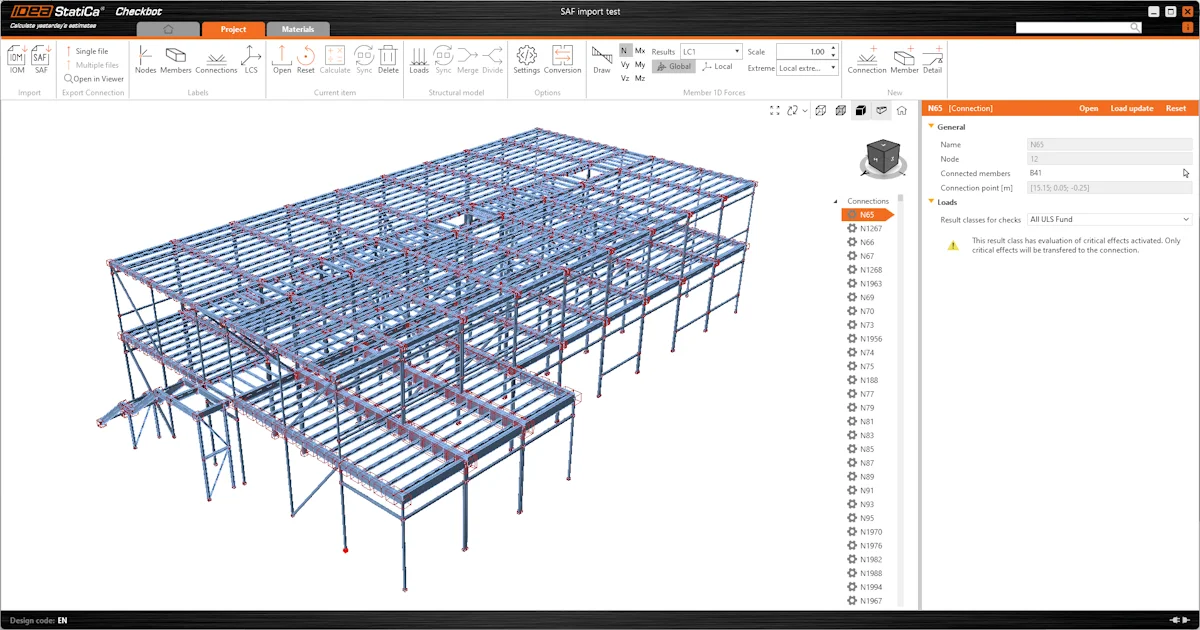
To import data from any global analysis software into Hilti PE, the information is first brought into Checkbot via any BIM link. A "HILTI PROFIS" tab in Checkbot facilitates the export to the Hilti process. By selecting a node with one anchored member, users can export the data directly to Hilti PE using the Export button, ensuring accurate transfer of relevant structural data for further analysis.

The Export button in Checkbot launches Hilti PE and, after logging in, automatically creates a new project with the same name as the Checkbot project. Within this project, a new design is generated.ย 

This entire workflow is available even with a IDEA StatiCa Basic license, meaning that it is available for free. How to use the plugin is described step-by-step in the following article, which is also accessible from the Learn more button in Checkbot.ย 

Data imported into PROFIS

  • International design standard (code)ย 
  • Profile type and materialย 
  • Internal forces from load cases and load combinations

Known limitations

  • Connection design is not processed by Hilti PE (anchor layout, baseplate geometry, stiffeners, welds)
  • Only connections with 1 member (simple footings)
    • Only steel-to-concrete anchoring
    • No complex design (footing with braces)
  • Hilti PE does not support "mirroring" of profiles at the moment. In the picture below, highlighted cases show the profile position in PROFIS does not match with the IDEA StatiCa profile position in relation to Connection at the START or END (LCS of the member in IDEA StatiCa).

Try out the new features of IDEA StatiCa today

Download the latest version for free

Related articles

Release notes IDEA StatiCa 24.1
  • Steel
  • Concrete
  • v24.1
  • +3
  • Steel
  • Concrete
  • v24.1

Release notes

Release notes IDEA StatiCa 24.1

Read more
3D Detail out of Beta
  • Concrete
  • v24.1
  • EN (Eurocode)
  • Detail 3D
  • +4
  • Concrete
  • v24.1
  • EN (Eurocode)
  • Detail 3D

Knowledge base

3D Detail out of Beta

Read more
Shear transfer through anchors, shear lugs, and friction
  • Concrete
  • v24.1
  • Detail 3D
  • EN (Eurocode)
  • +4
  • Concrete
  • v24.1
  • Detail 3D
  • EN (Eurocode)

Knowledge base

Shear transfer through anchors, shear lugs, and friction

Read more
Checkbot ready for big projects
  • Steel
  • Checkbot
  • IDEA Open Model (API)
  • v24.1
  • v24.0
  • +5
  • Steel
  • Checkbot
  • IDEA Open Model (API)
  • v24.1
  • v24.0

Knowledge base

Checkbot ready for big projects

Read more