Idea Statica
  • Steel
  • Concrete
  • BIM & Workflows
  • Support & Learning
  • Pricing
  • Company
  • Steel overview
  • Connection design
  • Member design
  • Parametric design
  • Steel case studies
  • Concrete overview
  • Walls and D-regions
  • Anchoring design
  • Concrete case studies
  • BIM Overview
  • Supported integrations
  • Checkbot
  • Viewer
  • APIs
  • Support Center
  • E-learning & certification
  • Blog
  • Downloads & Licensing
  • Plans
  • Free community tool
  • Enterprise customers
  • Students & educators
  • How much will you save?
  • About us
  • Contact
  • Research & development
  • Authorized resellers
  • Meet our customers
  • Career
  • Steel
    Steel overviewConnection designMember designParametric designSteel case studies
  • Concrete
    Concrete overviewWalls and D-regionsAnchoring designConcrete case studies
  • BIM & Workflows
    BIM OverviewSupported integrationsCheckbotViewerAPIs
  • Support & Learning
    Support CenterE-learning & certificationBlogDownloads & Licensing
  • Pricing
    PlansFree community toolEnterprise customersStudents & educatorsHow much will you save?
  • Company
    About usContactResearch & developmentAuthorized resellersMeet our customersCareer
14-Day Trial
14-Day Trial
  • Steel
  • Concrete
  • BIM & Workflows
  • Support & Learning
  • Pricing
  • Company

Subscribe to our newsletter

Company

  • About us
  • Partners
  • Careers
  • Patent

Resources

  • Customer projects
  • Case studies
  • Connection Library
  • Verification books

Legal

  • EULA
  • Privacy policy
  • California Privacy
  • TOS Viewer
  • Licensing

Help

  • Contact
  • Quote request
  • Resellers
  • Downloads
FacebookInstagramLinkedInYouTube

© IDEA StatiCa 2009-2026

Trusted and used worldwide by engineers, fabricators & consultants.

Support CenterKnowledge Base ArticlesIDEA StatiCa BIM interoperability for steel
IDEA StatiCa BIM interoperability for steel
IDEA StatiCa BIM interoperability for concrete
IDEA StatiCa BIM interoperability for steel
SteelConnection designMember designKnowledge baseCheckbot

IDEA StatiCa BIM interoperability for steel

This article is also available in
ENCZDEESFRITPTNLHUROKRPLTHTRVIZH

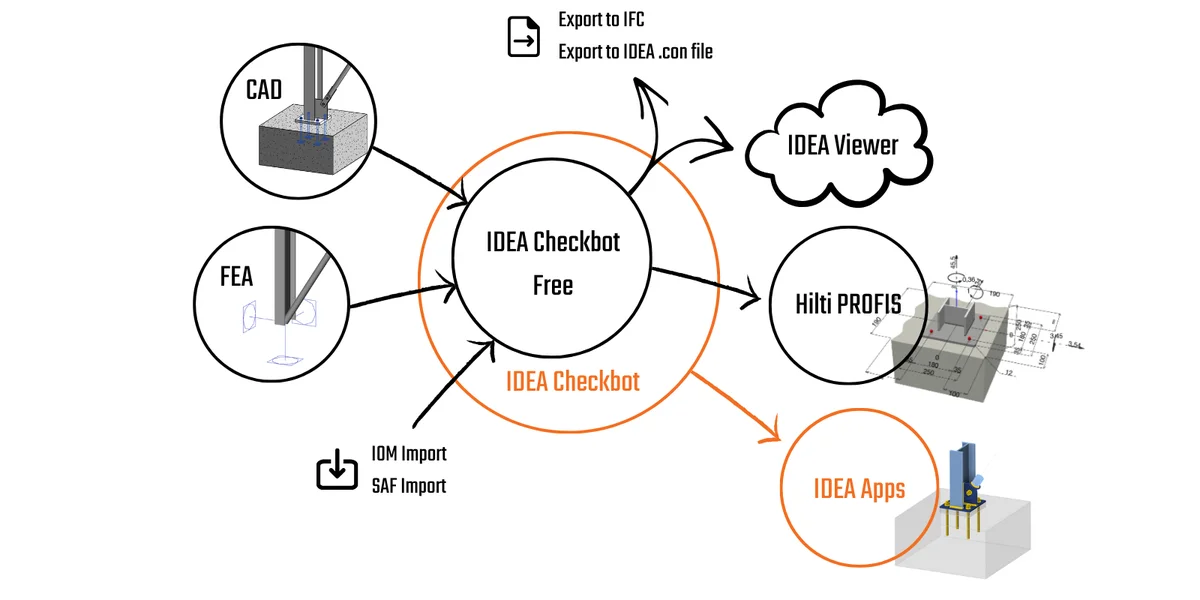
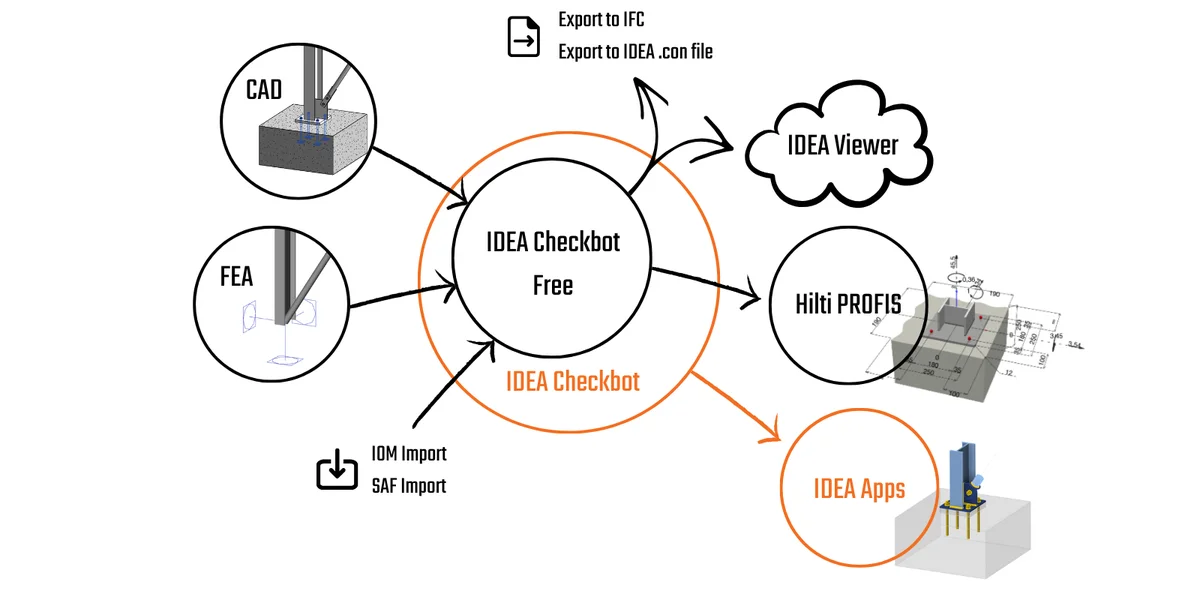
BIM links allow you to import data from your CAD or FEA software, letting you design connections and members straightforwardly. BIM links also minimize errors and repetitive work, so you save time and can focus on proper analysis, design, and code-check.

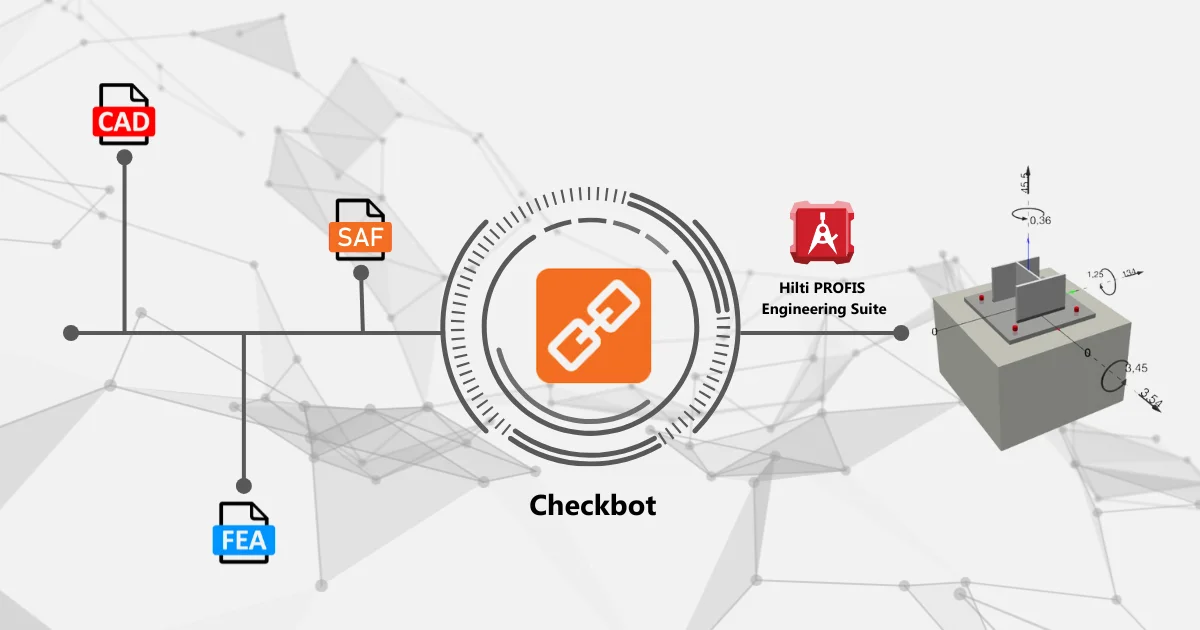
BIM links for IDEA StatiCa are executed in the application called the Checkbot. There is also the lite and free-of-charge version – Checkbot Free. For sharing connection models, there is the free online Viewer.

Checkbot = manager of BIM links

With IDEA StatiCa Checkbot, you can automatically import the model from your FEA or CAD and synchronize design data. IDEA StatiCa Checkbot lets you visualize imported loads and members in 3D, manage load combinations, and see all connection and member properties and statuses (checked/not checked).

  • To learn more about Checkbot and how to use it, read the knowledgebase article – Checkbot - bulk BIM workflow.
  • We also recommend watching the webinar – Master your connections – BIM Links.
  • Also, you can try it on your own with our step-by-step tutorials – All Checkbot tutorials.

Checkbot Free, the free of charge version

If you don't design steel connections or members yourself, you can use the free version to delegate the design data to other colleagues, or outsourced connection designers and detailers.

Checkbot Free works the same as the licensed version of Checkbot, except you can not open, design, and code-check connections and members.

  • Learn more about all the benefits in the article – Checkbot Free – the structural design hub.

Share connection models with online Viewer

IDEA StatiCa Viewer is a free cloud-based tool for sharing structural connection models and anchoring models among project participants.

As a connection designer, you can exchange accurate data and collaborate effectively with engineers of record (EORs), detailers, and checking engineers.

  • Read about all Viewer's functions in the article – The UI of the IDEA StatiCa Viewer tool.

Quote request

Do you like to work with IDEA StatiCa? Ask for commercial license.

Get an offer

Related articles

HILTI PROFIS plugin in Checkbot
  • Steel
  • v24.1
  • EN (Eurocode)
  • AISC (USA)
  • ACI (USA)
  • AS (Australia)
  • CSA (Canada)
  • IS (India)
  • GB (China)
  • HKG (Hong Kong)
  • SIA (Switzerland)
  • Hilti
  • +12
  • Steel
  • v24.1
  • EN (Eurocode)
  • AISC (USA)
  • ACI (USA)
  • AS (Australia)
  • CSA (Canada)
  • IS (India)
  • GB (China)
  • HKG (Hong Kong)
  • SIA (Switzerland)
  • Hilti

Knowledge base

HILTI PROFIS plugin in Checkbot

Read more
Checkbot Free – the structural design hub for FEA and CAD data
  • Checkbot
  • Licensing
  • v24.0
  • +3
  • Checkbot
  • Licensing
  • v24.0

Knowledge base

Checkbot Free – the structural design hub for FEA and CAD data

Read more
BIM links: Supported versions of 3rd party applications
  • Steel
  • Concrete
  • Checkbot
  • ACI (USA)
  • AISC (USA)
  • EN (Eurocode)
  • SIA (Switzerland)
  • BIM link
  • Advance Steel
  • Tekla Structures
  • SAP2000
  • SCIA Engineer
  • STAAD.Pro
  • Revit
  • Robot Structural Analysis
  • Advance Design
  • AxisVM
  • ETABS
  • midas Civil + Gen
  • RFEM
  • RSTAB
  • +21
  • Steel
  • Concrete
  • Checkbot
  • ACI (USA)
  • AISC (USA)
  • EN (Eurocode)
  • SIA (Switzerland)
  • BIM link
  • Advance Steel
  • Tekla Structures
  • SAP2000
  • SCIA Engineer
  • STAAD.Pro
  • Revit
  • Robot Structural Analysis
  • Advance Design
  • AxisVM
  • ETABS
  • midas Civil + Gen
  • RFEM
  • RSTAB

Knowledge base

BIM links: Supported versions of 3rd party applications

Read more
Checkbot – bulk BIM workflows
  • Steel
  • Checkbot
  • BIM link
  • v25.1
  • v25.0
  • +5
  • Steel
  • Checkbot
  • BIM link
  • v25.1
  • v25.0

Knowledge base

Checkbot – bulk BIM workflows

Read more