Idea Statica
  • Steel
  • Concrete
  • Support & Learning
  • Pricing
  • Company
  • Steel overview
  • Connection design
  • Member design
  • Parametric design
  • Steel case studies
  • Concrete overview
  • Walls and D-regions
  • Anchoring design
  • Concrete case studies
  • BIM Overview
  • Supported integrations
  • Checkbot
  • Viewer
  • APIs
  • Support Center
  • E-learning & certification
  • Blog
  • Downloads & Licensing
  • Plans
  • Free community tool
  • Enterprise customers
  • Students & educators
  • How much will you save?
  • About us
  • Contact
  • Research & development
  • Authorized resellers
  • Meet our customers
  • Career
  • Steel
    Steel overviewConnection designMember designParametric designSteel case studies
  • Concrete
    Concrete overviewWalls and D-regionsAnchoring designConcrete case studies
  • BIM OverviewSupported integrationsCheckbotViewerAPIs
  • Support & Learning
    Support CenterE-learning & certificationBlogDownloads & Licensing
  • Pricing
    PlansFree community toolEnterprise customersStudents & educatorsHow much will you save?
  • Company
    About usContactResearch & developmentAuthorized resellersMeet our customersCareer
14-Day Trial
14-Day Trial

Subscribe to our newsletter

Company

  • About us
  • Partners
  • Careers
  • Patent

Resources

  • Customer projects
  • Case studies
  • Connection Library
  • Verification books

Legal

  • EULA
  • Privacy policy
  • California Privacy
  • TOS Viewer
  • Licensing

Help

  • Contact
  • Quote request
  • Resellers
  • Downloads
FacebookInstagramLinkedInYouTube

ยฉ IDEA StatiCa 2009-2026

Trusted and used worldwide by engineers, fabricators & consultants.

Support CenterKnowledge Base ArticlesDistance between plates connected by a contact
How to set position of bolts
How to define preloaded bolts
Bolts and preloaded bolts connections
Prying and high tension force in bolts
Autodesign of bolts
Steel pins
Slotted holes for the selected plate
Distance between plates connected by a contact
Limitations of through bolts and hollow sections
Through bolts for hollow sections warning
Advanced anchoring design and anchors in Connection
Distance between plates connected by a contact
SteelConnection designKnowledge baseConnectionContacts

Distance between plates connected by a contact

This article is also available in
ENCZDEESFRITPTNLHUROKRPLTHTRVIZH

You must keep a maximum distance between parallel plates while modeling a contact or bolted connection with a contact. Plates can be analyzed up to a distance of 2 mm from each other. If the gap between plates is bigger than 2 mm, the analysis canโ€™t be performed.

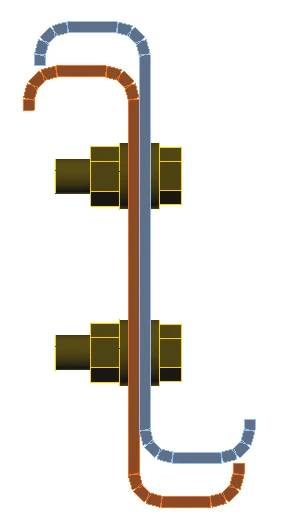
An example is a connection of two parallel Z-section members connected by bolts and by a contact.

Gap = 0 mm (plates are parallel and aligned and surfaces match), analysis is successful.
Gap = 2 mm (plates are parallel and aligned,ย but there is a gap between the surfaces) - application shows the error "The distance of plates for making a contact is too large. The limit value is 2.00 mm.".
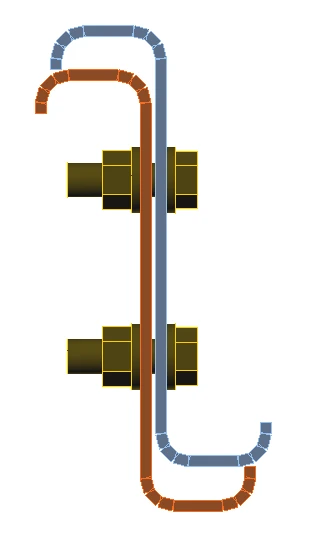
Distance between plates when using Bolt or Contact

Related articles

What is the singularity warning?
  • Steel
  • Connection
  • Modeling
  • +3
  • Steel
  • Connection
  • Modeling

Knowledge base

What is the singularity warning?

Read more
Singularity warning
  • Steel
  • Singularity
  • Modeling
  • +3
  • Steel
  • Singularity
  • Modeling

Blog post

Why did my validation fail?

Read more
Stress in plates higher than the yield strength
  • Steel
  • Connection
  • Overall check
  • CBFEM
  • Stress/strain
  • +5
  • Steel
  • Connection
  • Overall check
  • CBFEM
  • Stress/strain

Knowledge base

Stress in plates higher than the yield strength

Read more
Strain check is performed at shell finite elements simulating plates. IDEA StatiCa - structural analysis software for steel member design.
  • Steel
  • Connection
  • AISC (USA)
  • CBFEM
  • Contacts
  • EN (Eurocode)
  • +6
  • Steel
  • Connection
  • AISC (USA)
  • CBFEM
  • Contacts
  • EN (Eurocode)

Knowledge base

Contacts between steel connection plates

Read more