Idea Statica
  • Steel
  • Concrete
  • BIM & Workflows
  • Support & Learning
  • Pricing
  • Company
  • Steel overview
  • Connection design
  • Member design
  • Parametric design
  • Steel case studies
  • Concrete overview
  • Walls and D-regions
  • Anchoring design
  • Concrete case studies
  • BIM Overview
  • Supported integrations
  • Checkbot
  • Viewer
  • APIs
  • Support Center
  • E-learning & certification
  • Blog
  • Downloads & Licensing
  • Plans
  • Free community tool
  • Enterprise customers
  • Students & educators
  • How much will you save?
  • About us
  • Contact
  • Research & development
  • Authorized resellers
  • Meet our customers
  • Career
  • Steel
    Steel overviewConnection designMember designParametric designSteel case studies
  • Concrete
    Concrete overviewWalls and D-regionsAnchoring designConcrete case studies
  • BIM & Workflows
    BIM OverviewSupported integrationsCheckbotViewerAPIs
  • Support & Learning
    Support CenterE-learning & certificationBlogDownloads & Licensing
  • Pricing
    PlansFree community toolEnterprise customersStudents & educatorsHow much will you save?
  • Company
    About usContactResearch & developmentAuthorized resellersMeet our customersCareer
14-Day Trial
14-Day Trial
  • Steel
  • Concrete
  • BIM & Workflows
  • Support & Learning
  • Pricing
  • Company

Subscribe to our newsletter

Company

  • About us
  • Partners
  • Careers
  • Patent

Resources

  • Customer projects
  • Case studies
  • Connection Library
  • Verification books

Legal

  • EULA
  • Privacy policy
  • California Privacy
  • TOS Viewer
  • Licensing

Help

  • Contact
  • Quote request
  • Resellers
  • Downloads
FacebookInstagramLinkedInYouTube

© IDEA StatiCa 2009-2026

Trusted and used worldwide by engineers, fabricators & consultants.

Support CenterKnowledge Base ArticlesChange just the language of the report
How to create and export a report to MS Word, PDF or DXF files
Detailed model and loads reporting
Change just the language of the report
Improvements in report readability
Black rectangles in report
Exporting an IFC file from IDEA StatiCa
Language of the report
Connection designMember designSteelKnowledge basev24.0

Change just the language of the report

This article is also available in
ENCZDEESFRITPTNLHUROKRPLTHTRVIZH

Generate the report of your project in a different language while keeping the application in yours. This feature helps you easily deliver the report in the language spoken by your customer.

Sometimes, the project report should be submitted in a language that you do not speak. In some software, that means changing the language of the whole application (and restarting it) just to print the reports.

The possibility of changing the report language under the Report tab makes this tedious process unnecessary.
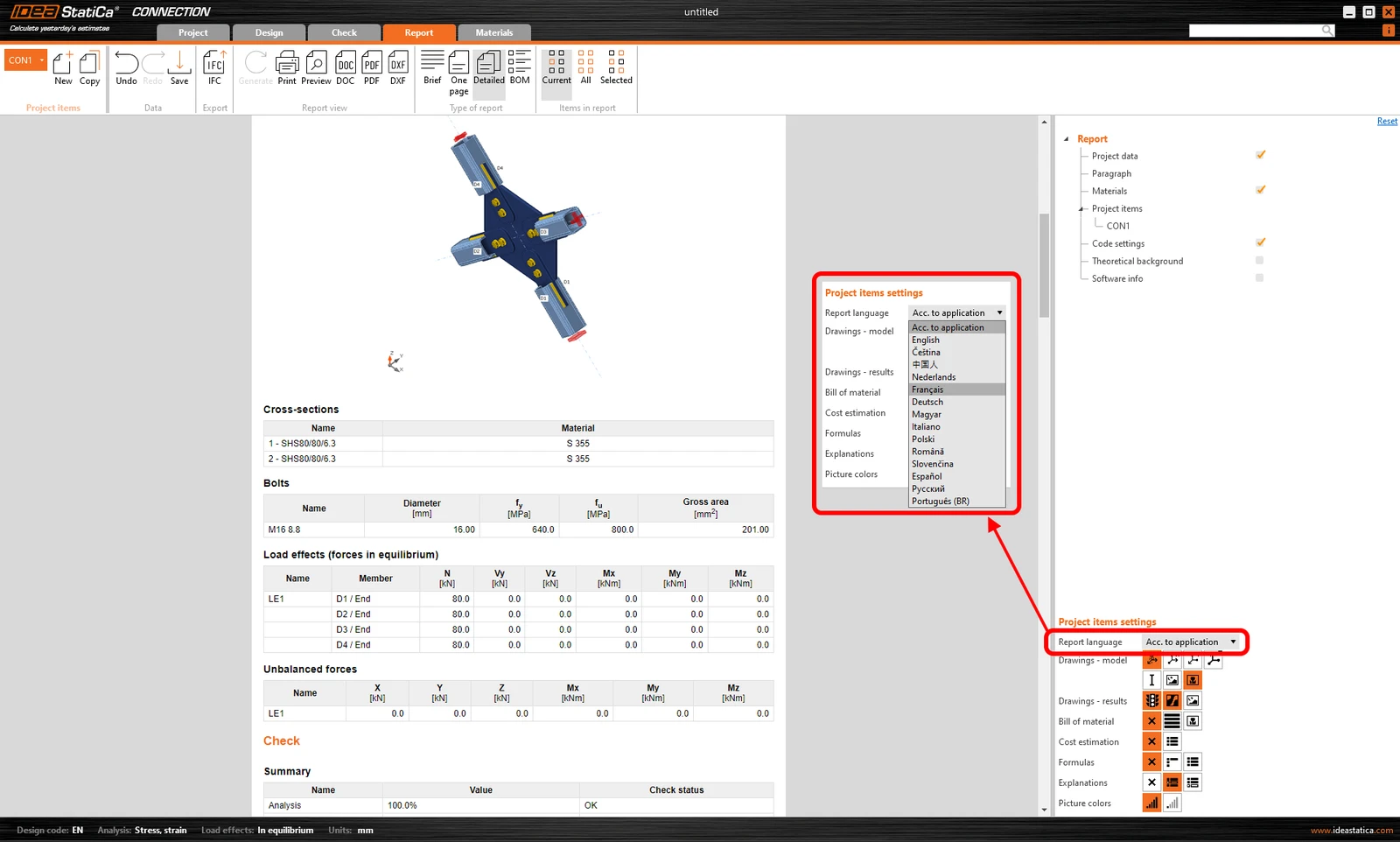
Language of the report

After re-generating the report, the document can be saved/printed in the changed language while the application interface stays unchanged.
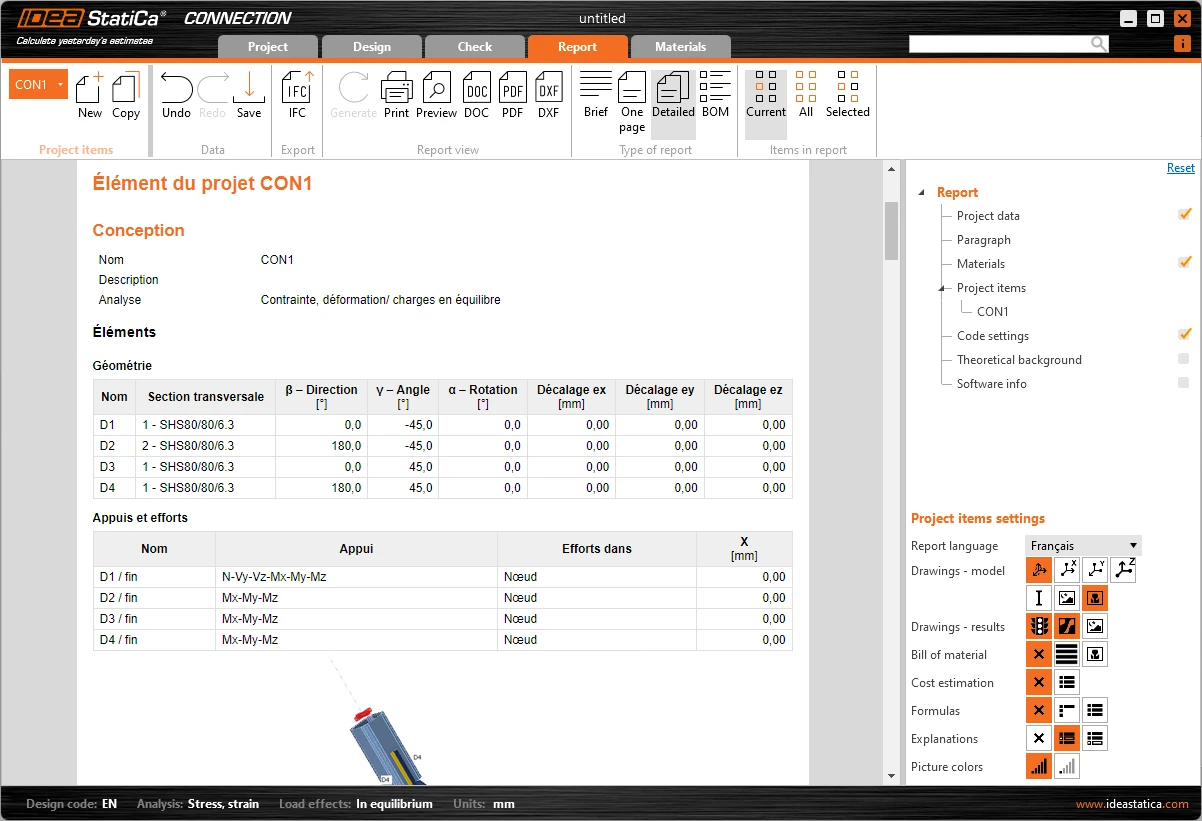
Language of the report

Available in IDEA StatiCa Connection and Member apps.

Released in IDEA StatiCa version 24.0.

Take the latest version of IDEA StatiCa for a test drive today

Get 14 days of full access, completely free.

Check out IDEA StatiCa for free
Related articles

Release notes IDEA StatiCa 24.0
  • Steel
  • Concrete
  • v24.0
  • +3
  • Steel
  • Concrete
  • v24.0

Release notes

Release notes IDEA StatiCa 24.0

Read more
Reporting improvements
  • Steel
  • Connection
  • Report
  • v23.0
  • +4
  • Steel
  • Connection
  • Report
  • v23.0

Knowledge base

Detailed model and loads reporting

Read more
How to export report to MS Word, DXF or PDF files
  • Steel
  • Connection
  • EN (Eurocode)
  • Report
  • AISC (USA)
  • v25.1
  • +6
  • Steel
  • Connection
  • EN (Eurocode)
  • Report
  • AISC (USA)
  • v25.1

Knowledge base

How to create and export a report to MS Word, PDF or DXF files

Read more
Black rectangles in report
  • Steel
  • Report
  • +2
  • Steel
  • Report

Knowledge base

Black rectangles in report

Read more