Idea Statica
  • Steel
  • Concrete
  • Support & Learning
  • Pricing
  • Company
  • Steel overview
  • Connection design
  • Member design
  • Parametric design
  • Steel case studies
  • Concrete overview
  • Walls and D-regions
  • Anchoring design
  • Concrete case studies
  • BIM Overview
  • Supported integrations
  • Checkbot
  • Viewer
  • APIs
  • Support Center
  • E-learning & certification
  • Blog
  • Downloads & Licensing
  • Plans
  • Free community tool
  • Enterprise customers
  • Students & educators
  • How much will you save?
  • About us
  • Contact
  • Research & development
  • Authorized resellers
  • Meet our customers
  • Career
  • Steel
    Steel overviewConnection designMember designParametric designSteel case studies
  • Concrete
    Concrete overviewWalls and D-regionsAnchoring designConcrete case studies
  • BIM OverviewSupported integrationsCheckbotViewerAPIs
  • Support & Learning
    Support CenterE-learning & certificationBlogDownloads & Licensing
  • Pricing
    PlansFree community toolEnterprise customersStudents & educatorsHow much will you save?
  • Company
    About usContactResearch & developmentAuthorized resellersMeet our customersCareer
14-Day Trial
14-Day Trial

Subscribe to our newsletter

Company

  • About us
  • Partners
  • Careers
  • Patent

Resources

  • Customer projects
  • Case studies
  • Connection Library
  • Verification books

Legal

  • EULA
  • Privacy policy
  • California Privacy
  • TOS Viewer
  • Licensing

Help

  • Contact
  • Quote request
  • Resellers
  • Downloads
FacebookInstagramLinkedInYouTube

© IDEA StatiCa 2009-2026

Trusted and used worldwide by engineers, fabricators & consultants.

Support CenterKnowledge Base ArticlesBulk import from DXF drawing
Reinforcement template in IDEA StatiCa Detail
Reinforcement definition in the Detail application
Smooth rebars in Detail
Development length in IDEA StatiCa Detail (Metric)
Development length in IDEA StatiCa Detail (US Units)
Rebar modeling enhancement – superelement
Bulk import from DXF drawing
Realistic reinforcement layouts in Detail
Importing reinforcements from DXF files in IDEA StatiCa Detail
Bulk import from DXF drawing
Multiselect and multi-edit in Detail
Simple insertion of table inputs into IDEA StatiCa Detail
What is the Topology optimization for? And how does it go with the strut and tie method?
Export Beam to Detail
Export of the beam to Detail app
Bulk import from DXF drawing
ConcreteReinforced concretePrestressed concreteKnowledge baseDetail 2D

Bulk import from DXF drawing

This article is also available in
ENCZDEESFRITPTNLHUROKRPLTHTRVIZH

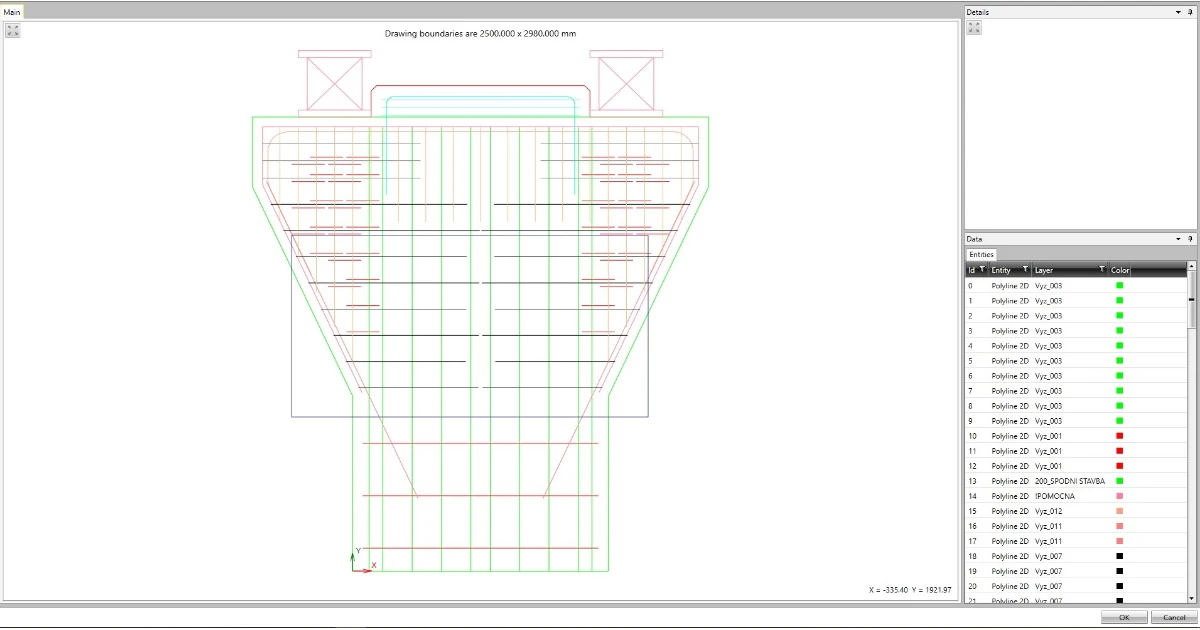
Since version 21.1.1, it is possible to use bulk selection in the Detail application when importing a cross-section or reinforcement from a DXF file. Bulk selection is achieved by pressing the Ctrl key and selecting entities one by one or selecting by the selection window.

Bulk import from DXF drawing in Detail application is available in Concrete Enhanced and Prestressing Enhanced edition of IDEA StatiCa Concrete.
Related articles

Release notes IDEA StatiCa Steel & Concrete 22.0
  • Concrete
  • Steel
  • Connection
  • Detail 2D
  • Member
  • Checkbot
  • Viewer
  • RCS
  • IDEA Open Model (API)
  • ACI (USA)
  • AISC (USA)
  • BIM link
  • EN (Eurocode)
  • +13
  • Concrete
  • Steel
  • Connection
  • Detail 2D
  • Member
  • Checkbot
  • Viewer
  • RCS
  • IDEA Open Model (API)
  • ACI (USA)
  • AISC (USA)
  • BIM link
  • EN (Eurocode)

Release notes

Release notes IDEA StatiCa Steel & Concrete 22.0

Read more