Idea Statica
  • Steel
  • Concrete
  • Support & Learning
  • Pricing
  • Company
  • Steel overview
  • Connection design
  • Member design
  • Parametric design
  • Steel case studies
  • Concrete overview
  • Walls and D-regions
  • Anchoring design
  • Concrete case studies
  • BIM Overview
  • Supported integrations
  • Checkbot
  • Viewer
  • APIs
  • Support Center
  • E-learning & certification
  • Blog
  • Downloads & Licensing
  • Plans
  • Free community tool
  • Enterprise customers
  • Students & educators
  • How much will you save?
  • About us
  • Contact
  • Research & development
  • Authorized resellers
  • Meet our customers
  • Career
  • Steel
    Steel overviewConnection designMember designParametric designSteel case studies
  • Concrete
    Concrete overviewWalls and D-regionsAnchoring designConcrete case studies
  • BIM OverviewSupported integrationsCheckbotViewerAPIs
  • Support & Learning
    Support CenterE-learning & certificationBlogDownloads & Licensing
  • Pricing
    PlansFree community toolEnterprise customersStudents & educatorsHow much will you save?
  • Company
    About usContactResearch & developmentAuthorized resellersMeet our customersCareer
14-Day Trial
14-Day Trial

Subscribe to our newsletter

Company

  • About us
  • Partners
  • Careers
  • Patent

Resources

  • Customer projects
  • Case studies
  • Connection Library
  • Verification books

Legal

  • EULA
  • Privacy policy
  • California Privacy
  • TOS Viewer
  • Licensing

Help

  • Contact
  • Quote request
  • Resellers
  • Downloads
FacebookInstagramLinkedInYouTube

© IDEA StatiCa 2009-2026

Trusted and used worldwide by engineers, fabricators & consultants.

Support CenterKnowledge Base ArticlesStop at limit strain
Advanced analysis types for your steel structures
Nonconformity in connection analysis results
Connection analysis 0% or doesn't reach 100%
What is the singularity warning?
Stop at limit strain
Torsion moments and warping
Warping of members – Load in shear center
Thin-walled (cold-formed) members
Load effects displayed in the scene
Stop at limit strain
SteelConnection designKnowledge baseConnectionAISC (USA)

Stop at limit strain

This article is also available in
ENCZDEESFRITPTNLHUROKRPLTHTRVIZH

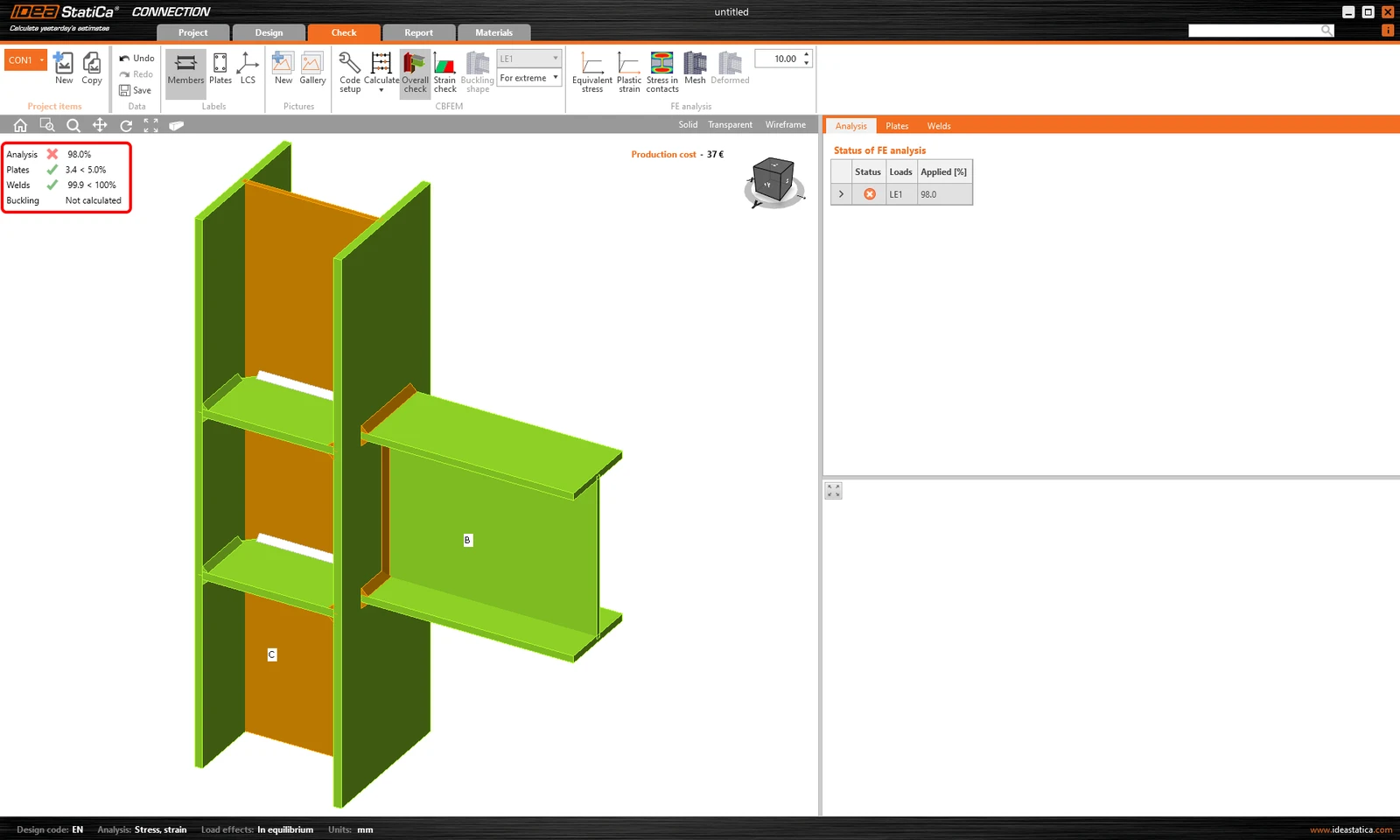
It can happen that sometimes the connection is overloaded, exceeding the limit value of plastic strain. And in some such cases, it's not efficient to let the software continue with the calculation to apply 100% of the load. For these occasions, we have the Stop at limit strain functionality.

How it works

The Stop at limit strain functionality in IDEA StatiCa Connection is turned off by default. I.e., even though the structure is overloaded, once you run the analysis, it stops after 100% of the input load is applied (in most cases. In some, the software is not able to apply 100%. For what might be the reason, see the Connection analysis 0% or doesn't reach 100% article) And you will see corresponding results.
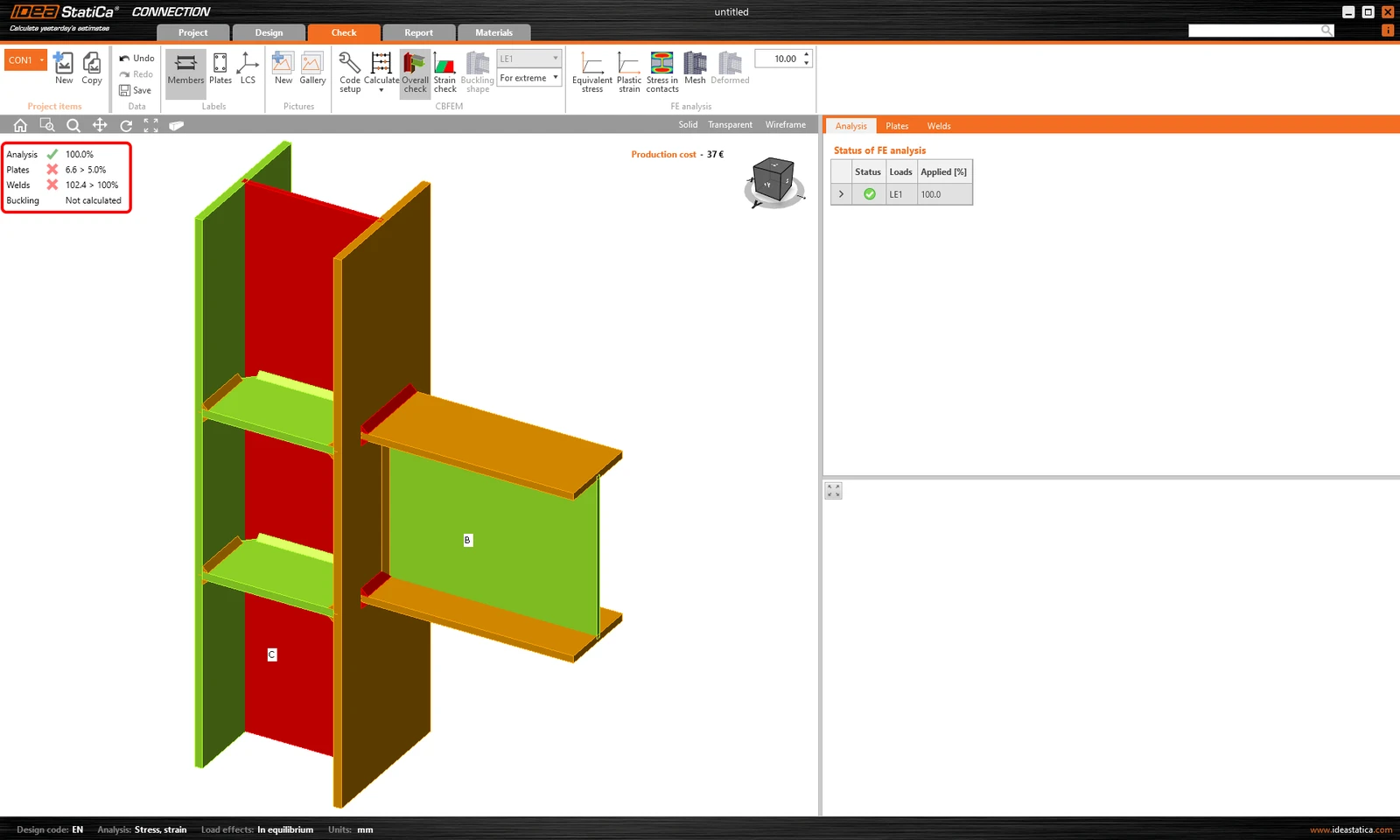
However, there can be cases the connection may be too complex, and the analysis takes a long time. Or you assume that the structure will fail, so you want to quickly see how much of the load the joint is able to handle.

To find out what is the weakest part of a joint or connection and which member or component collapses as the first one, we recommend using Stop at limit strain. 

This functionality stops the finite element analysis iteration process when one of the code checks reaches the limit value. Only the relevant percentage of the input load is applied in that case.
Where to find it

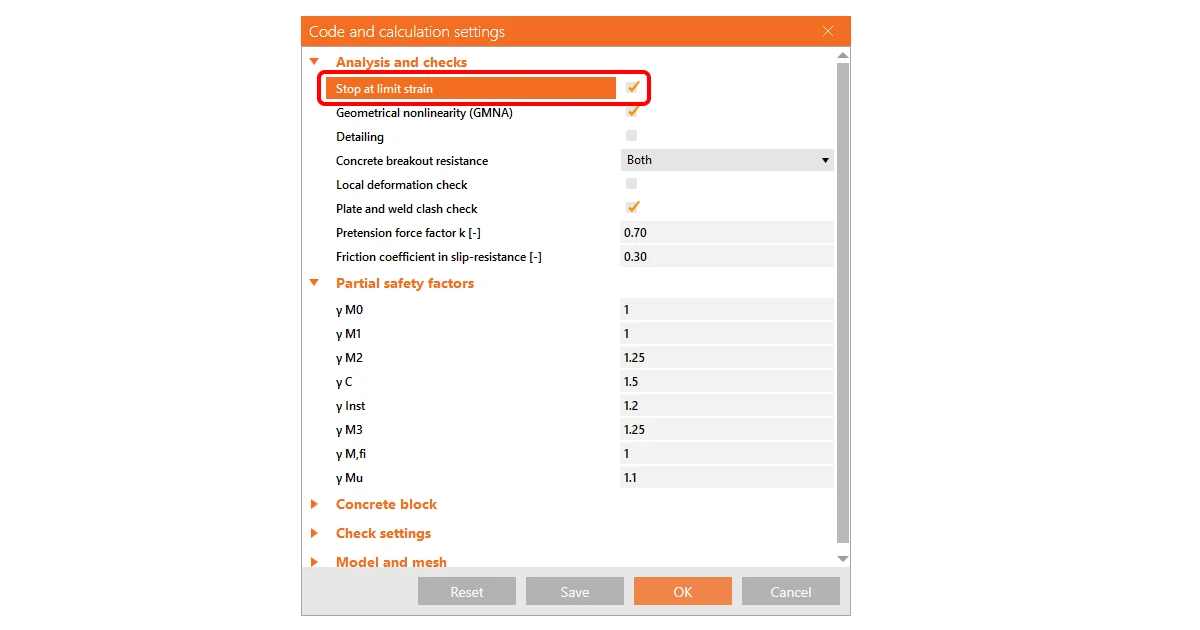
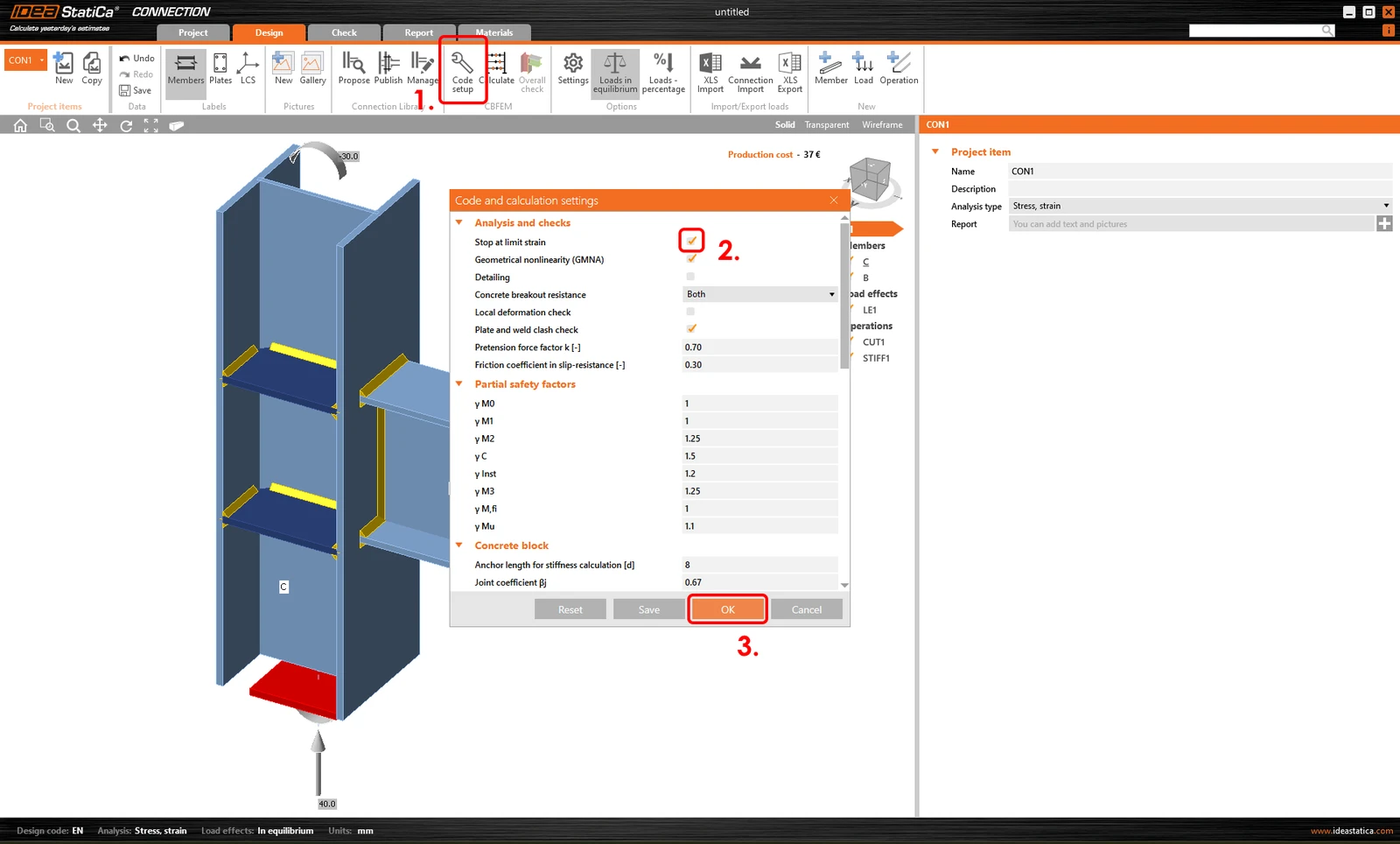
If you want to activate the Stop at limit strain feature, select the Code setup button in the top ribbon in the Design or Check section. The Code and calculation settings wizard appears.

Tick the checkbox for Stop at limit strain and confirm OK. 
Try IDEA StatiCa for free

Start your trial today and enjoy 14 days of full access and services free of charge.

Start free trial
Related articles

Connection analysis 0% or doesn't reach 100%
  • Steel
  • Connection
  • EN (Eurocode)
  • Overall check
  • Project settings
  • GMNA
  • AISC (USA)
  • v25.1
  • +8
  • Steel
  • Connection
  • EN (Eurocode)
  • Overall check
  • Project settings
  • GMNA
  • AISC (USA)
  • v25.1

Knowledge base

Connection analysis 0% or doesn't reach 100%

Read more
CBFEM - how it works, code compliance, validation and verification
  • Steel
  • Connection
  • AISC (USA)
  • Overall check
  • CBFEM
  • Stress/strain
  • EN (Eurocode)
  • AS (Australia)
  • CSA (Canada)
  • IS (India)
  • GB (China)
  • HKG (Hong Kong)
  • SP 16 (Russia)
  • Material settings
  • Bolts
  • Concrete block
  • Anchoring
  • GMNA
  • MNA
  • Plates
  • +20
  • Steel
  • Connection
  • AISC (USA)
  • Overall check
  • CBFEM
  • Stress/strain
  • EN (Eurocode)
  • AS (Australia)
  • CSA (Canada)
  • IS (India)
  • GB (China)
  • HKG (Hong Kong)
  • SP 16 (Russia)
  • Material settings
  • Bolts
  • Concrete block
  • Anchoring
  • GMNA
  • MNA
  • Plates

Knowledge base

CBFEM - how it works, code compliance, validation and verification

Read more
Why is 5% plastic strain limit used in material diagram for EN?
  • Steel
  • EN (Eurocode)
  • Connection
  • Stress/strain
  • Overall check
  • Material settings
  • CBFEM
  • MNA
  • GMNA
  • +9
  • Steel
  • EN (Eurocode)
  • Connection
  • Stress/strain
  • Overall check
  • Material settings
  • CBFEM
  • MNA
  • GMNA

Knowledge base

Why is 5% plastic strain limit used in material diagram for EN?

Read more
Why is 5% strain limit used in material diagram for AISC?
  • Steel
  • AISC (USA)
  • Connection
  • Stress/strain
  • +4
  • Steel
  • AISC (USA)
  • Connection
  • Stress/strain

Knowledge base

Why is 5% plastic strain limit used in material diagram for AISC?

Read more