Idea Statica
  • Steel
  • Concrete
  • BIM & Workflows
  • Support & Learning
  • Pricing
  • Company
  • Steel overview
  • Connection design
  • Member design
  • Parametric design
  • Steel case studies
  • Concrete overview
  • Walls and D-regions
  • Anchoring design
  • Concrete case studies
  • BIM Overview
  • Supported integrations
  • Checkbot
  • Viewer
  • APIs
  • Support Center
  • E-learning & certification
  • Blog
  • Downloads & Licensing
  • Plans
  • Free community tool
  • Enterprise customers
  • Students & educators
  • How much will you save?
  • About us
  • Contact
  • Research & development
  • Authorized resellers
  • Meet our customers
  • Career
  • Steel
    Steel overviewConnection designMember designParametric designSteel case studies
  • Concrete
    Concrete overviewWalls and D-regionsAnchoring designConcrete case studies
  • BIM & Workflows
    BIM OverviewSupported integrationsCheckbotViewerAPIs
  • Support & Learning
    Support CenterE-learning & certificationBlogDownloads & Licensing
  • Pricing
    PlansFree community toolEnterprise customersStudents & educatorsHow much will you save?
  • Company
    About usContactResearch & developmentAuthorized resellersMeet our customersCareer
14-Day Trial
14-Day Trial
  • Steel
  • Concrete
  • BIM & Workflows
  • Support & Learning
  • Pricing
  • Company

Subscribe to our newsletter

Company

  • About us
  • Partners
  • Careers
  • Patent

Resources

  • Customer projects
  • Case studies
  • Connection Library
  • Verification books

Legal

  • EULA
  • Privacy policy
  • California Privacy
  • TOS Viewer
  • Licensing

Help

  • Contact
  • Quote request
  • Resellers
  • Downloads
FacebookInstagramLinkedInYouTube

ยฉ IDEA StatiCa 2009-2026

Trusted and used worldwide by engineers, fabricators & consultants.

Support CenterKnowledge Base ArticlesRelative positions of members
How to define correct load position (Forces in)
Equilibrium and supporting member
Key insights into constraints, member length and GMNA vs MNA analysis
When to use a stiffening member?
How to model a single bolt connection (Model type)
Model type - additional boundary condition
Shear force position input and visualization
Default member length in Connection
The right LCS (local coordinate system) orientation
How to use a rod (solid bar) member
Relative positions of members
Steel joint analysis model
Relative positions of members
Connection designSteelKnowledge baseConnectionEN (Eurocode)

Relative positions of members

This article is also available in
ENCZDEESFRITPTNLHUROKRPLTHTRVIZH

This new feature enables to easily place members relative to other member plates. Members can be aligned to plates of other members. The plates are moved and rotated to be parallel.

You can change the position of the member in its properties.

Relative positions of members

Moreover, the feature is available also for different manufacturing operations: Stiffener can be positioned relative to another plate. The stiffener is placed perpendicular to the member axis by default.

Manufacturing operations are consolidated - the property grid is unified and a new setting of Dimension: "Top of steel" is made available for:

  • Cleat
  • Fin plate
  • End plate
  • Splice
  • Stub
  • Plate to plate
Relative position of members in a steel joint

Entering the bolt position: A reference line can be changed

Relative position of members in steel joint

Entering the bolt position: A reference line can be changed

Available inย Expertย andย Enhancedย edition.

Related articles

IDEA Statica Version 21.0
  • Concrete
  • Steel
  • Connection
  • Detail 2D
  • Member
  • Checkbot
  • Viewer
  • RCS
  • ACI (USA)
  • AISC (USA)
  • EN (Eurocode)
  • BIM link
  • Advance Steel
  • Tekla Structures
  • SAP2000
  • SCIA Engineer
  • STAAD.Pro
  • Revit
  • Robot Structural Analysis
  • Advance Design
  • AxisVM
  • ETABS
  • midas Civil + Gen
  • RFEM
  • RSTAB
  • +25
  • Concrete
  • Steel
  • Connection
  • Detail 2D
  • Member
  • Checkbot
  • Viewer
  • RCS
  • ACI (USA)
  • AISC (USA)
  • EN (Eurocode)
  • BIM link
  • Advance Steel
  • Tekla Structures
  • SAP2000
  • SCIA Engineer
  • STAAD.Pro
  • Revit
  • Robot Structural Analysis
  • Advance Design
  • AxisVM
  • ETABS
  • midas Civil + Gen
  • RFEM
  • RSTAB

Release notes

Release notes IDEA StatiCa Steel & Concrete 21.0

Read more
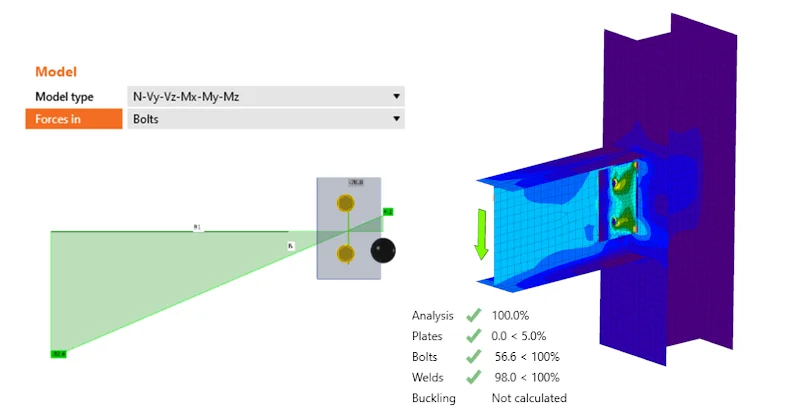
How to define correct load position (Forces in)
  • Steel
  • Connection
  • Bolts
  • Load effects
  • +4
  • Steel
  • Connection
  • Bolts
  • Load effects

Knowledge base

How to define correct load position (Forces in)

Read more