
Idea Statica
Steel
Concrete
BIM & Workflows
Support & Learning
Pricing
Company
14-Day Trial
Support CenterKnowledge BaseEvaluate critical effects for loads imported via BIM links
IDEA StatiCa BIM interoperability for steel
IDEA StatiCa BIM interoperability for concrete
Checkbot – bulk BIM workflows
Bulk workflows and critical load filter in Checkbot
Export of editable connections from Checkbot
How to merge the joint from CAD and FEA software
Add or merge nodes of connections and members in Checkbot
Import of recommended welds
Checkbot ready for big projects
Checkbot Free – the structural design hub for FEA and CAD data
Checkbot (BIM link) does not start
Unbalanced forces from BIM link import
Evaluate critical effects for loads imported via BIM links
SteelConnection designMember designKnowledge baseCheckbot

Evaluate critical effects for loads imported via BIM links

This article is also available in
ENCSDEESFRITPTNLHURO

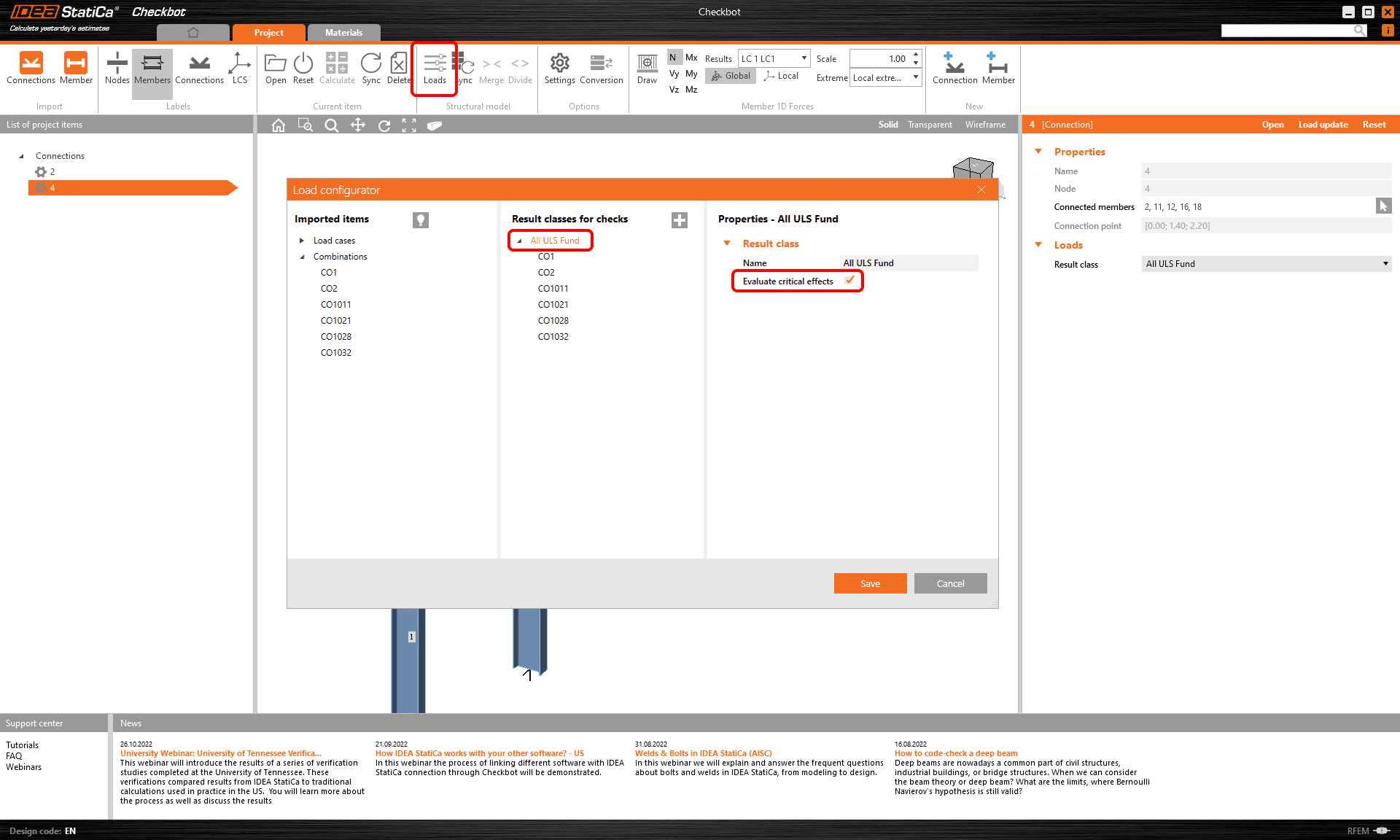
Load effects (load cases, load combinations) are imported to Checkbot via the BIM links from FEA applications. "Evaluate critical effects" filters out load effects unnecessary for the analysis and code-check of connections to speed up the calculation time while still ensuring safe results.

When the Evaluate critical effects* is checked in the Load configurator in Checkbot, the following algorithm is run for every connection (when it is created or when the Load Update is forced).

For every Load case and Load combination in a Result class assigned to the Connection, the algorithm looks for the positive and negative extremes of each of the six internal forces on every member (N, Vy, Vz, My, Mz, Mx). E.g. for a Connection with 4 members, it finds a maximum of 2x4x6 = 48 critical load effects (2 extremes - positive and negative, 4 members, 6 internal forces). In reality, this number is often lower since one load effect usually produces multiple internal force extremes.

Evaluate critical effects for loads imported via BIM links

When there is an Envelope Combination assigned to the imported result class, this algorithm is used regardless of the state of the Evaluate critical effects checkbox (is always on and can not be turned off). 

This can be neglected by deleting the envelope combination from the current result class or creating a new result class in the Load configurator and adding selected load effects to this new result class while keeping the Evaluate critical effects unchecked.
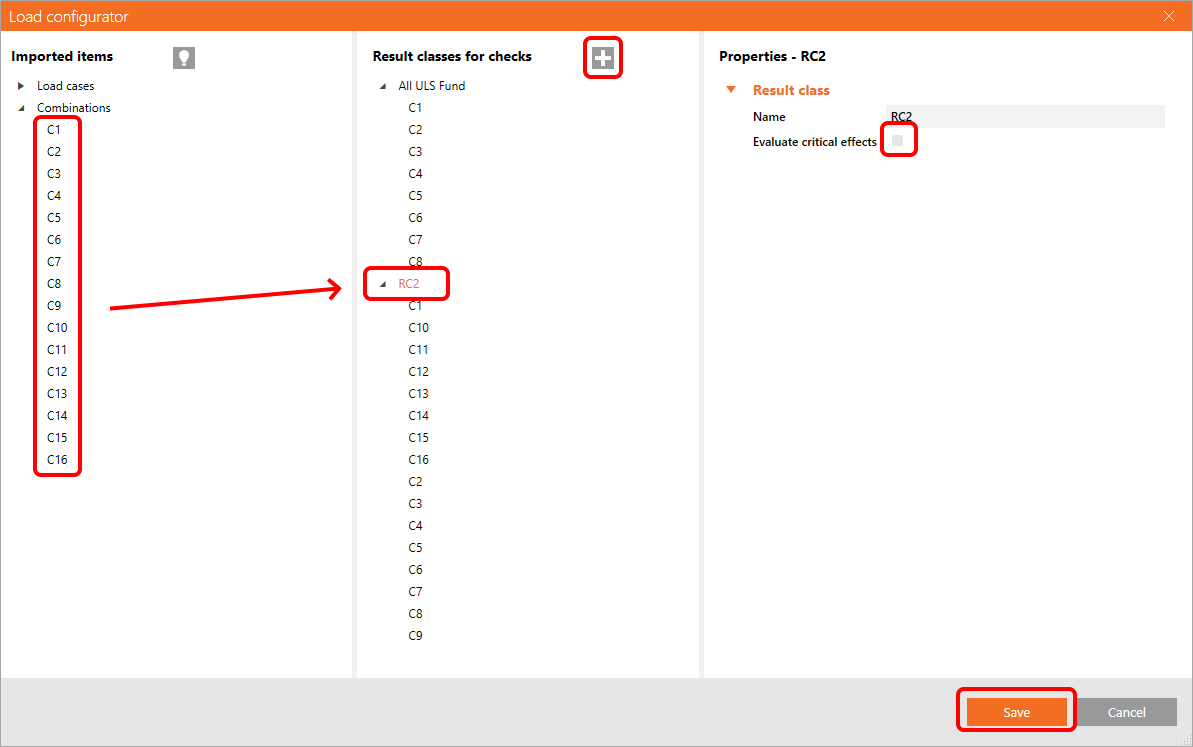
You need to call the Load update after closing the Load configurator window (located in the top right corner of the right column in Checkbot).

The load extremes can also be filtered directly in the Connection application using the Calculate load extremes function. Read more about this in the Load Extreme Selection article.

* The Evaluate critical effects function was removed and replaced by the Calculate load extremes function since version 25.1.2.

Subscribe to our newsletter

Company

  • About us
  • Partnerships
  • Job openings
  • Patented technology for structural engineers

Resources

  • Customer projects
  • Case studies
  • IDEA StatiCa Connection Library
  • Concrete verifications

Legal

  • IDEA StatiCa END USER LICENSE AGREEMENT
  • Privacy policy
  • Terms of Services – IDEA StatiCa Viewer
  • Licensing

Help

  • Contact
  • Get price quote
  • IDEA StatiCa Specialists
  • Download the latest version
FacebookInstagramLinkedInYouTube

© IDEA StatiCa 2009-2026

Trusted and used worldwide by engineers, fabricators & consultants.