Idea Statica
  • Steel
  • Concrete
  • BIM & Workflows
  • Support & Learning
  • Pricing
  • Company
  • Steel overview
  • Connection design
  • Member design
  • Parametric design
  • Steel case studies
  • Concrete overview
  • Walls and D-regions
  • Anchoring design
  • Concrete case studies
  • BIM Overview
  • Supported integrations
  • Checkbot
  • Viewer
  • APIs
  • Support Center
  • E-learning & certification
  • Blog
  • Downloads & Licensing
  • Plans
  • Free community tool
  • Enterprise customers
  • Students & educators
  • How much will you save?
  • About us
  • Contact
  • Research & development
  • Authorized resellers
  • Meet our customers
  • Career
  • Steel
    Steel overviewConnection designMember designParametric designSteel case studies
  • Concrete
    Concrete overviewWalls and D-regionsAnchoring designConcrete case studies
  • BIM & Workflows
    BIM OverviewSupported integrationsCheckbotViewerAPIs
  • Support & Learning
    Support CenterE-learning & certificationBlogDownloads & Licensing
  • Pricing
    PlansFree community toolEnterprise customersStudents & educatorsHow much will you save?
  • Company
    About usContactResearch & developmentAuthorized resellersMeet our customersCareer
14-Day Trial
14-Day Trial
  • Steel
  • Concrete
  • BIM & Workflows
  • Support & Learning
  • Pricing
  • Company

Subscribe to our newsletter

Company

  • About us
  • Partners
  • Careers
  • Patent

Resources

  • Customer projects
  • Case studies
  • Connection Library
  • Verification books

Legal

  • EULA
  • Privacy policy
  • California Privacy
  • TOS Viewer
  • Licensing

Help

  • Contact
  • Quote request
  • Resellers
  • Downloads
FacebookInstagramLinkedInYouTube

ยฉ IDEA StatiCa 2009-2026

Trusted and used worldwide by engineers, fabricators & consultants.

Support CenterKnowledge Base ArticlesThorough CSFM results available
General description of Auxiliary results in Detail application
General description of SLS results in Detail application
General description of Summary results in Detail application
General description of ULS results in Detail application
Singularities vs. stress concentration area
Thorough CSFM results available
Crack width check improvements
Limited stress check feature in Detail
Presentation of relevant curve results in detailed graphs in IDEA StatiCa Detail
Anchorage check step by step
Thorough CSFM results available
ConcreteReinforced concretePrestressed concreteKnowledge baseDetail 2D

Thorough CSFM results available

This article is also available in
ENCZDEESFRITPTNLHUROKRPLTHTRVIZH

Thanks to advanced post-processing of the CSFM results you can observe all results at any part of the analyzed structure and comprehensive the structure behavior upon defined loads.

All CSFM outputs are available

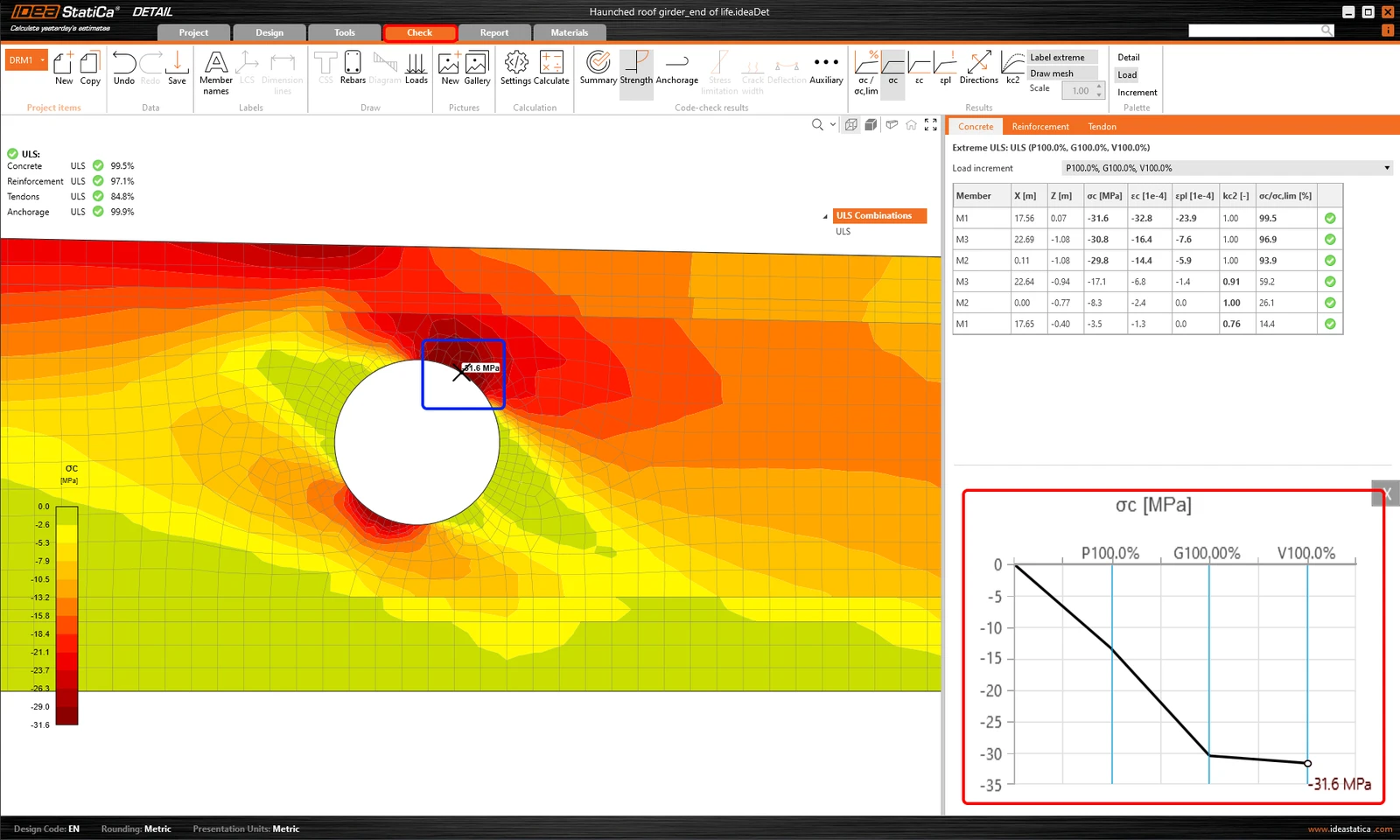
All CSFM results can be displayed as a tooltip by staying with your mouse pointer at the point of your interest for a few seconds or simply using the left-click button. The displayed value always corresponds to the result of the closest node of the finite element mesh of the reinforced concrete model. This functionality is available for all CSFM outputs and checks for all entities of the finite element model, i.e., concrete, reinforcement, and tendon.

Results in a Chart

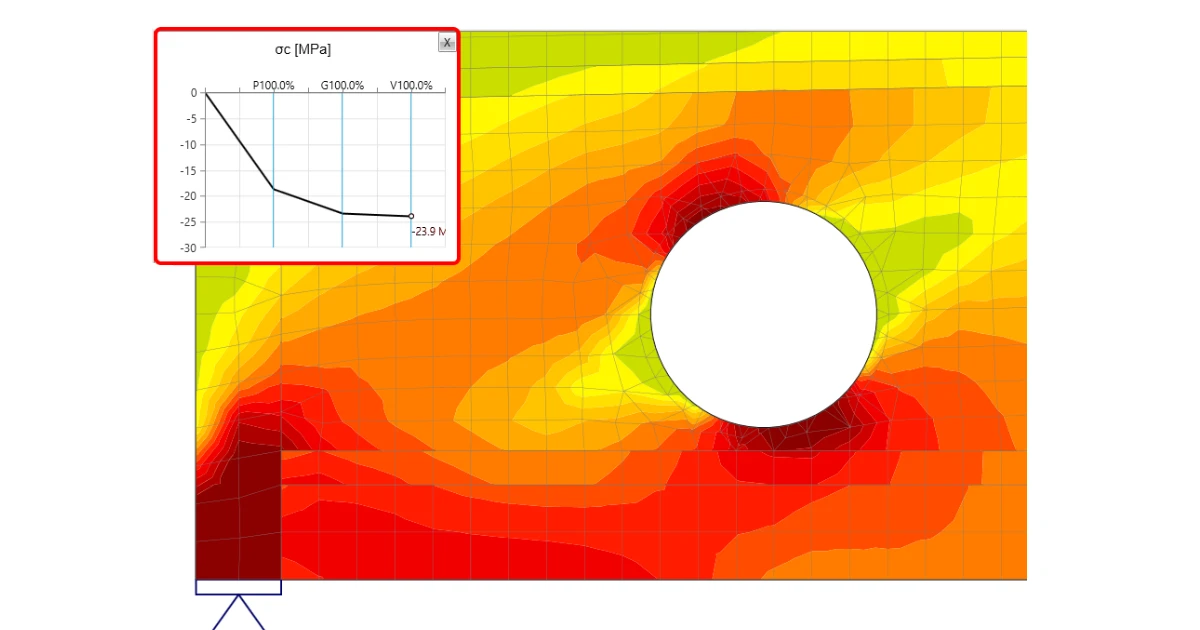
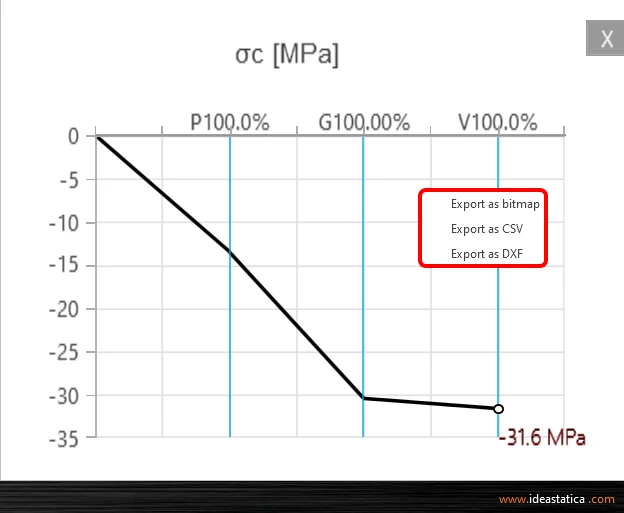
And there is more! Use the right-click button and observe another advanced functionality - result interpretation in a Chart. After clicking on a part of a structure (Shift+ย left-click buttonย or running the context menu by right-click button), the load-deformation curve or curve presents the development of the observed variable (stress, strain, crack width, etc.) is drawn in the upper-left corner of the main scene. The curve presents all load increments that were applied in CSFM analysis for the current load case or combination. The value of the load increment selected in the ribbon of Results is highlighted in the chart by the red color. The horizontal axis represents the applied load increment (P = 100% of applied prestressing, G = applied 100% of permanent load, V = applied 100% of variable load). The vertical axis represents the observed CSFM results, such as stresses, strains, deformation, crack width, anchorage forces, and others. The data from the chart can be exported to a bitmap, CSV, or DXF file using the context menu of the chart (right-click button).
The load-deformation curve is actually the capacity curve (or pushover curve) of the analyzed discontinuity region. So you can use these chart outputs when the structural seismic design is necessary for your project. In that case, you appreciate the data export to CSV file.

Tips on how to work efficiently with thorough results in IDEA StatiCa Detail

  • staying on the point displays the tooltip with the currently observed result
  • using left-click button displays the tooltip with the currently observed result
  • using right-click context menu within the main scene offers a new possibility to display the detailed results in the chart, apart from the functionalities (Print, export to Bitmap, DXF and clipboard)
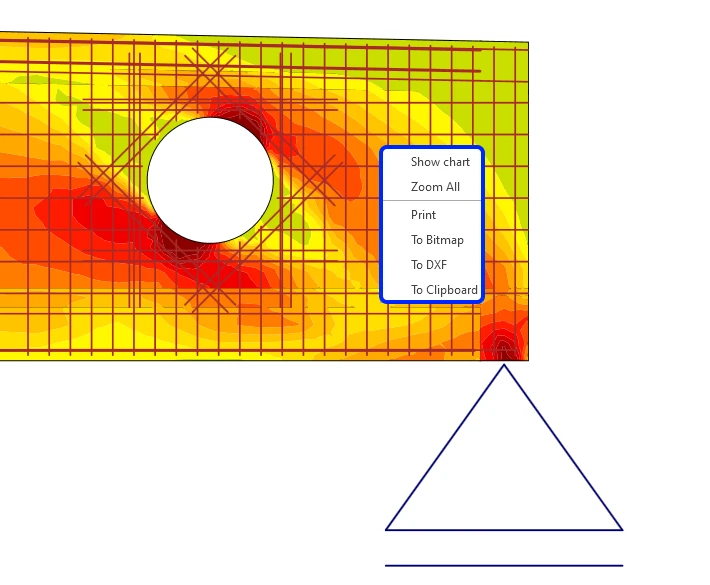
  • using right-click context menu within the chart you can export the chart to bitmap, CSV or DXF
  • set the number of the load increments to get the smooth capacity curves
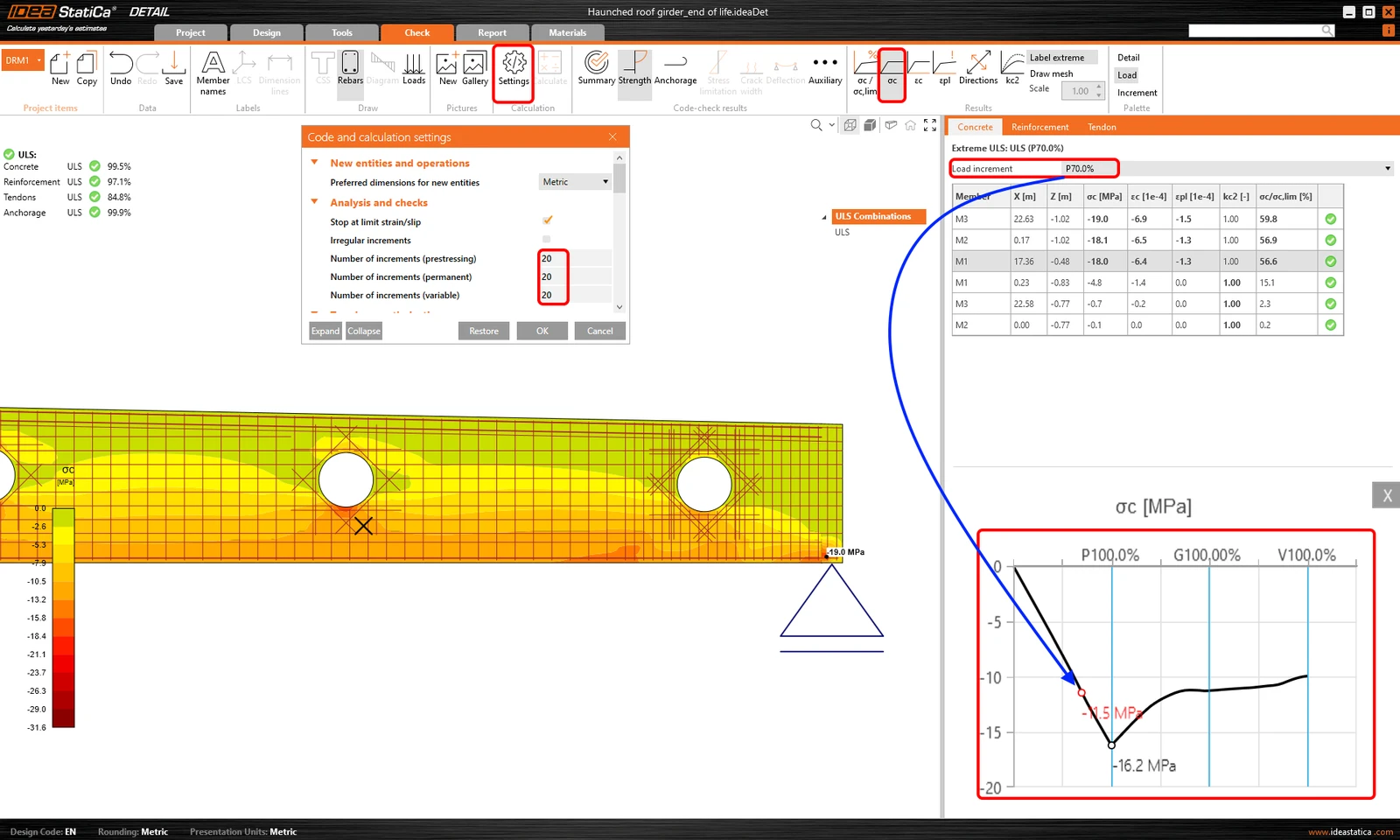
  • pressing Shift key+left click button within the analyzed structure, you get the corresponding result in the chartย 
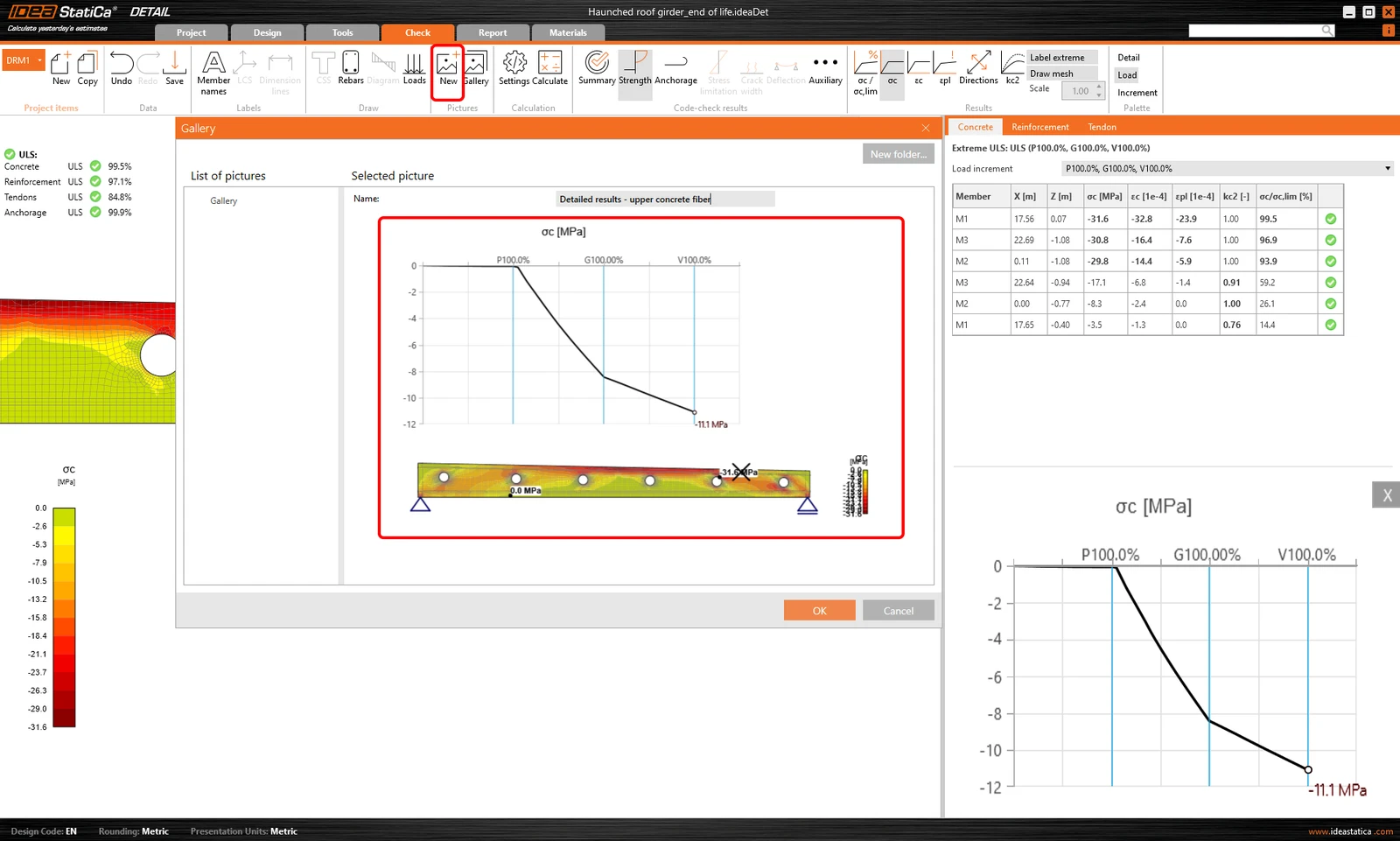
  • save the detailed results to the Gallery and attach these snapshots to your reportย 

Related articles

Release notes IDEA StatiCa Steel & Concrete 22.0
  • Concrete
  • Steel
  • Connection
  • Detail 2D
  • Member
  • Checkbot
  • Viewer
  • RCS
  • IDEA Open Model (API)
  • ACI (USA)
  • AISC (USA)
  • BIM link
  • EN (Eurocode)
  • +13
  • Concrete
  • Steel
  • Connection
  • Detail 2D
  • Member
  • Checkbot
  • Viewer
  • RCS
  • IDEA Open Model (API)
  • ACI (USA)
  • AISC (USA)
  • BIM link
  • EN (Eurocode)

Release notes

Release notes IDEA StatiCa Steel & Concrete 22.0

Read more
What is the CSFM?
  • Concrete
  • Detail 2D
  • ACI (USA)
  • EN (Eurocode)
  • CSFM
  • +5
  • Concrete
  • Detail 2D
  • ACI (USA)
  • EN (Eurocode)
  • CSFM

FAQ

What is the CSFM?

Read more
IDEA StatiCa Detail is concrete design software for the structural design and code-check of concrete discontinuity regions. Concrete members stress analysis & concrete wall design.
  • Concrete
  • ACI (USA)
  • EN (Eurocode)
  • Geometry
  • Load effects
  • Overall check
  • Material settings
  • Corbels/Brackets
  • CSFM
  • Cracks
  • Deflections
  • Diaphragms
  • Openings
  • SLS
  • Stress in reinforcement
  • TDA
  • Topology optimization
  • ULS
  • Detail 2D
  • +19
  • Concrete
  • ACI (USA)
  • EN (Eurocode)
  • Geometry
  • Load effects
  • Overall check
  • Material settings
  • Corbels/Brackets
  • CSFM
  • Cracks
  • Deflections
  • Diaphragms
  • Openings
  • SLS
  • Stress in reinforcement
  • TDA
  • Topology optimization
  • ULS
  • Detail 2D

Theoretical background

IDEA StatiCa Detail โ€“ Structural design of concrete discontinuities

Read more