Idea Statica
  • Steel
  • Concrete
  • Support & Learning
  • Pricing
  • Company
  • Steel overview
  • Connection design
  • Member design
  • Parametric design
  • Steel case studies
  • Concrete overview
  • Walls and D-regions
  • Anchoring design
  • Concrete case studies
  • BIM Overview
  • Supported integrations
  • Checkbot
  • Viewer
  • APIs
  • Support Center
  • E-learning & certification
  • Blog
  • Downloads & Licensing
  • Plans
  • Free community tool
  • Enterprise customers
  • Students & educators
  • How much will you save?
  • About us
  • Contact
  • Research & development
  • Authorized resellers
  • Meet our customers
  • Career
  • Steel
    Steel overviewConnection designMember designParametric designSteel case studies
  • Concrete
    Concrete overviewWalls and D-regionsAnchoring designConcrete case studies
  • BIM OverviewSupported integrationsCheckbotViewerAPIs
  • Support & Learning
    Support CenterE-learning & certificationBlogDownloads & Licensing
  • Pricing
    PlansFree community toolEnterprise customersStudents & educatorsHow much will you save?
  • Company
    About usContactResearch & developmentAuthorized resellersMeet our customersCareer
14-Day Trial
14-Day Trial

Subscribe to our newsletter

Company

  • About us
  • Partners
  • Careers
  • Patent

Resources

  • Customer projects
  • Case studies
  • Connection Library
  • Verification books

Legal

  • EULA
  • Privacy policy
  • California Privacy
  • TOS Viewer
  • Licensing

Help

  • Contact
  • Quote request
  • Resellers
  • Downloads
FacebookInstagramLinkedInYouTube

© IDEA StatiCa 2009-2026

Trusted and used worldwide by engineers, fabricators & consultants.

Support CenterKnowledge Base ArticlesError message – An error occurred while sending the request
Licensing
What licensing system does IDEA StatiCa use?
How can I recover my forgotten password?
How to sign out a stuck license
How to reset IDEA StatiCa settings and temporary files
How to overcome license conflicts between versions?
How to send the diagnostic (log) files
Error message – An error occurred while sending the request
Error message – License does not allow usage of application version
Error message – Number of Allowed Activations Exceeded
Error message - The license products are not configured
Error message – Unable to authorize the application
Error message – Wrong user name or password
Error message – An error occurred while sending the request
LicensingKnowledge baseLicensingLicense Connection

Error message – An error occurred while sending the request

This article is also available in
ENCZDEESFRITPTHUROKRPLTHTRVIZH

This answer is valid for IDEA StatiCa version 22.0

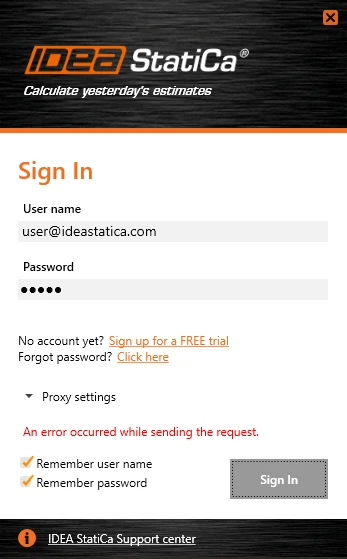
Displaying this message means, that you are offline or your internet connection does not allow IDEA StatiCa to connect to the license server. Please check your internet connection first. 

If the connection is OK, there are two options to solve this problem: 

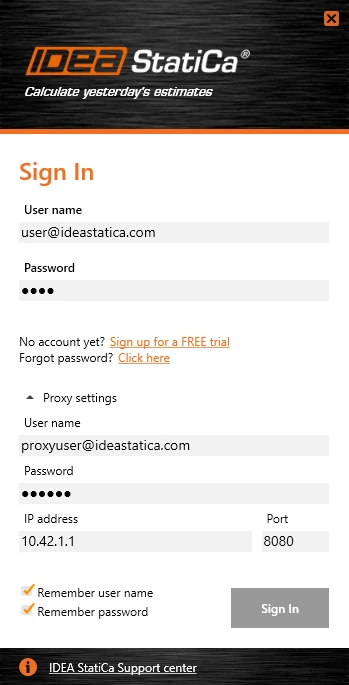
Change proxy settings

Set up the proxy settings in the license dialog. Please keep in mind that the proxy user name and password are not the same as IDEA StatiCa credentials. Please confirm with your company IT administrator.
Whitelist the licensing domain

In some cases, your company may block automated connections with various servers. Ask your IT administrator to put this list of domains on the whitelist of allowed servers.

Tags: #License #LicenseConnection
Related articles

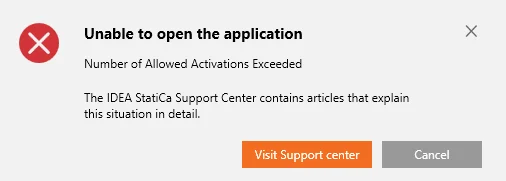
Error message – Number of Allowed Activations Exceeded
  • Licensing
  • License Seat Not Available
  • +2
  • Licensing
  • License Seat Not Available

Knowledge base

Error message – Number of Allowed Activations Exceeded

Read more