
Idea Statica
Steel
Concrete
BIM & Workflows
Support & Learning
Pricing
Company
14-Day Trial
Support CenterKnowledge BaseHow to sign out a stuck license
Licensing
What licensing system does IDEA StatiCa use?
How can I recover my forgotten password?
How to sign out a stuck license
How to reset IDEA StatiCa settings and temporary files
How to overcome license conflicts between versions?
How to send the diagnostic (log) files
LicensingKnowledge baseLicensingLicense Seat Not AvailableLicense Token Expired

How to sign out a stuck license

This article is also available in
ENCSDEITNL

All IDEA StatiCa licenses are returned to the pool automatically based on the settings of the company admin (by default 1 hour). And all the users can see who is using which products at any given moment at https://www.ideastatica.com/Portal/License.

If, for some reason, your IDEA StatiCa license gets stuck on a PC, you can use this special command to directly log out your consumed license seat. Just click on the License.exe located in "C:\Program Files\IDEA StatiCa\StatiCa 24.0\License.exe".
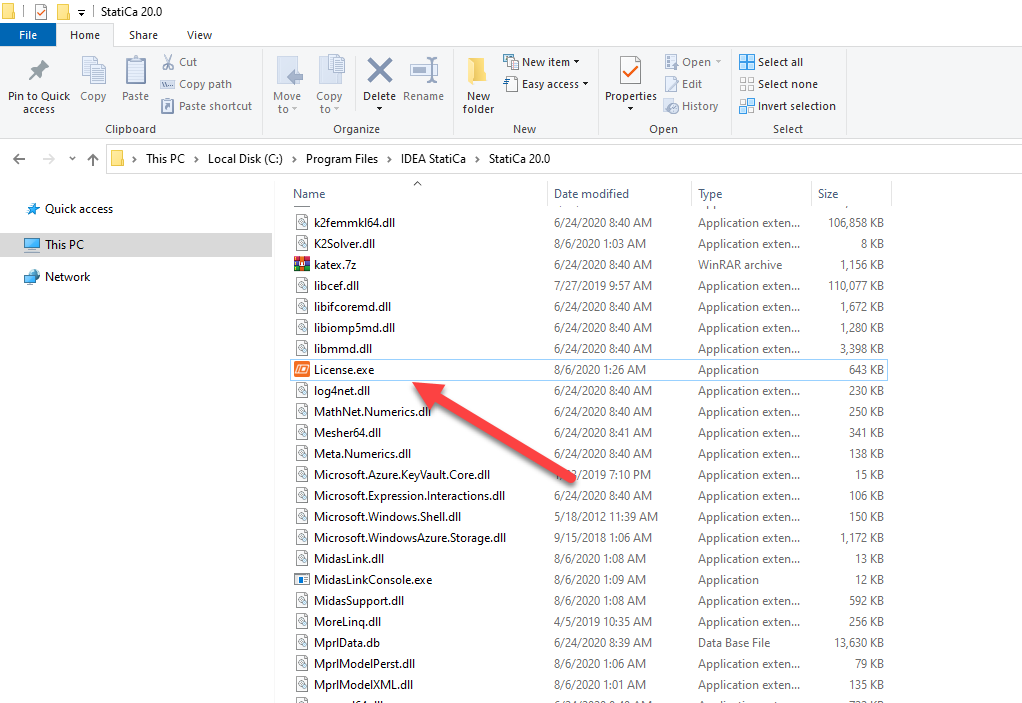
This will immediately return all the seats to the license pool and make them available for the rest of your organization. Please be aware you need to be connected to the Internet to do this.

Tags: #Licensing #LicenseTokenExpired #LicenseSeatNotAvailable

Subscribe to our newsletter

Company

  • About us
  • Partnerships
  • Job openings
  • Patented technology for structural engineers

Resources

  • Customer projects
  • Case studies
  • IDEA StatiCa Connection Library
  • Concrete verifications

Legal

  • IDEA StatiCa END USER LICENSE AGREEMENT
  • Privacy policy
  • Terms of Services – IDEA StatiCa Viewer
  • Licensing

Help

  • Contact
  • Get price quote
  • IDEA StatiCa Specialists
  • Download the latest version
FacebookInstagramLinkedInYouTube

© IDEA StatiCa 2009-2026

Trusted and used worldwide by engineers, fabricators & consultants.