


There are two types of temporary data of IDEA StatiCa in the hidden Windows system folder, where these data are stored. You can delete/reset the data default settings or empty the disc space. This is handy when you have troubles with the visibility of some application windows (after e.g. disconnecting the second screen), or you need to free disc space.
Deleting the user settings
This data contains information such as:
- language settings
- default unit system and code
- size and position of application windows
- defined colors
- temporary model data
You can delete this data and restore the default installation settings by either deleting this folder:
C:\Users\%userprofile%\AppData\Local\IDEA_RS
Or by running the Reset settings to default command from the Windows start menu in the IDEA StatiCa folder. When the dialog opens, you confirm the reset by typing Y and Enter and then press any key on your keyboard to close the dialog.
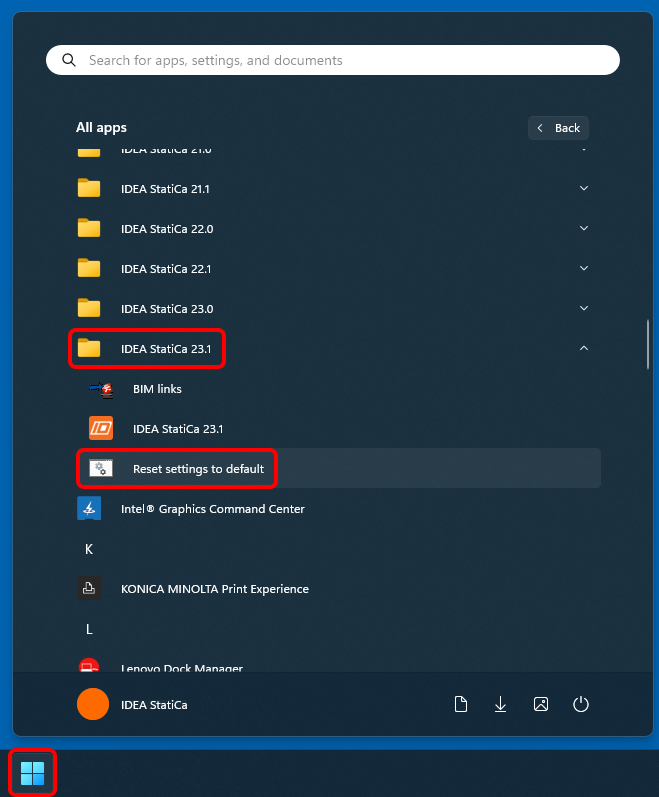
Note: This action also contains the model data (folder TempWS) described in the text below.
Deleting the model data only
This data contains the temporary information of the models you were working on. These data are stored to provide you with faster interaction with models in the application and serve as a backup if something goes wrong and the application falls.
You can delete this data to empty your disc space by deleting this folder:
C:\Users\%userprofile%\AppData\Local\IDEA_RS\TempWS
No settings are affected by this action.
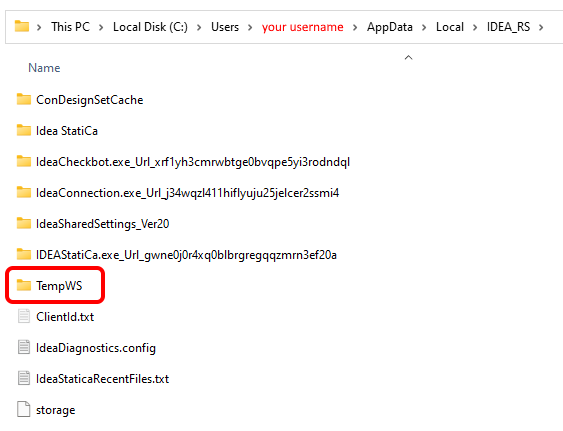
Note: The reset/deleting of settings and temporary data can not be reverted