Idea Statica
  • Steel
  • Concrete
  • Support & Learning
  • Pricing
  • Company
  • Steel overview
  • Connection design
  • Member design
  • Parametric design
  • Steel case studies
  • Concrete overview
  • Walls and D-regions
  • Anchoring design
  • Concrete case studies
  • BIM Overview
  • Supported integrations
  • Checkbot
  • Viewer
  • APIs
  • Support Center
  • E-learning & certification
  • Blog
  • Downloads & Licensing
  • Plans
  • Free community tool
  • Enterprise customers
  • Students & educators
  • How much will you save?
  • About us
  • Contact
  • Research & development
  • Authorized resellers
  • Meet our customers
  • Career
  • Steel
    Steel overviewConnection designMember designParametric designSteel case studies
  • Concrete
    Concrete overviewWalls and D-regionsAnchoring designConcrete case studies
  • BIM OverviewSupported integrationsCheckbotViewerAPIs
  • Support & Learning
    Support CenterE-learning & certificationBlogDownloads & Licensing
  • Pricing
    PlansFree community toolEnterprise customersStudents & educatorsHow much will you save?
  • Company
    About usContactResearch & developmentAuthorized resellersMeet our customersCareer
14-Day Trial
14-Day Trial

Subscribe to our newsletter

Company

  • About us
  • Partners
  • Careers
  • Patent

Resources

  • Customer projects
  • Case studies
  • Connection Library
  • Verification books

Legal

  • EULA
  • Privacy policy
  • California Privacy
  • TOS Viewer
  • Licensing

Help

  • Contact
  • Quote request
  • Resellers
  • Downloads
FacebookInstagramLinkedInYouTube

ยฉ IDEA StatiCa 2009-2026

Trusted and used worldwide by engineers, fabricators & consultants.

Support CenterTutorialsSlab code-check using shell element in RCS (EN)
Slab code-check using shell element in RCS (EN)
ConcreteReinforced concreteTutorialsRCSEN (Eurocode)

Slab code-check using shell element in RCS (EN)

This article is also available in
ENCZDEESFRITPTNLHUROKRPLTHTRVIZH

By following this tutorial step-by-step, you will learn how to code-check a shell element in IDEA StatiCa RCS. Internal forces are taken over from the third-party software.

1 Project in FEA app

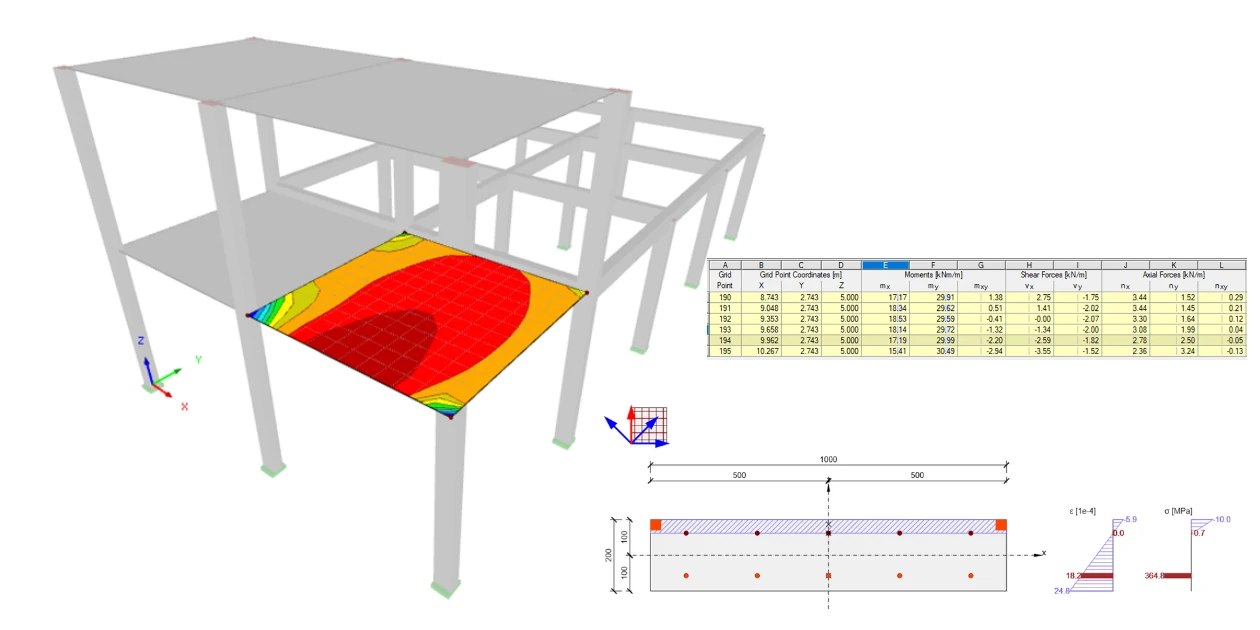
The FEM model consists of 1D and 2D elements(shell).

To make it simple. You can find one combination for ULS and two for SLS.

The code check will be performed in Grid point 192. The internal forces from the ULS combination CO1 are enclosed in the postprocessing results.

Characteristic combination - CO2.

Quasi-combination CO3.

2 New project

Run IDEA StatiCa app and move to the part-->Concrete-->RCS.

Create a new project-->Select Eurocode--> Section type 2D-->Member type shell. This setting ensures adaptability with your FEA model where is used the 2D shell element.ย 

3 Cross-section

Define the Thickness 200 mm and Concrete grade C30/37.ย 

4 Design member

The exposure class is set as XC3 and XD1. This setting decides the crack width and cover limits according to the code.ย 

5 Internal forces

Copy+Paste or Manual input can be used for filling out the tab. The angle from the x-axis serves for the recalculation of designed internal forces from the basic ones, which are inserted into the tab.

6 Reinforcement

The predefined template of reinforcement helps with swift predesign. The bottom and upper layers of the rebars define according to the figure below.ย 

ย Summary overview of designed reinforcements layout, diameters, and distances. ย ย 

7 Results

You can display the results for ULS and SLS in very detail. The activate red arrow mentions which direction you are looking at. Stress and strain redistribution over the height depicts the behavior of the analyzed element. ย 

Crack width displayed results for SLS.

8 Report

At last, go to theย Report Preview/Print. IDEA StatiCa offers a fully customizable report to print out or save in an editable format.

Download