Idea Statica
  • Steel
  • Concrete
  • Support & Learning
  • Pricing
  • Company
  • Steel overview
  • Connection design
  • Member design
  • Parametric design
  • Steel case studies
  • Concrete overview
  • Walls and D-regions
  • Anchoring design
  • Concrete case studies
  • BIM Overview
  • Supported integrations
  • Checkbot
  • Viewer
  • APIs
  • Support Center
  • E-learning & certification
  • Blog
  • Downloads & Licensing
  • Plans
  • Free community tool
  • Enterprise customers
  • Students & educators
  • How much will you save?
  • About us
  • Contact
  • Research & development
  • Authorized resellers
  • Meet our customers
  • Career
  • Steel
    Steel overviewConnection designMember designParametric designSteel case studies
  • Concrete
    Concrete overviewWalls and D-regionsAnchoring designConcrete case studies
  • BIM OverviewSupported integrationsCheckbotViewerAPIs
  • Support & Learning
    Support CenterE-learning & certificationBlogDownloads & Licensing
  • Pricing
    PlansFree community toolEnterprise customersStudents & educatorsHow much will you save?
  • Company
    About usContactResearch & developmentAuthorized resellersMeet our customersCareer
14-Day Trial
14-Day Trial

Subscribe to our newsletter

Company

  • About us
  • Partners
  • Careers
  • Patent

Resources

  • Customer projects
  • Case studies
  • Connection Library
  • Verification books

Legal

  • EULA
  • Privacy policy
  • California Privacy
  • TOS Viewer
  • Licensing

Help

  • Contact
  • Quote request
  • Resellers
  • Downloads
FacebookInstagramLinkedInYouTube

© IDEA StatiCa 2009-2026

Trusted and used worldwide by engineers, fabricators & consultants.

Support CenterKnowledge Base ArticlesUse global/local coordinates in supports settings
IDEA StatiCa Member for steel
Member model organization
Modeling wizard for typical use-cases in Steel Member
Member wizard models available for AISC and AS
Member - boundary conditions
Use global/local coordinates in supports settings
Supports with offset in Member
Global/local coordinates in supports settings
SteelMember designConcreteKnowledge baseMember

Use global/local coordinates in supports settings

This article is also available in
ENCZDEESFRITPTNLHUROKRPLTHTRVIZH

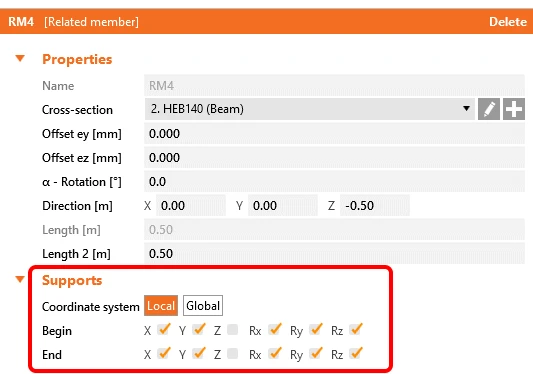
While defining supports of the model, you will now have an option to choose between the local system of coordinates (LCS) and the global system of coordinates (GCS). The local system is set as default.

This aims to remedy some difficulties with supporting the model. The feature is available for steel and concrete members.

IDEA StatiCa Member for steel members is available in Enhanced edition of IDEA StatiCa Steel.
Related articles

What is new in IDEA StatiCa 21.1
  • Steel
  • Concrete
  • Connection
  • Member
  • Detail 2D
  • BIM link
  • +6
  • Steel
  • Concrete
  • Connection
  • Member
  • Detail 2D
  • BIM link

Webinar

What is new in IDEA StatiCa 21.1

Read more
IDEA StatiCa version 21.1
  • Concrete
  • Steel
  • Connection
  • Detail 2D
  • Member
  • Checkbot
  • Viewer
  • RCS
  • IDEA Open Model (API)
  • ACI (USA)
  • AISC (USA)
  • BIM link
  • EN (Eurocode)
  • +13
  • Concrete
  • Steel
  • Connection
  • Detail 2D
  • Member
  • Checkbot
  • Viewer
  • RCS
  • IDEA Open Model (API)
  • ACI (USA)
  • AISC (USA)
  • BIM link
  • EN (Eurocode)

Release notes

Release notes IDEA StatiCa Steel & Concrete 21.1

Read more