Idea Statica
  • Steel
  • Concrete
  • BIM & Workflows
  • Support & Learning
  • Pricing
  • Company
  • Steel overview
  • Connection design
  • Member design
  • Parametric design
  • Steel case studies
  • Concrete overview
  • Walls and D-regions
  • Anchoring design
  • Concrete case studies
  • BIM Overview
  • Supported integrations
  • Checkbot
  • Viewer
  • APIs
  • Support Center
  • E-learning & certification
  • Blog
  • Downloads & Licensing
  • Plans
  • Free community tool
  • Enterprise customers
  • Students & educators
  • How much will you save?
  • About us
  • Contact
  • Research & development
  • Authorized resellers
  • Meet our customers
  • Career
  • Steel
    Steel overviewConnection designMember designParametric designSteel case studies
  • Concrete
    Concrete overviewWalls and D-regionsAnchoring designConcrete case studies
  • BIM & Workflows
    BIM OverviewSupported integrationsCheckbotViewerAPIs
  • Support & Learning
    Support CenterE-learning & certificationBlogDownloads & Licensing
  • Pricing
    PlansFree community toolEnterprise customersStudents & educatorsHow much will you save?
  • Company
    About usContactResearch & developmentAuthorized resellersMeet our customersCareer
14-Day Trial
14-Day Trial

Subscribe to our newsletter

Company

  • About us
  • Partners
  • Careers
  • Patent

Resources

  • Customer projects
  • Case studies
  • Connection Library
  • Verification books

Legal

  • EULA
  • Global privacy policy
  • California Privacy
  • TOS Viewer
  • Licensing

Help

  • Contact
  • Quote request
  • Resellers
  • Downloads
FacebookInstagramLinkedInYouTube

ยฉ IDEA StatiCa 2009-2026

Trusted and used worldwide by engineers, fabricators & consultants.

Support CenterKnowledge Base ArticlesRight-click mouse button design proposal
Developer mode
SteelConnection designKnowledge baseConnectionAISC (USA)

Right-click mouse button design proposal

This article is also available in
ENCZDEESFRITPTNLHUROKRPLTHTRVIZH

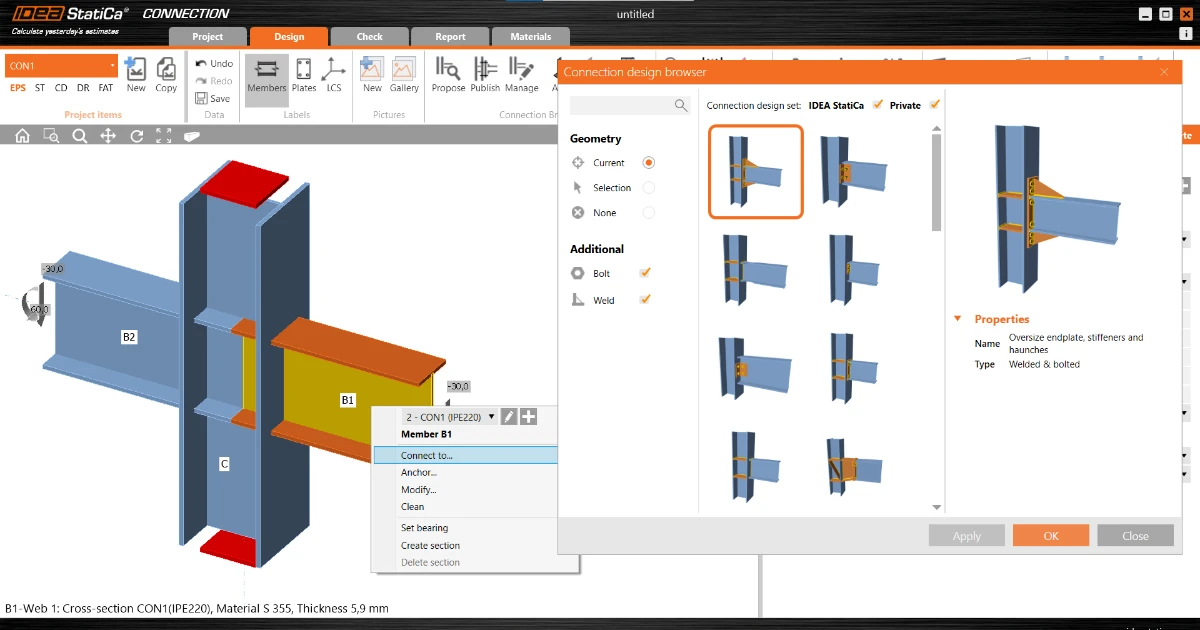
This feature in patch 21.1.2 is another step of the Connection Browser integration into IDEA StatiCa Connection and replaces the similar old-style feature. Shortcut for those of you who like to be super fast - the right-click on a member in the 3D scene automatically proposes designs that fit.

Note: Connection Browser was renamed to Connection Library with version 23.0 (April, 2023).

The UI of the right mouse button features Connect to, Anchor, and Modify remains the same. Instead of a solid set of general templates, the Connection Browser proposes designs that fit the number of selected members, their geometry, and cross-sections.

When Connect to function is chosen, multiple members can be now selected.

Current right-click selection workflow:

  • Click the right mouse button at a member
  • Click on Connect to (or Anchor or Modify)
  • With left mouse button select just one additional member to which you want to connect
  • Choose one of the provided templates

New right-click selection workflow with integrated Connection Browser:

  • Click the right mouse button at a member
  • Click on Connect to (or Anchor or Modify)
  • For patch 21.1.2 with the left mouse button select just one additional member to which you want to connect
  • For patch 21.1.3 hold the Ctrl/Shift key and with the left mouse button select multiple additional members which you want to connect
  • Press Spacebar to confirm the selection
  • Choose one of the proposed designs

Available in both Expert andย Enhancedย editions ofย IDEA StatiCa Steel.