Idea Statica
  • Steel
  • Concrete
  • BIM & Workflows
  • Support & Learning
  • Pricing
  • Company
  • Steel overview
  • Connection design
  • Member design
  • Parametric design
  • Steel case studies
  • Concrete overview
  • Walls and D-regions
  • Anchoring design
  • Concrete case studies
  • BIM Overview
  • Supported integrations
  • Checkbot
  • Viewer
  • APIs
  • Support Center
  • E-learning & certification
  • Blog
  • Downloads & Licensing
  • Plans
  • Free community tool
  • Enterprise customers
  • Students & educators
  • How much will you save?
  • About us
  • Contact
  • Research & development
  • Authorized resellers
  • Meet our customers
  • Career
  • Steel
    Steel overviewConnection designMember designParametric designSteel case studies
  • Concrete
    Concrete overviewWalls and D-regionsAnchoring designConcrete case studies
  • BIM & Workflows
    BIM OverviewSupported integrationsCheckbotViewerAPIs
  • Support & Learning
    Support CenterE-learning & certificationBlogDownloads & Licensing
  • Pricing
    PlansFree community toolEnterprise customersStudents & educatorsHow much will you save?
  • Company
    About usContactResearch & developmentAuthorized resellersMeet our customersCareer
14-Day Trial
14-Day Trial
  • Steel
  • Concrete
  • BIM & Workflows
  • Support & Learning
  • Pricing
  • Company

Subscribe to our newsletter

Company

  • About us
  • Partners
  • Careers
  • Patent

Resources

  • Customer projects
  • Case studies
  • Connection Library
  • Verification books

Legal

  • EULA
  • Privacy policy
  • California Privacy
  • TOS Viewer
  • Licensing

Help

  • Contact
  • Quote request
  • Resellers
  • Downloads
FacebookInstagramLinkedInYouTube

© IDEA StatiCa 2009-2026

Trusted and used worldwide by engineers, fabricators & consultants.

Support CenterKnowledge Base ArticlesImport/export cross-section, reinforcement, and tendons in RCS
RCS API for streamlined, simplified, and efficient design processes
Import/export cross-section, reinforcement, and tendons in RCS
How to work with templates
RCS automation API - all documentation
Lateral torsional buckling for prefabricated beams
Import/export cross-section, reinforcement, and tendons in RCS
ConcreteReinforced concretePrestressed concreteKnowledge baseRCS

Import/export cross-section, reinforcement, and tendons in RCS

This article is also available in
ENCZDEESFRITPTNLHUROKRPLTHTRVIZH

In this article, we will guide you through all export/import options, providing a thorough understanding of each method. Whether you prefer working with coordinates, DXF files, or external files, we have you covered.

There are several options for importing and exporting geometry, reinforcement, and tendons in the RCS application. In this article, we will introduce and explain all the options. Let's dive in and explore all the ways you can efficiently create a cross-section.

General cross-section

The first option is to create a cross-section by using coordinates. Click on the General button in the top ribbon and the input table will appear. After that, you can simply fill the table from your spreadsheet by using copy-paste method.
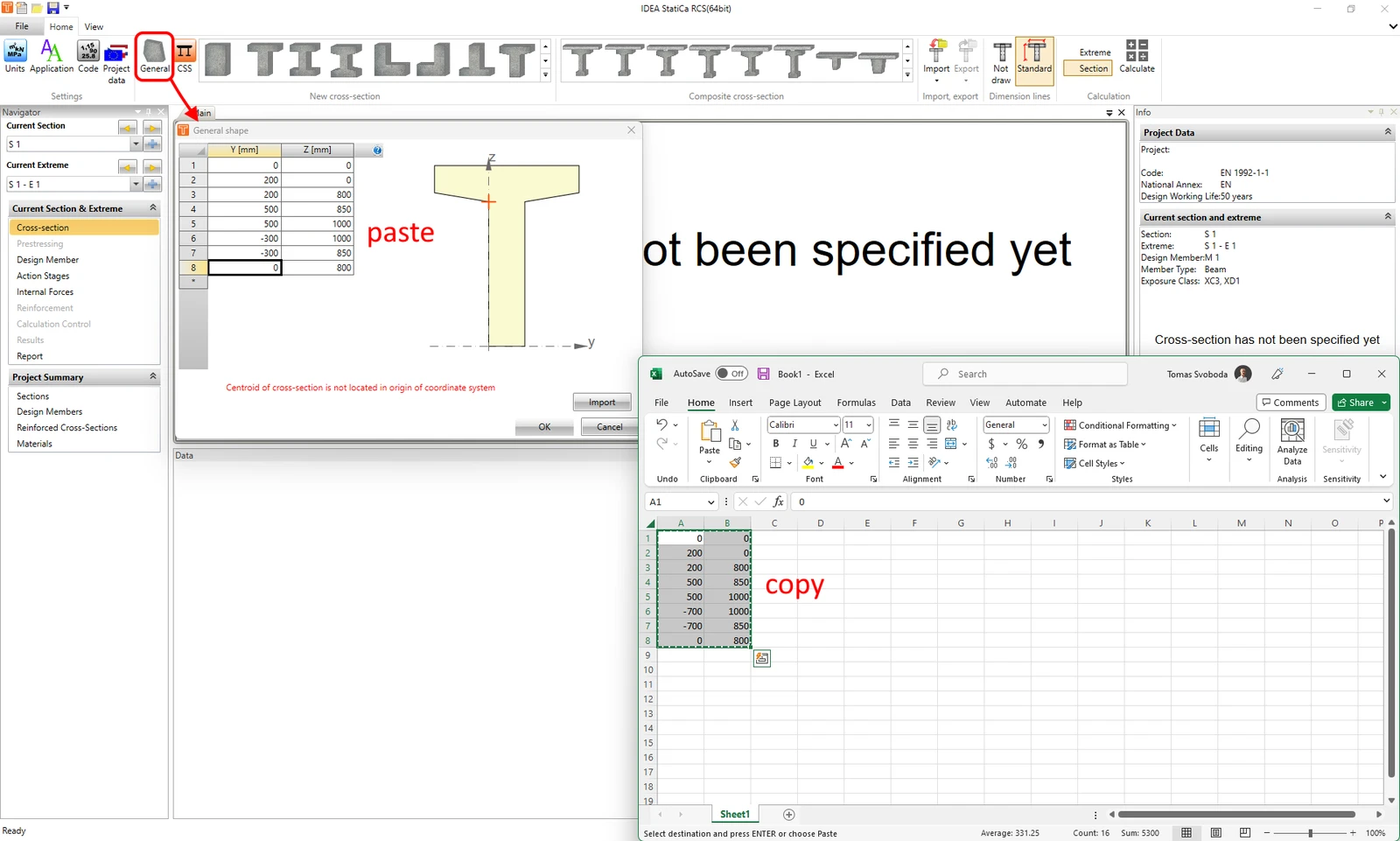
Or there is an option to use the Import button in the General shape window to import the shape from the .nav or the .txt file. These options will be explained in detail further in this article.

Import from DXF file

The second option is to launch the General cross-section editor and import geometry from the DXF file. The whole process is described in the following article:

  • General cross-section editor for concrete

Import/Export using the .nav file

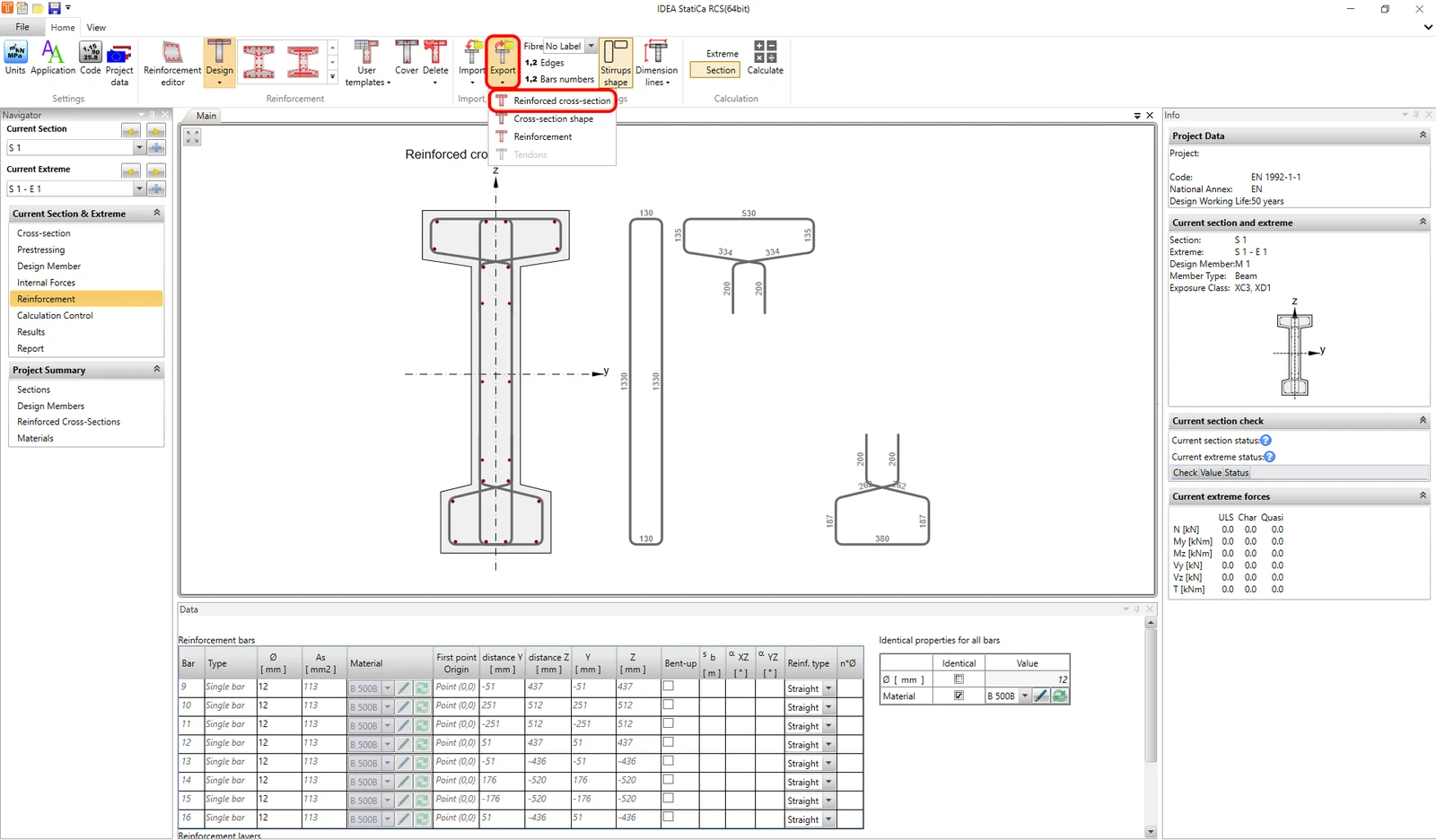
Last but not least, there's an option to use the .nav file. This functionality can be accessed from the Navigator from Cross-section, Prestressing, and Reinforcement. And it can be also found in the Reinforcement editor. 

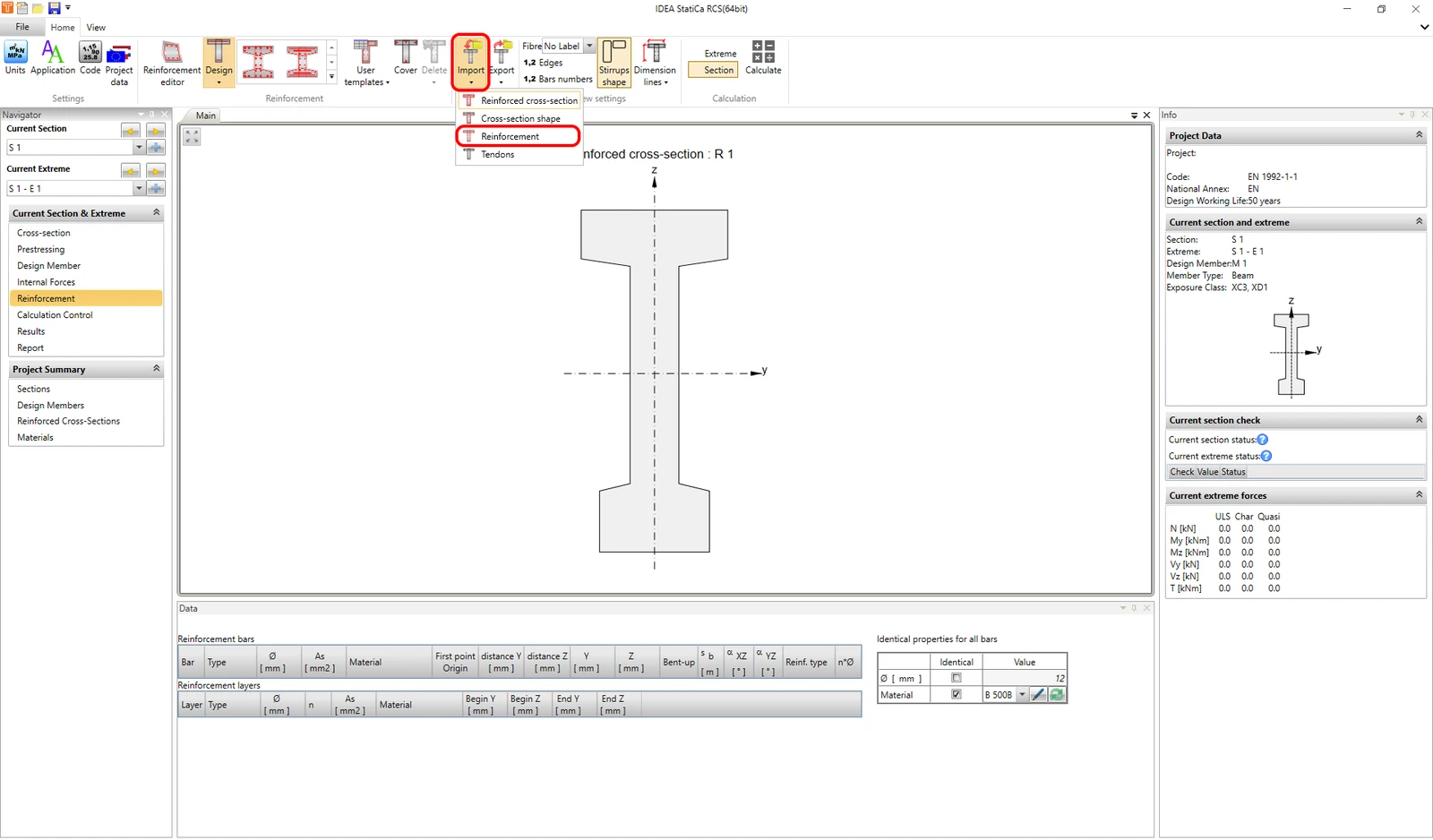
You can import or export the whole cross-section including reinforcement and tendons as well as only geometry, or only reinforcement or only tendons.

First, you need to create a file, by exporting the section.
After that, you can import the whole cross-section to the new file or section. Or for example reinforcement to a new section.
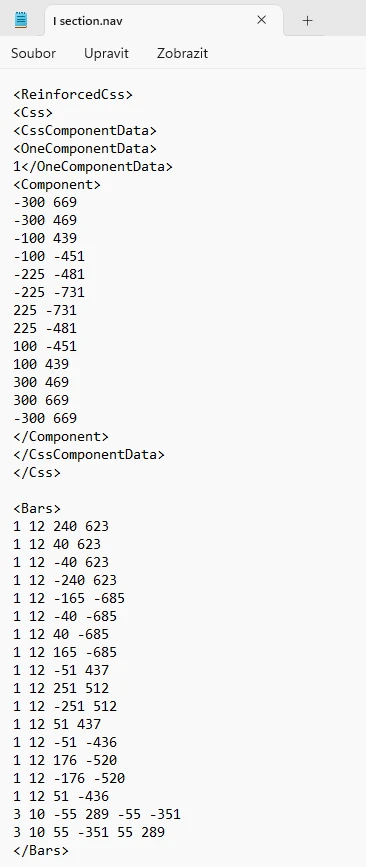
The .nav file can be opened and modified in the Notepad application. Or you can copy the prescription from your spreadsheet.
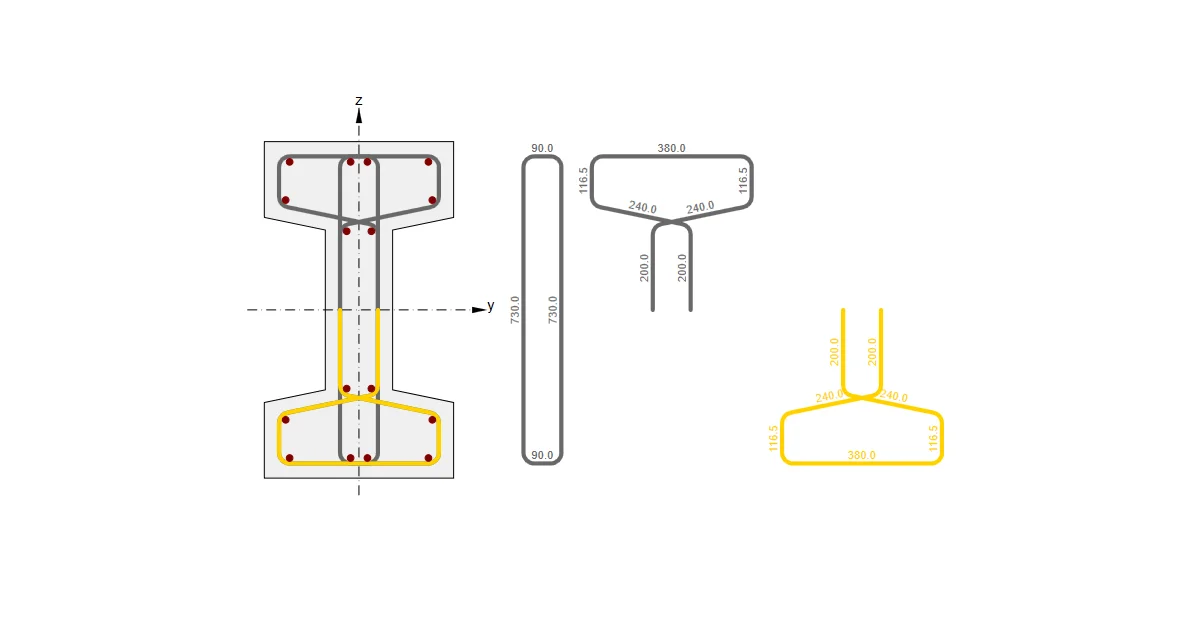
Finally, you can observe the workflow in this video.

Take the latest version of IDEA StatiCa for a test drive today

Get 14 days of full access, completely free.

Check out IDEA StatiCa for free
Related articles

Reinforcement in RCS application
  • Concrete
  • RCS
  • EN (Eurocode)
  • Reinforcement
  • +4
  • Concrete
  • RCS
  • EN (Eurocode)
  • Reinforcement

Knowledge base

Reinforcement in RCS application

Read more
Shear stress caused by unit torsional moment Mx
  • Concrete
  • RCS
  • Geometry
  • DXF
  • +4
  • Concrete
  • RCS
  • Geometry
  • DXF

Knowledge base

General cross-section editor for concrete

Read more
Action stages - RCS, Initial state
  • Concrete
  • RCS
  • Prestressed members
  • Prestressing losses
  • EN (Eurocode)
  • Load effects
  • +6
  • Concrete
  • RCS
  • Prestressed members
  • Prestressing losses
  • EN (Eurocode)
  • Load effects

Knowledge base

RCS - Action stages

Read more
Section and member types in the RCS application
  • Concrete
  • RCS
  • EN (Eurocode)
  • Geometry
  • Reinforcement
  • +5
  • Concrete
  • RCS
  • EN (Eurocode)
  • Geometry
  • Reinforcement

Knowledge base

Section and member types in the RCS application

Read more