Idea Statica
  • Steel
  • Concrete
  • Support & Learning
  • Pricing
  • Company
  • Steel overview
  • Connection design
  • Member design
  • Parametric design
  • Steel case studies
  • Concrete overview
  • Walls and D-regions
  • Anchoring design
  • Concrete case studies
  • BIM Overview
  • Supported integrations
  • Checkbot
  • Viewer
  • APIs
  • Support Center
  • E-learning & certification
  • Blog
  • Downloads & Licensing
  • Plans
  • Free community tool
  • Enterprise customers
  • Students & educators
  • How much will you save?
  • About us
  • Contact
  • Research & development
  • Authorized resellers
  • Meet our customers
  • Career
  • Steel
    Steel overviewConnection designMember designParametric designSteel case studies
  • Concrete
    Concrete overviewWalls and D-regionsAnchoring designConcrete case studies
  • BIM OverviewSupported integrationsCheckbotViewerAPIs
  • Support & Learning
    Support CenterE-learning & certificationBlogDownloads & Licensing
  • Pricing
    PlansFree community toolEnterprise customersStudents & educatorsHow much will you save?
  • Company
    About usContactResearch & developmentAuthorized resellersMeet our customersCareer
14-Day Trial
14-Day Trial

Subscribe to our newsletter

Company

  • About us
  • Partners
  • Careers
  • Patent

Resources

  • Customer projects
  • Case studies
  • Connection Library
  • Verification books

Legal

  • EULA
  • Privacy policy
  • California Privacy
  • TOS Viewer
  • Licensing

Help

  • Contact
  • Quote request
  • Resellers
  • Downloads
FacebookInstagramLinkedInYouTube

© IDEA StatiCa 2009-2026

Trusted and used worldwide by engineers, fabricators & consultants.

Support CenterKnowledge Base ArticlesCustomizable report tab in Detail
Customizable report tab in Detail
Report in Detail application
Customizable report tab in Detail
ConcreteKnowledge baseDetail 2DReportv24.0

Customizable report tab in Detail

This article is also available in
ENCZDEESFRITPTNLHUROKRPLTHTRVIZH

The Report tab layout simplifies the selection of report types (Brief, Detailed, or Bill of Material) and integrates export commands directly into the ribbon, optimizing the report customization process via the tree of entities.

Enhanced interaction with entities

The tree of entities, a central feature of the application, streamlines report customization. Entities within the tree correspond to specific report sections, with the content being adjustable through checkbox activations or deactivations. This design supports the intuitive reordering of report sections via drag and drop. At the same time, the selection of an entity instantly updates the property grid and highlights the selected section at the top of the interface.
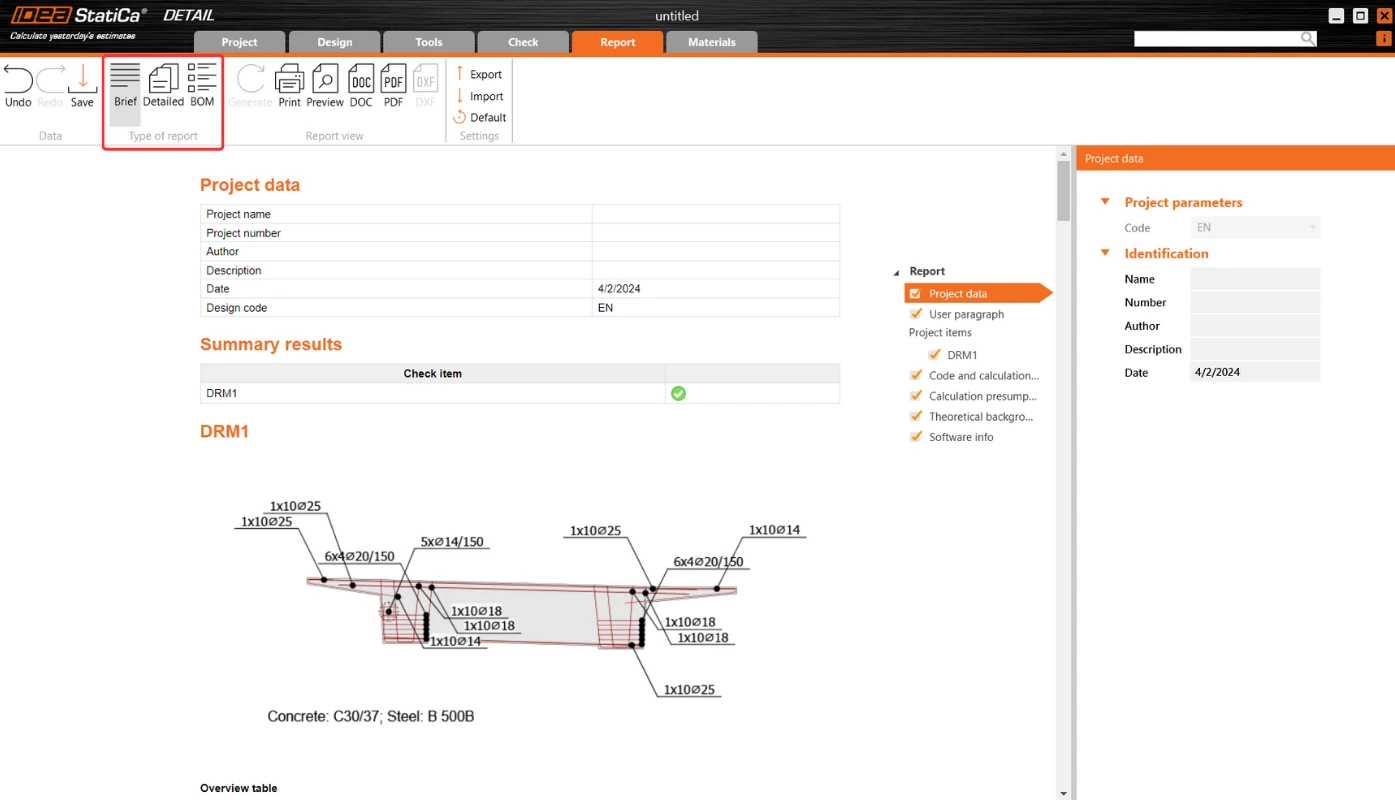
Property Grid and report content management

Selected item properties are displayed in the Property Grid on the right side of the application, although not all entities possess properties. This setup provides a detailed overview and control over the report's content, ensuring relevant information is included as per user preference.
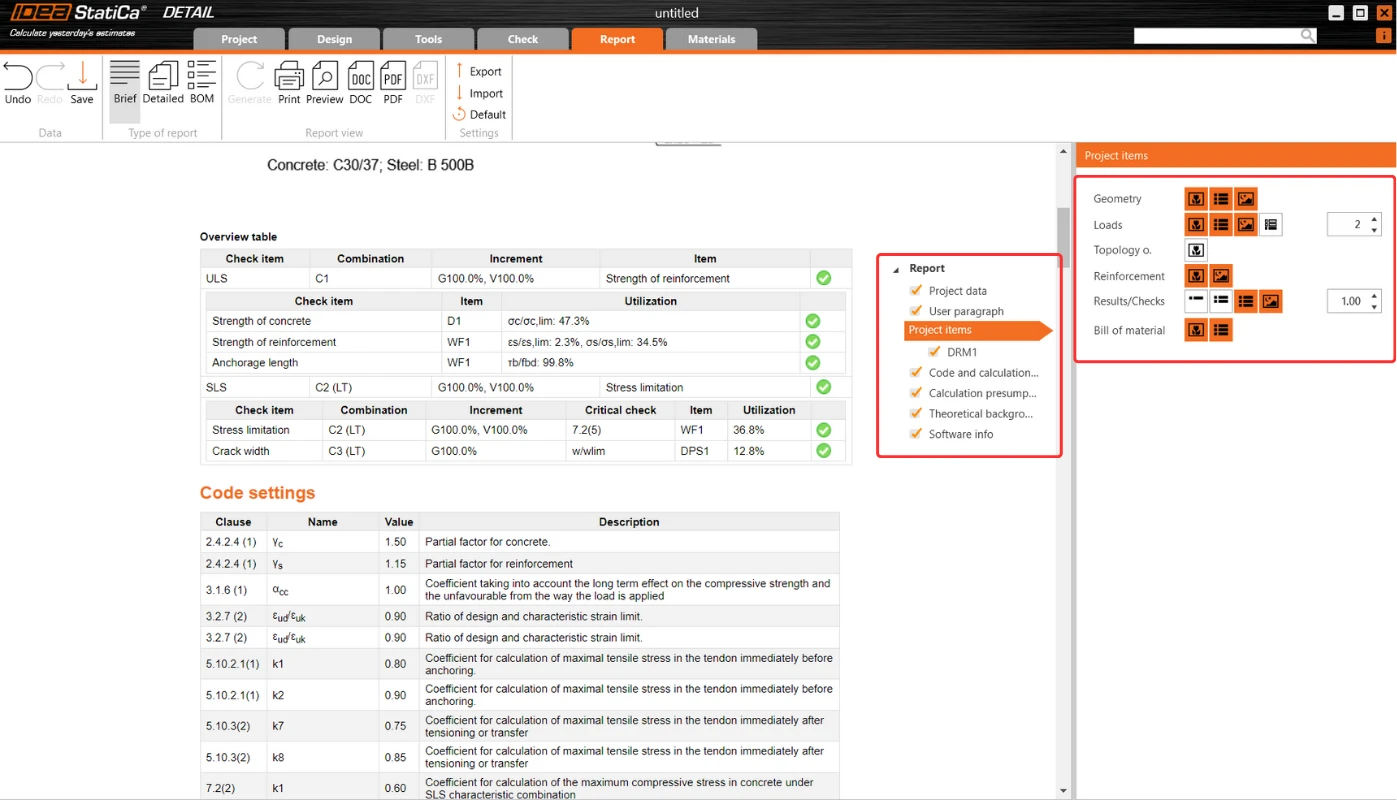
Transparent report generation

The Report tab aids in report generation, enhances transparency in calculations, and facilitates code checks. This includes:

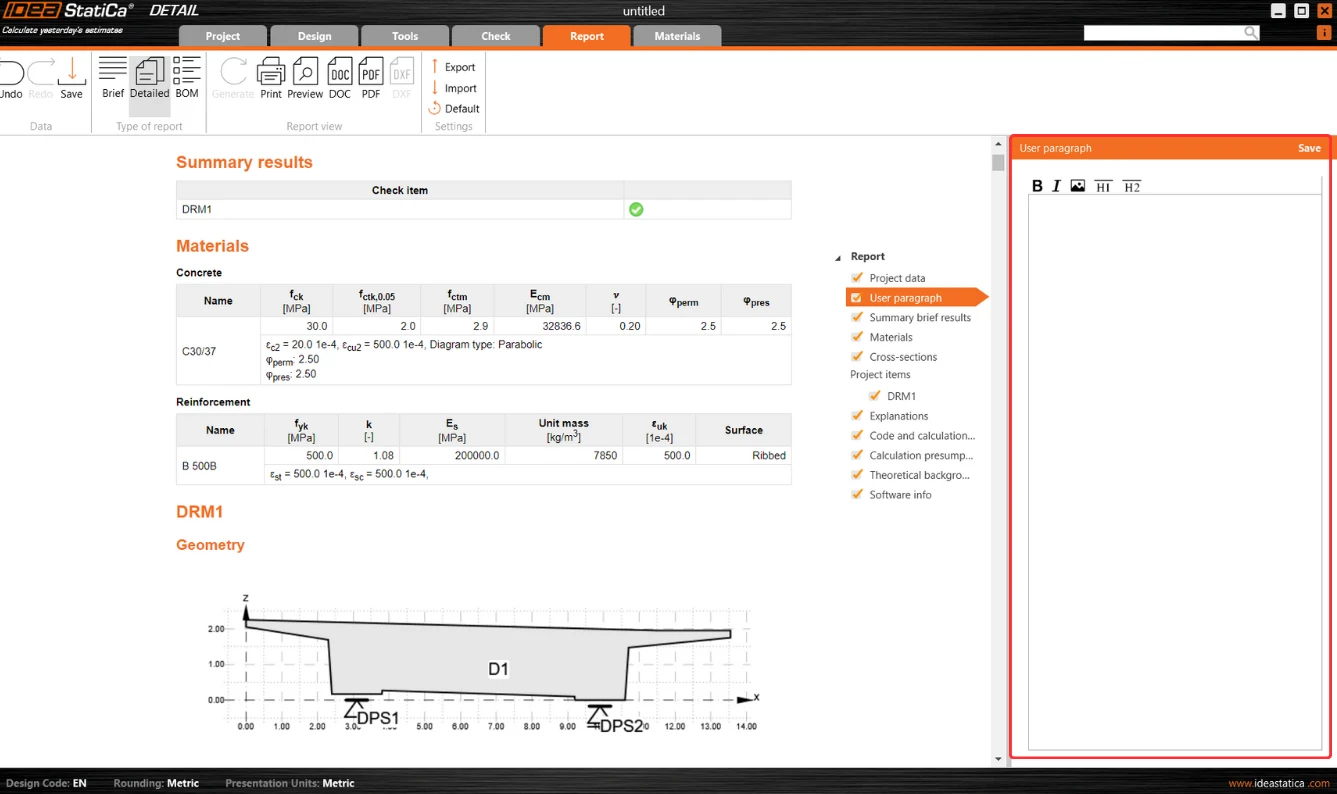
  • User paragraph incorporation: A "User Paragraph" can be incorporated into the report for the entire project or individual entities, utilizing an advanced editor for text and image manipulation reminiscent of MS Office tools. Changes are saved directly within the Report tab for convenience.
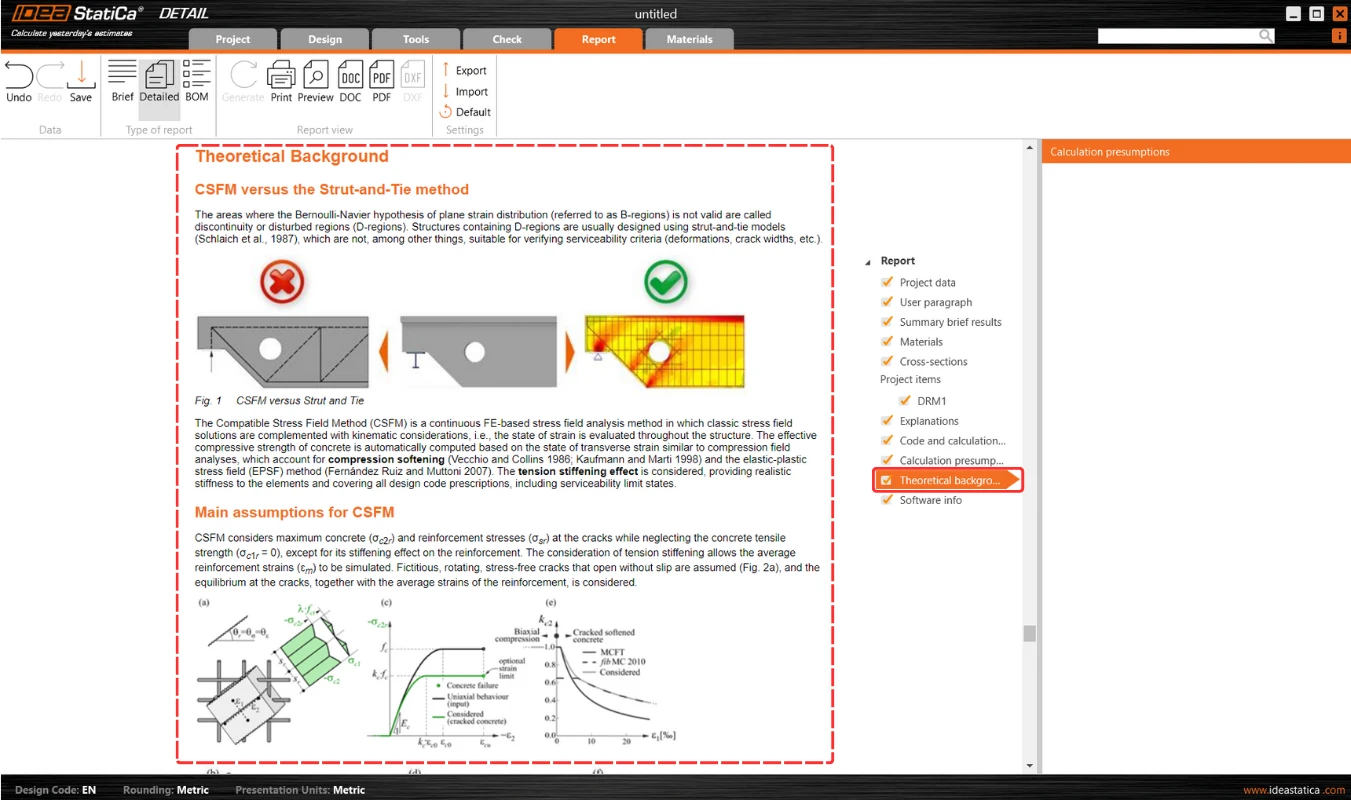
  • Inclusion of additional essential sections: Sections like Theoretical Background and Software Information enrich the report, providing essential insights into calculation bases and software functionalities. The Theoretical Background section delves into calculation assumptions and model entity functionalities alongside code-check and design code references.
Multilingual support for theoretical background

Theoretical Background is accessible in English, German, Dutch, and Czech. For languages beyond these, an English version is provided to ensure wide accessibility.

Advanced Bill of Material features

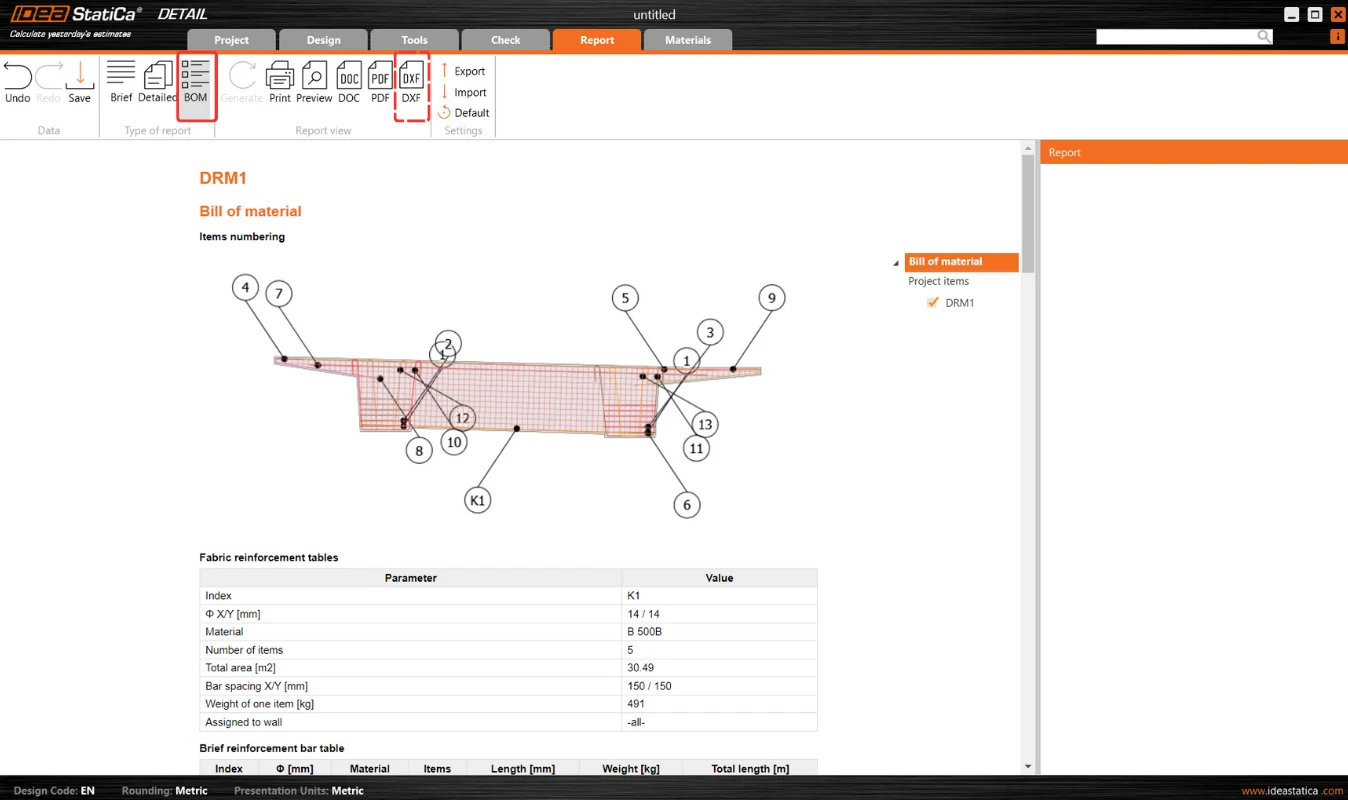
Bill of Material (BOM) offers advanced features such as displaying rebar model entity names within the rebar table. This enhancement aids in effortlessly identifying rebars in the BOM, correlating them with their respective entities in the model. BOM also provides an option for the scheme to export reinforcement into dxf. 
Released in IDEA StatiCa patch 23.1.5.

Take the latest version of IDEA StatiCa for a test drive today

Get 14 days of full access, completely free.

Check out IDEA StatiCa for free
Related articles

Release notes IDEA StatiCa 24.0
  • Steel
  • Concrete
  • v24.0
  • +3
  • Steel
  • Concrete
  • v24.0

Release notes

Release notes IDEA StatiCa 24.0

Read more
Why IDEA StatiCa Detail?
  • Concrete
  • Detail 2D
  • EN (Eurocode)
  • CSFM
  • ACI (USA)
  • +5
  • Concrete
  • Detail 2D
  • EN (Eurocode)
  • CSFM
  • ACI (USA)

FAQ

Why IDEA StatiCa Detail?

Read more
Supports in IDEA StatiCa Detail
  • Concrete
  • Detail 2D
  • Bridges
  • CSFM
  • Pier caps
  • +5
  • Concrete
  • Detail 2D
  • Bridges
  • CSFM
  • Pier caps

Knowledge base

Supports in IDEA StatiCa Detail - Advanced Topics

Read more
CSFM explained
  • Concrete
  • Detail 2D
  • EN (Eurocode)
  • ACI (USA)
  • Corbels/Brackets
  • CSFM
  • Coupling beams
  • Cracks
  • Deflections
  • Diaphragms
  • Pier caps
  • Openings
  • Reinforcement
  • SLS
  • Stress in reinforcement
  • ULS
  • Wall
  • Bridges
  • +18
  • Concrete
  • Detail 2D
  • EN (Eurocode)
  • ACI (USA)
  • Corbels/Brackets
  • CSFM
  • Coupling beams
  • Cracks
  • Deflections
  • Diaphragms
  • Pier caps
  • Openings
  • Reinforcement
  • SLS
  • Stress in reinforcement
  • ULS
  • Wall
  • Bridges

Knowledge base

CSFM explained

Read more