Idea Statica
  • Steel
  • Concrete
  • BIM & Workflows
  • Support & Learning
  • Pricing
  • Company
  • Steel overview
  • Connection design
  • Member design
  • Parametric design
  • Steel case studies
  • Concrete overview
  • Walls and D-regions
  • Anchoring design
  • Concrete case studies
  • BIM Overview
  • Supported integrations
  • Checkbot
  • Viewer
  • APIs
  • Support Center
  • E-learning & certification
  • Blog
  • Downloads & Licensing
  • Plans
  • Free community tool
  • Enterprise customers
  • Students & educators
  • How much will you save?
  • About us
  • Contact
  • Research & development
  • Authorized resellers
  • Meet our customers
  • Career
  • Steel
    Steel overviewConnection designMember designParametric designSteel case studies
  • Concrete
    Concrete overviewWalls and D-regionsAnchoring designConcrete case studies
  • BIM & Workflows
    BIM OverviewSupported integrationsCheckbotViewerAPIs
  • Support & Learning
    Support CenterE-learning & certificationBlogDownloads & Licensing
  • Pricing
    PlansFree community toolEnterprise customersStudents & educatorsHow much will you save?
  • Company
    About usContactResearch & developmentAuthorized resellersMeet our customersCareer
14-Day Trial
14-Day Trial
  • Steel
  • Concrete
  • BIM & Workflows
  • Support & Learning
  • Pricing
  • Company

Subscribe to our newsletter

Company

  • About us
  • Partners
  • Careers
  • Patent

Resources

  • Customer projects
  • Case studies
  • Connection Library
  • Verification books

Legal

  • EULA
  • Privacy policy
  • California Privacy
  • TOS Viewer
  • Licensing

Help

  • Contact
  • Quote request
  • Resellers
  • Downloads
FacebookInstagramLinkedInYouTube

© IDEA StatiCa 2009-2026

Trusted and used worldwide by engineers, fabricators & consultants.

Support CenterKnowledge Base ArticlesAutomatic weld sizing to ductility
Weld sizing to ductility
SteelConnection designKnowledge basev24.0Welds

Automatic weld sizing to ductility

This article is also available in
ENCZDEESFRITPTNLHUROKRPLTHTRVIZH

Automatic weld sizing removes the tedious and time-consuming manual input and check of each weld. With the automating algorithm, IDEA StatiCa provides faster modeling and absolutely safe design of welded connections.

This article contains outdated information. Please refer to the updated version.

The aim of this feature is to control the ductility level in all welds in the connection with one click! This weld sizing approach uses an algorithm that adjusts the weld size according to the strength of connected plates (parent metal). In the IDEA StatiCa Connection application, there are three levels of weld sizing per ductility:

  • Weld sizing to minimum ductility (Eurocode only)
  • Weld sizing to full-strength
  • Weld sizing with overstrength

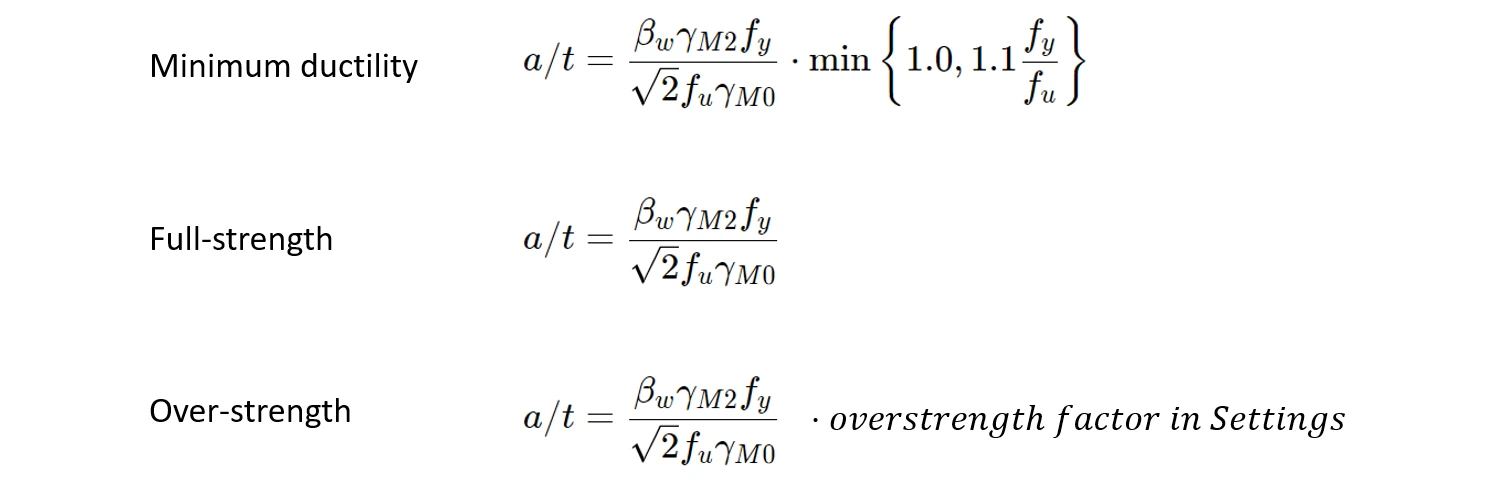
The algorithm for each level of ductility is governed by the following equations.
Weld sizing to minimum ductility

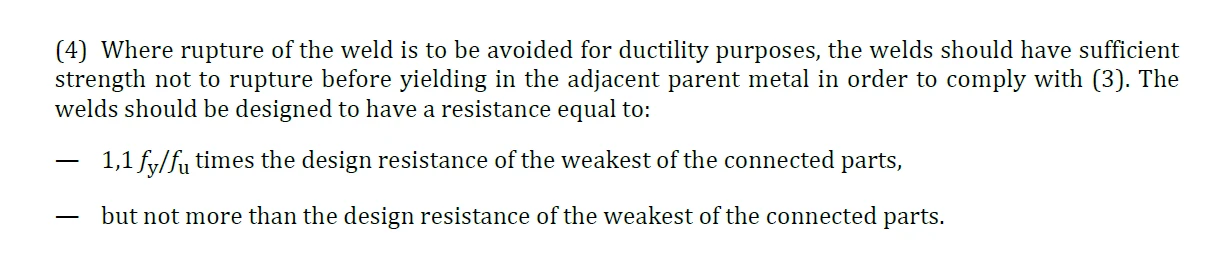
This method modifies weld size to minimum ductility of welded joints as per the Eurocode requirements in FprEN 1993-1-8:2023 – 6.9(4), and it applies to all welds and all different steel grades used in the model. The weld resistance is designed to be high enough to prevent brittle failures in the connection and, at the same time, allow plastification in the connected weld.
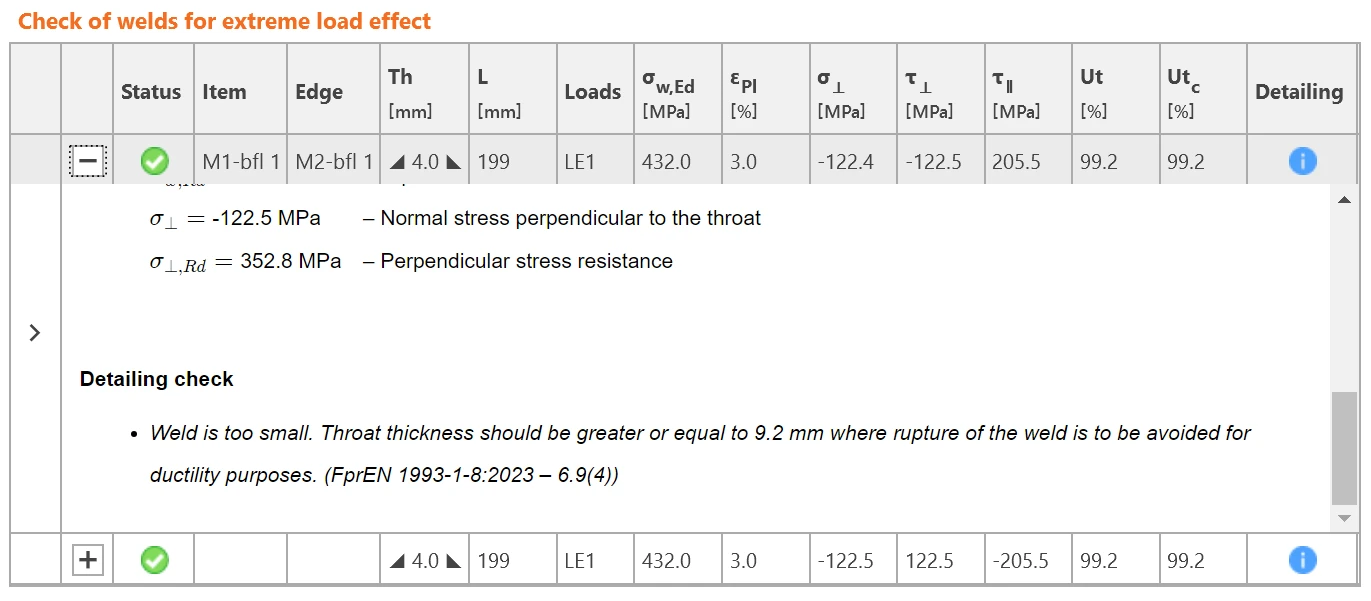
Minimum ductility requirements are also included in the detailing check of welds.
Note: Weld sizing to minimum ductility is available for Eurocode (EN) only.

Weld sizing to full-strength

The full-strength weld sizing algorithm produces thicker welds than the minimum ductility type. The resistance of the weld is higher than the resistance of the plate connected by edge. This means, welds designed with this criteria will not brittle fail before the plate fails.

Weld sizing with overstrength

This type of weld sizing produces even thicker welds than the full-strength, so the welds are much stronger than the connected plate. The aim is to add more safety in the plastic design approach and for cyclic loading scenarios (e.g., some seismic loads). The algorithm here is the same as for the full-strength, but the weld size is multiplied by the Overstrength factor.

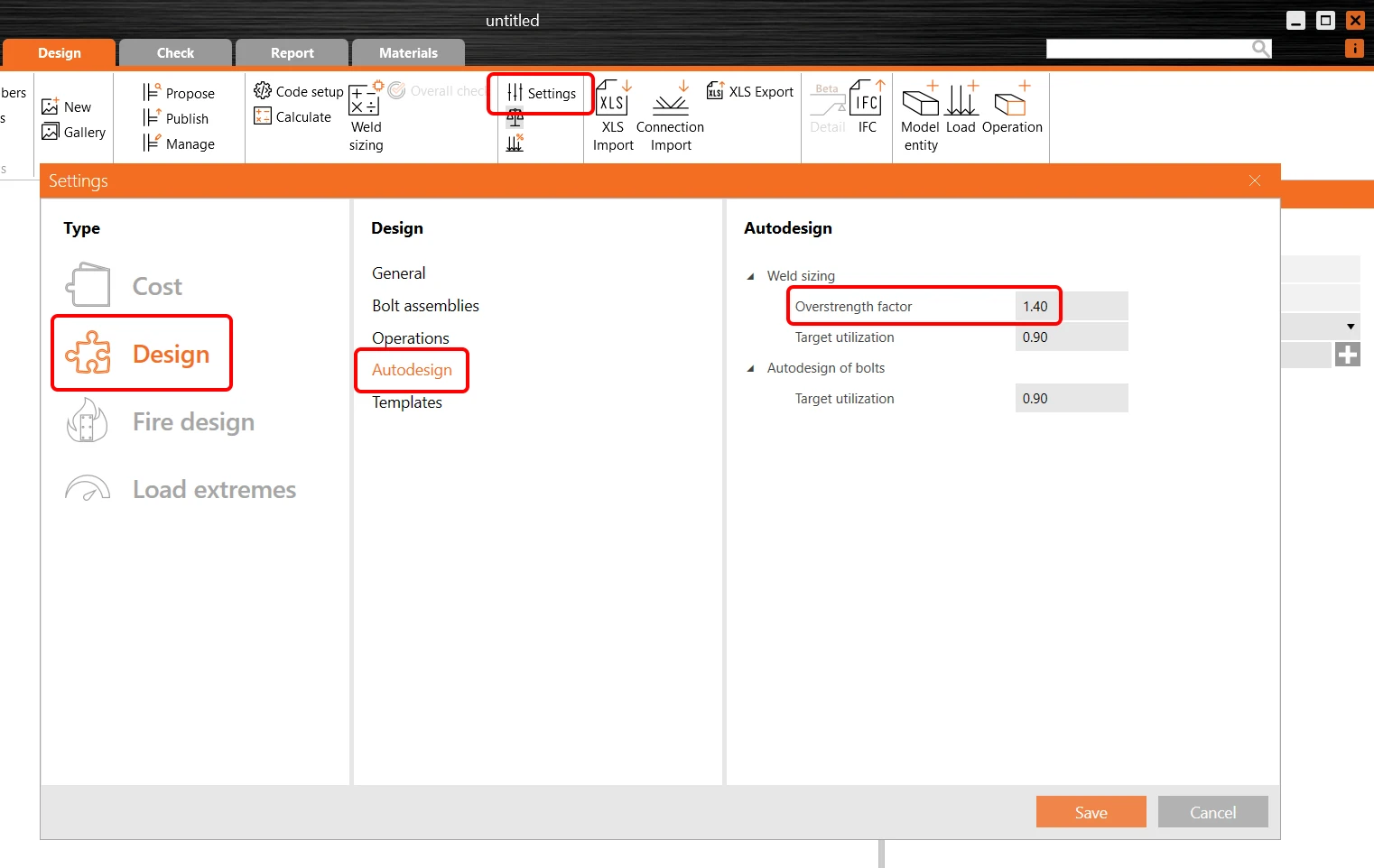
By default, the Overstrength factor is set to 1.4 and can be changed in the project Settings/Design/Autodesign/Overstrength factor.
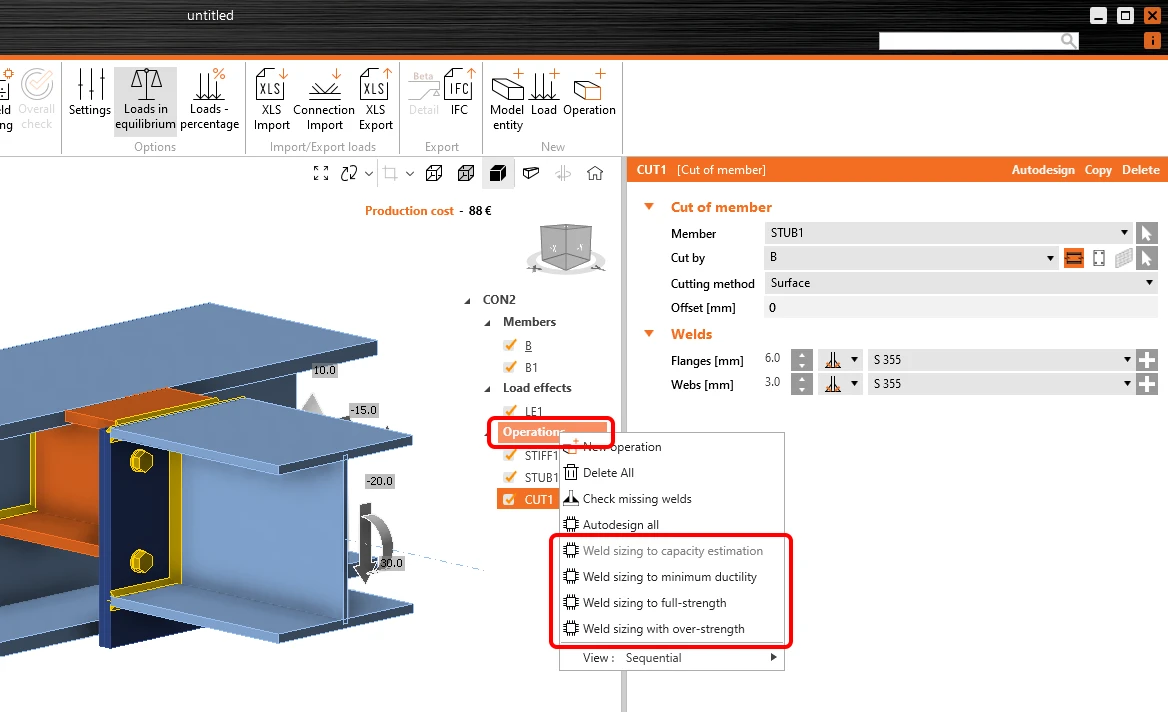
Executing the weld sizing to ductility levels

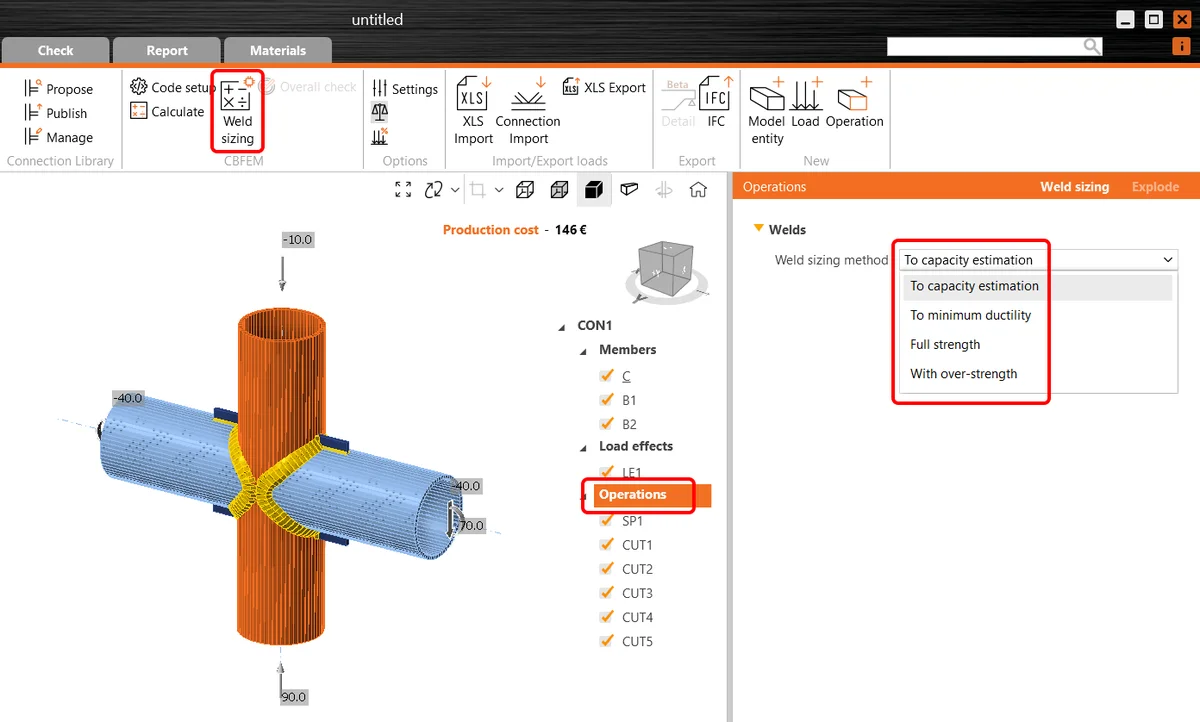
To run the automatic weld sizing, right-click the Operations item in the tree menu and carry out the weld sizing from here by choosing the weld sizing method.
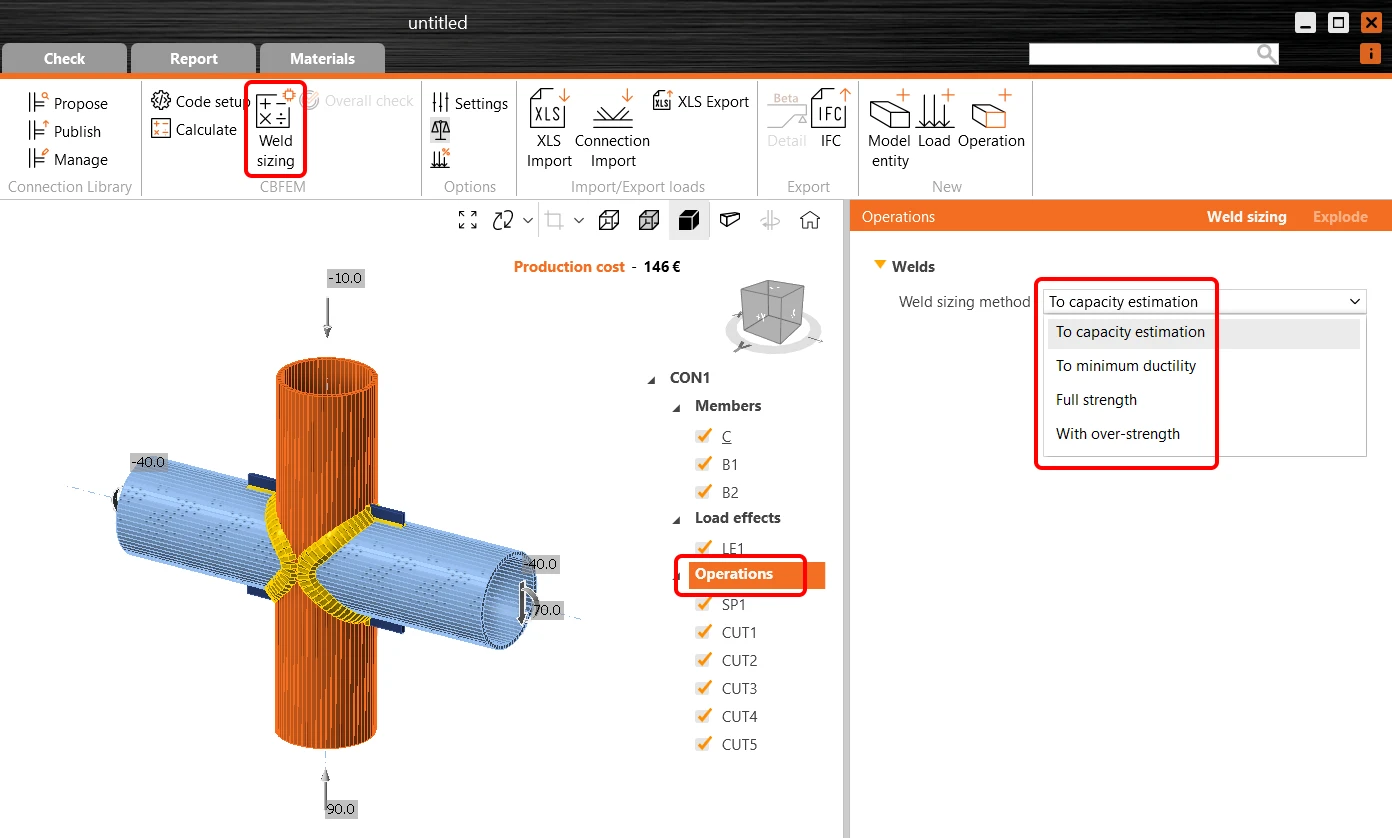
Alternatively, you can click the Operations in the tree menu, select the desired Weld sizing method, and run the Weld sizing command in the ribbon.
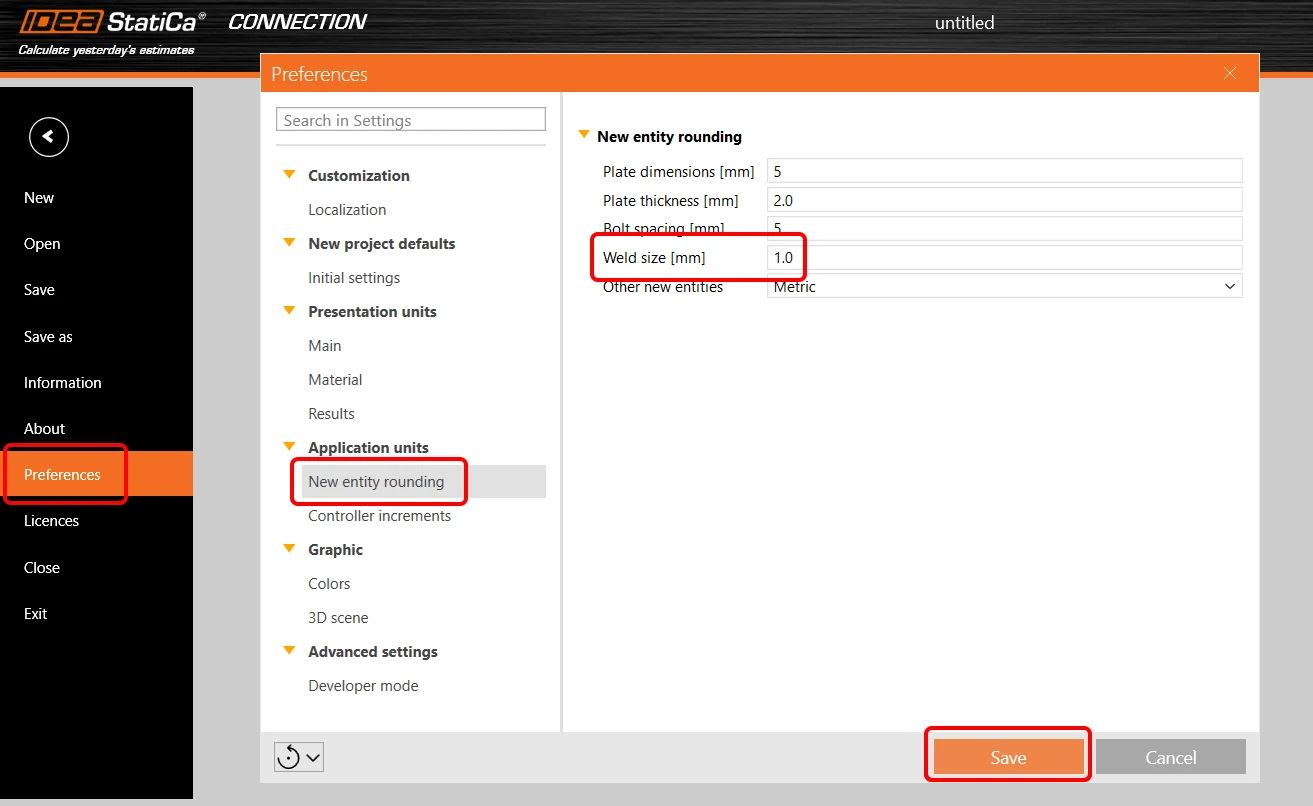
Welds size rounding up can be defined in application Preferences/New entity rounding/Weld size.
Read more about the weld sizing method in the Theoretical background chapter.

Released in IDEA StatiCa version 24.0.

Take the latest version of IDEA StatiCa for a test drive today

Get 14 days of full access, completely free.

Check out IDEA StatiCa for free
Related articles

Release notes IDEA StatiCa 24.0
  • Steel
  • Concrete
  • v24.0
  • +3
  • Steel
  • Concrete
  • v24.0

Release notes

Release notes IDEA StatiCa 24.0

Read more
Weld / Welds in IDEA StatiCa
  • Steel
  • Connection
  • Member
  • Welds
  • EN (Eurocode)
  • AISC (USA)
  • AS (Australia)
  • CSA (Canada)
  • IS (India)
  • GB (China)
  • HKG (Hong Kong)
  • SP 16 (Russia)
  • +12
  • Steel
  • Connection
  • Member
  • Welds
  • EN (Eurocode)
  • AISC (USA)
  • AS (Australia)
  • CSA (Canada)
  • IS (India)
  • GB (China)
  • HKG (Hong Kong)
  • SP 16 (Russia)

Knowledge base

Weld / Welds in IDEA StatiCa

Read more
Weld sizing
  • Steel
  • Welds
  • Connection
  • Plates
  • +4
  • Steel
  • Welds
  • Connection
  • Plates

Knowledge base

Weld sizing

Read more