Idea Statica
  • Steel
  • Concrete
  • Support & Learning
  • Pricing
  • Company
  • Steel overview
  • Connection design
  • Member design
  • Parametric design
  • Steel case studies
  • Concrete overview
  • Walls and D-regions
  • Anchoring design
  • Concrete case studies
  • BIM Overview
  • Supported integrations
  • Checkbot
  • Viewer
  • APIs
  • Support Center
  • E-learning & certification
  • Blog
  • Downloads & Licensing
  • Plans
  • Free community tool
  • Enterprise customers
  • Students & educators
  • How much will you save?
  • About us
  • Contact
  • Research & development
  • Authorized resellers
  • Meet our customers
  • Career
  • Steel
    Steel overviewConnection designMember designParametric designSteel case studies
  • Concrete
    Concrete overviewWalls and D-regionsAnchoring designConcrete case studies
  • BIM OverviewSupported integrationsCheckbotViewerAPIs
  • Support & Learning
    Support CenterE-learning & certificationBlogDownloads & Licensing
  • Pricing
    PlansFree community toolEnterprise customersStudents & educatorsHow much will you save?
  • Company
    About usContactResearch & developmentAuthorized resellersMeet our customersCareer
14-Day Trial
14-Day Trial

Subscribe to our newsletter

Company

  • About us
  • Partners
  • Careers
  • Patent

Resources

  • Customer projects
  • Case studies
  • Connection Library
  • Verification books

Legal

  • EULA
  • Privacy policy
  • California Privacy
  • TOS Viewer
  • Licensing

Help

  • Contact
  • Quote request
  • Resellers
  • Downloads
FacebookInstagramLinkedInYouTube

ยฉ IDEA StatiCa 2009-2026

Trusted and used worldwide by engineers, fabricators & consultants.

Support CenterKnowledge Base ArticlesAdvanced results presentation
Advanced results presentation
ConcreteKnowledge basev25.1

Advanced results presentation

This article is also available in
ENCZDEESFRITPTNLHUROKRPLTHTRVIZH

The Detail application offers a user-customizable view of results to match individual preferences. It can be used not only for browsing results but also for generating more user-friendly reports. Advanced options include adjustable palette limits, value fonts, and more.


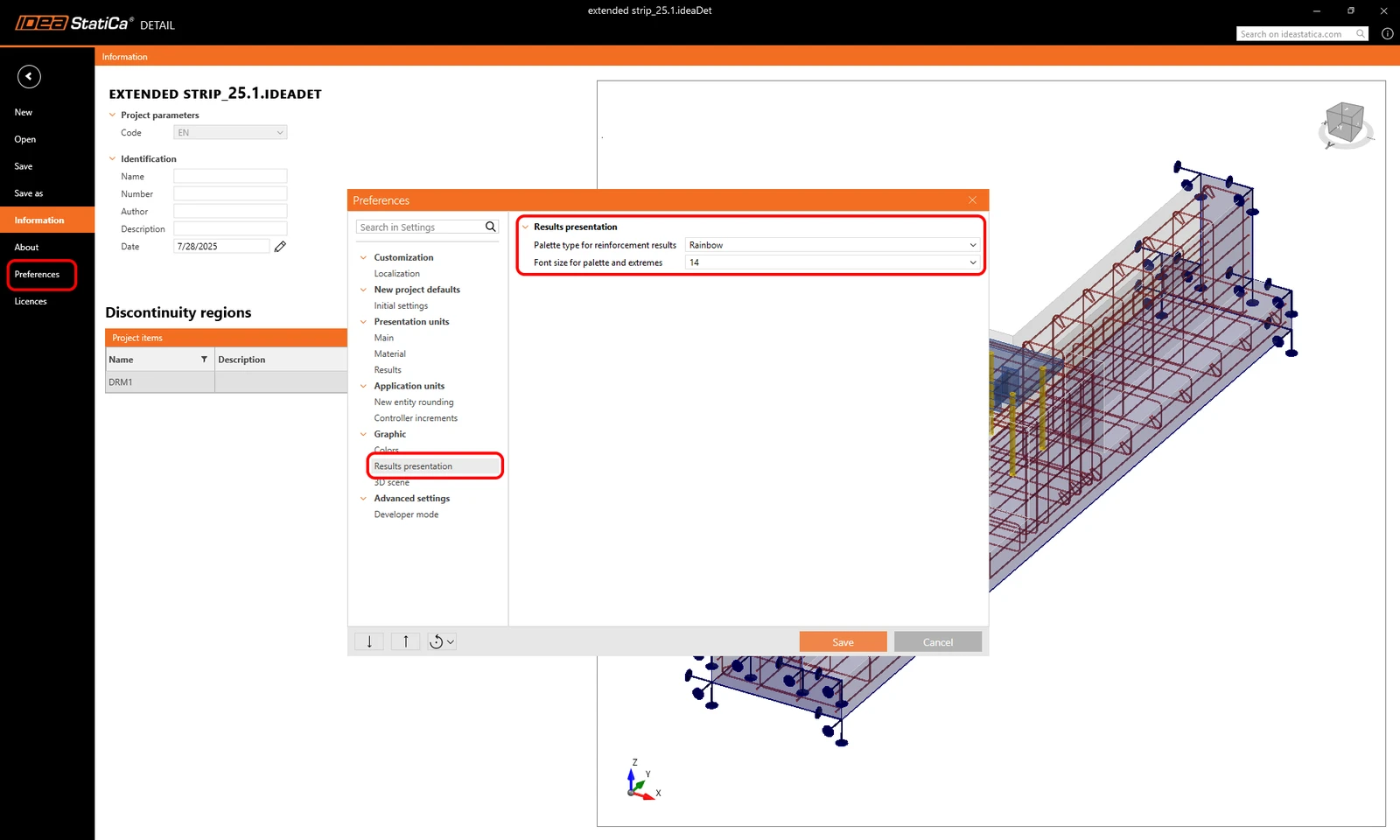
"Rainbow Colorsโ€œ for reinforcement

For displaying reinforcement results, it is possible to choose between so-called rainbow coloring or red-and-blue coloring (which distinguishes between tension and compression).
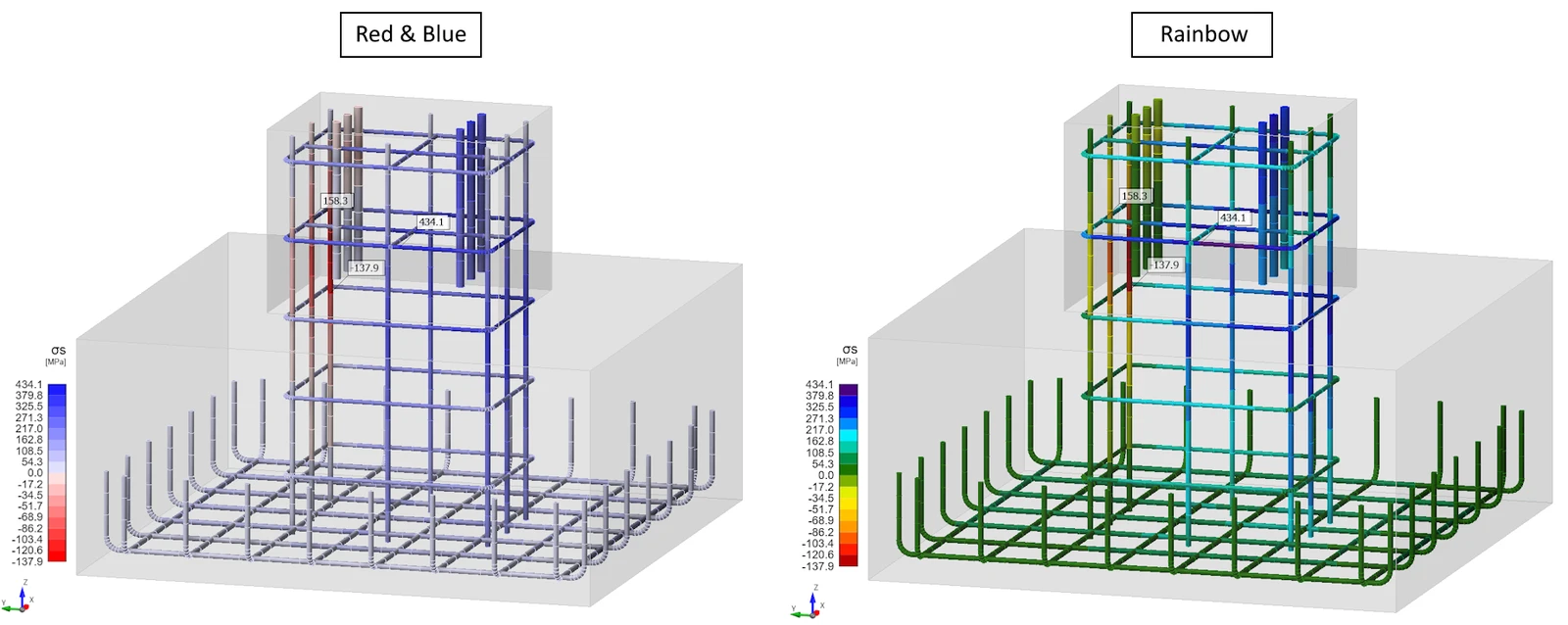
This setting can be adjusted in the preferences dialog and is saved with the application settings for future projects. Similarly, it is possible to define the font size for values displayed in the scene.
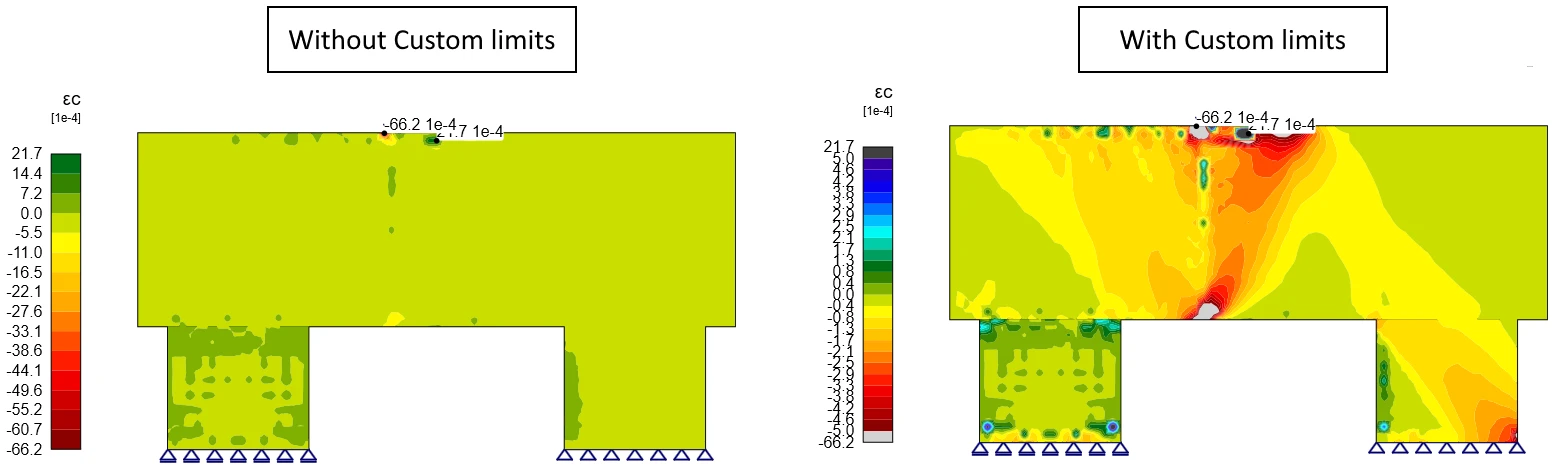
Custom limits for the results palette

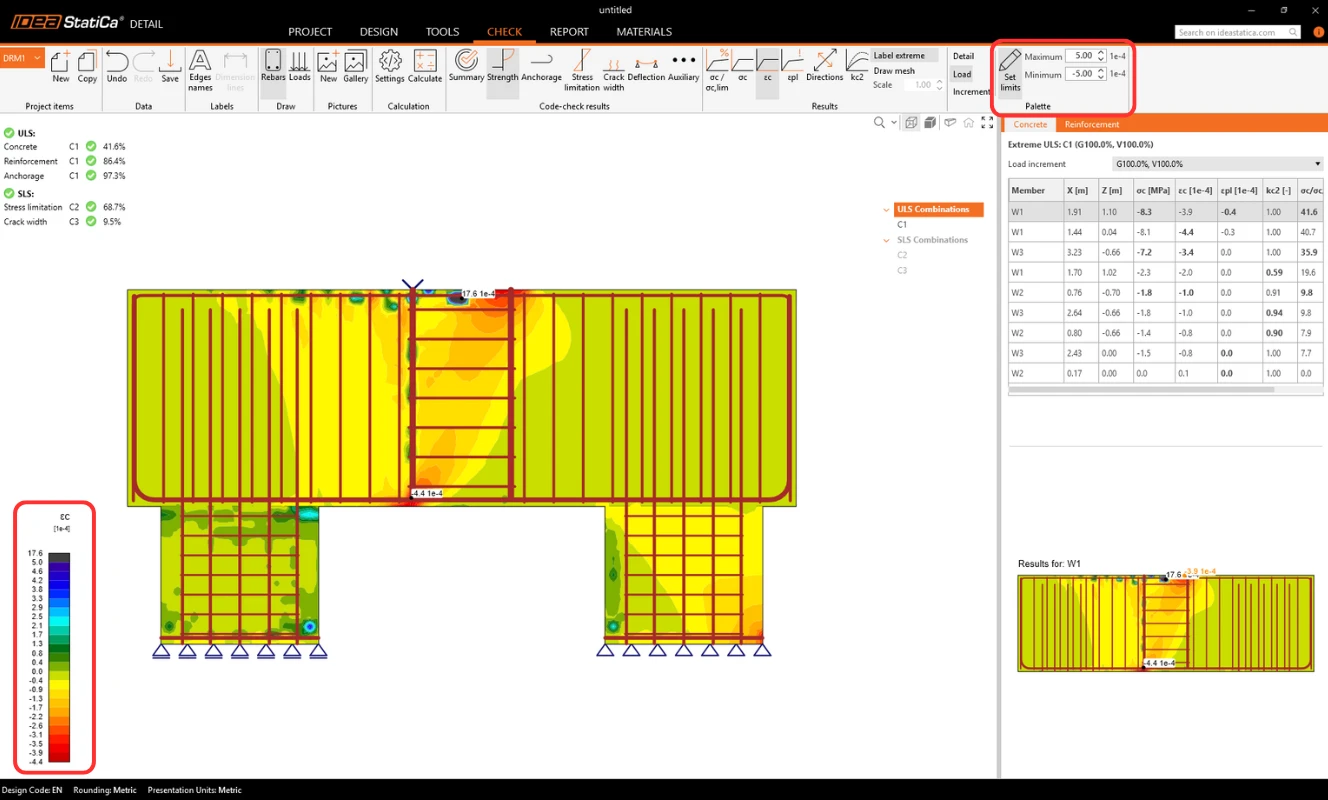
In the main ribbon, it is also possible to set custom limits for the color palette used to display results. This is particularly useful in cases where peaks with concentrated stresses occur, which would otherwise make it difficult to read the results and see the stresses in the rest of the structure.
These settings are temporary (not saved with the project), but they are saved for each view. So when switching from one result to another and back, your settings are persistent. Moreover, figures can be saved to the gallery and then added to the report.
Drawing results for selected reinforcement only

For Strength results on reinforcement (e.g., stress, strain) and Anchorage results (e.g., bond stress, Ftot, Flim) there is option to display only selected reinforcement.

The option can be found it the main tab:

  • When Rebars = ON, result plots display on all reinforcement groups (default behavior).
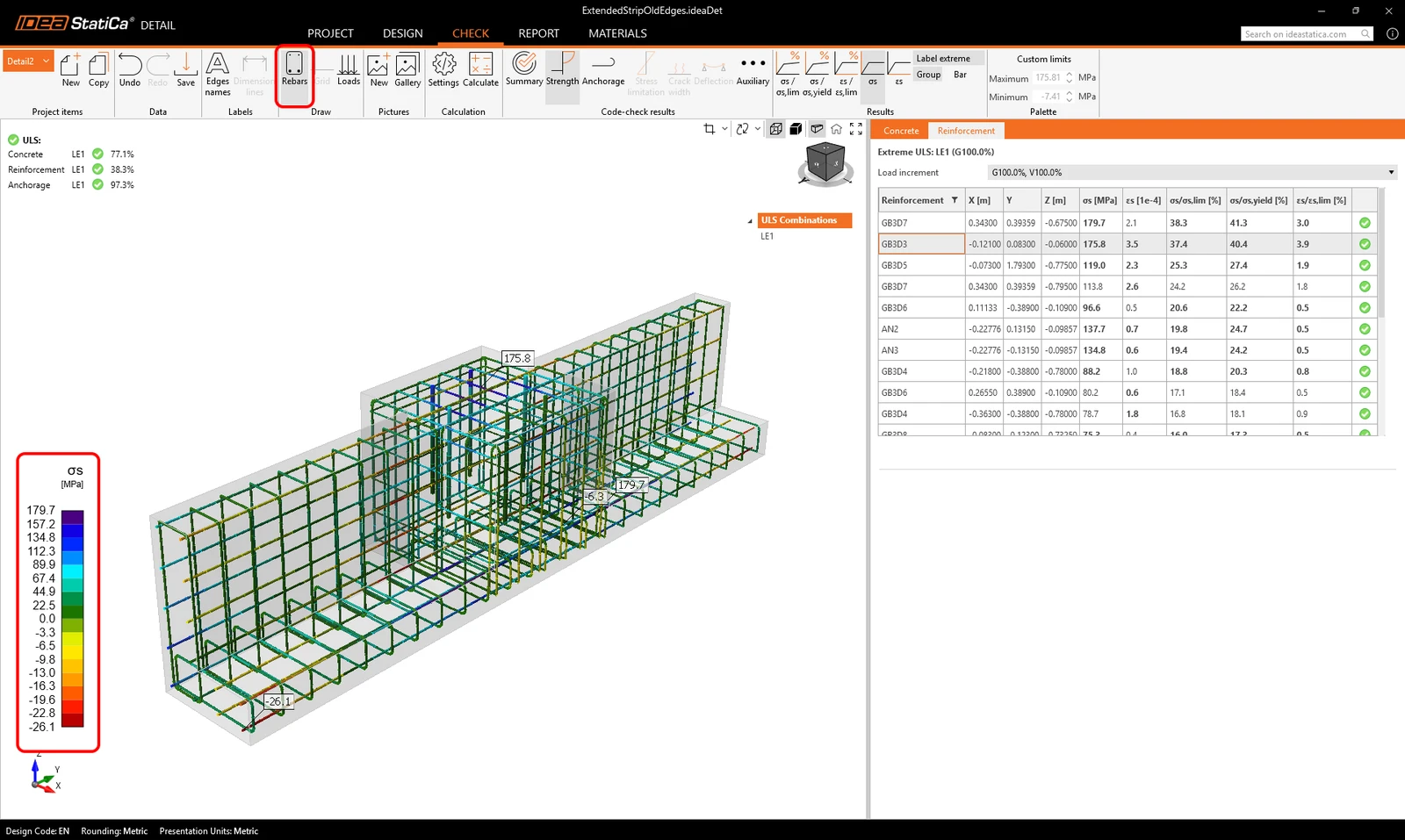
  • When Rebars = OFF, the scene shows results only on the reinforcement group currently selected in the Results table (vprvoright Property Grid).
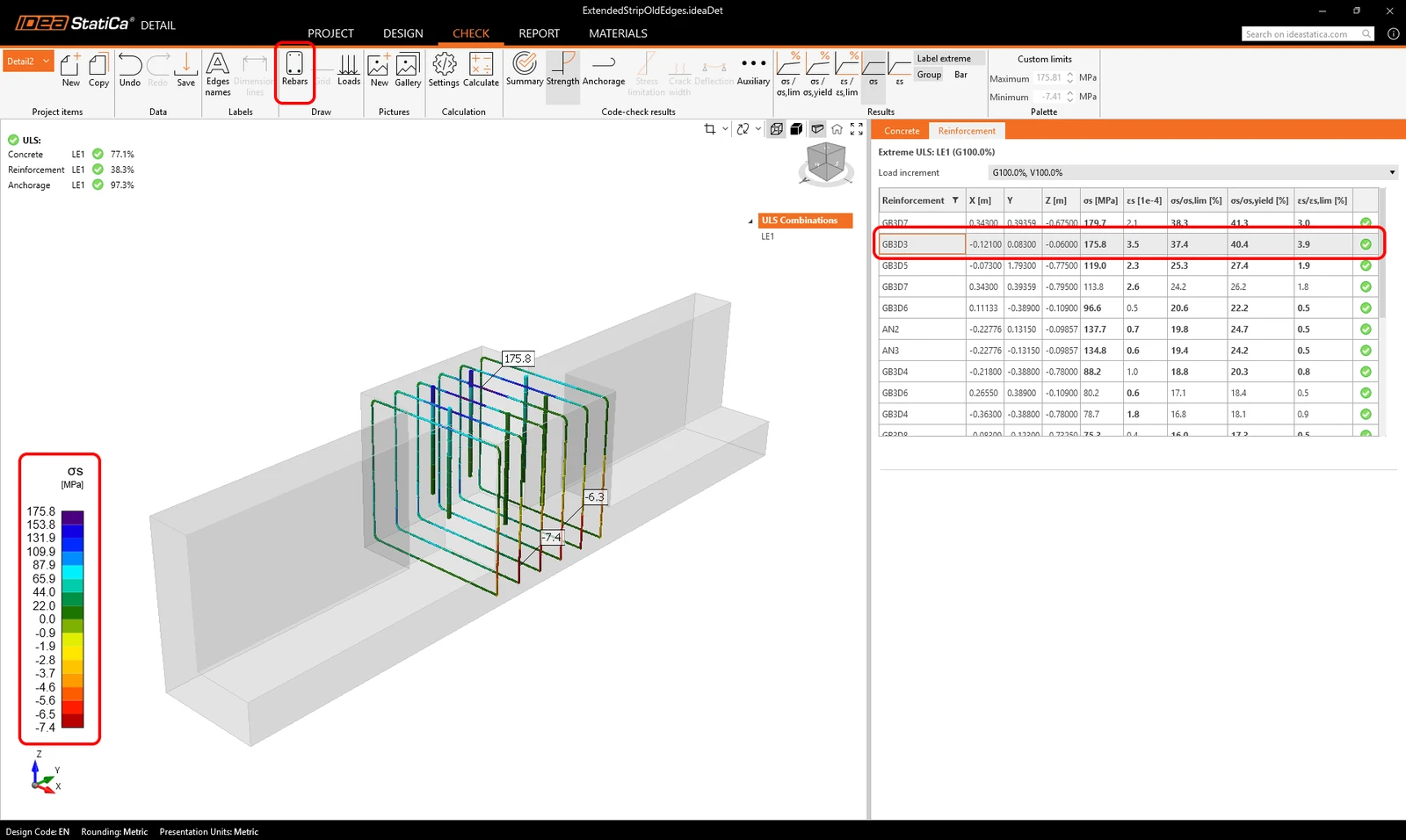
Any filtered view can be saved to the Gallery as a user-defined image and then inserted into the report, eliminating the need for external editing.
Try out the new features of IDEA StatiCa today

Download the latest version for free

Related articles

Release notes IDEA StatiCa 25.1
  • Steel
  • Concrete
  • v25.1
  • +3
  • Steel
  • Concrete
  • v25.1

Release notes

Release notes IDEA StatiCa 25.1

Read more
Cast-in plates in Detail
  • Concrete
  • Detail 3D
  • v25.0
  • v25.1
  • v26.0
  • +5
  • Concrete
  • Detail 3D
  • v25.0
  • v25.1
  • v26.0

Knowledge base

Cast-in plates in Detail

Read more
Anchoring plates options
  • Concrete
  • v25.1
  • v25.0
  • Detail 3D
  • +4
  • Concrete
  • v25.1
  • v25.0
  • Detail 3D

Knowledge base

Anchoring plates options

Read more
Prestressing in Detail โ€“ unbonded tendons
  • Concrete
  • v25.1
  • Prestressed members
  • +3
  • Concrete
  • v25.1
  • Prestressed members

Knowledge base

Prestressing in Detail โ€“ unbonded tendons

Read more