Idea Statica
  • Steel
  • Concrete
  • BIM & Workflows
  • Support & Learning
  • Pricing
  • Company
  • Steel overview
  • Connection design
  • Member design
  • Parametric design
  • Steel case studies
  • Concrete overview
  • Walls and D-regions
  • Anchoring design
  • Concrete case studies
  • BIM Overview
  • Supported integrations
  • Checkbot
  • Viewer
  • APIs
  • Support Center
  • E-learning & certification
  • Blog
  • Downloads & Licensing
  • Plans
  • Free community tool
  • Enterprise customers
  • Students & educators
  • How much will you save?
  • About us
  • Contact
  • Research & development
  • Authorized resellers
  • Meet our customers
  • Career
  • Steel
    Steel overviewConnection designMember designParametric designSteel case studies
  • Concrete
    Concrete overviewWalls and D-regionsAnchoring designConcrete case studies
  • BIM & Workflows
    BIM OverviewSupported integrationsCheckbotViewerAPIs
  • Support & Learning
    Support CenterE-learning & certificationBlogDownloads & Licensing
  • Pricing
    PlansFree community toolEnterprise customersStudents & educatorsHow much will you save?
  • Company
    About usContactResearch & developmentAuthorized resellersMeet our customersCareer
14-Day Trial
14-Day Trial
  • Steel
  • Concrete
  • BIM & Workflows
  • Support & Learning
  • Pricing
  • Company

Subscribe to our newsletter

Company

  • About us
  • Partners
  • Careers
  • Patent

Resources

  • Customer projects
  • Case studies
  • Connection Library
  • Verification books

Legal

  • EULA
  • Privacy policy
  • California Privacy
  • TOS Viewer
  • Licensing

Help

  • Contact
  • Quote request
  • Resellers
  • Downloads
FacebookInstagramLinkedInYouTube

© IDEA StatiCa 2009-2026

Trusted and used worldwide by engineers, fabricators & consultants.

Support CenterRelease notesRelease notes IDEA StatiCa Concrete & Prestressing 9.1
ConcreteRelease notesBeamBIM linkEN (Eurocode)

Release notes IDEA StatiCa Concrete & Prestressing 9.1

October 1, 2018
This article is also available in
ENCZDEESFRITPTNLHUROKRPLTHTRVIZH

We are proud to present improvements to IDEA StatiCa version 9.1. We did our best to choose the most impactful improvements from the huge amount of feedback and requests we received from you.

FEA links (SAP 2000, Robot, RFEM, etc.)

Until now, we had to export the beam from FEA applications to a new project every time. This meant designing the connection again.

Version 9.1 changes this dramatically:

  • We select a node in the FEA application.
  • We export it to IDEA StatiCa (geometry, cross-sections, and load effects), design the beam and perform a code-check.
  • Let’s say we want to optimize/change the model – we go back to the FEA application and do the necessary changes (loads, cross-sections, etc.).
  • Then we click the “Synchronize” button in the IDEA plugin embedded in the FEA application and all the changes are automatically applied in our IDEA StatiCa project – no need to design the connection again manually.
  • Let’s say we want to make another change in the model – we go back to the FEA application and add/delete necessary beams, loads, etc.
  • Then we click the “Modify” button in the IDEA plugin embedded in the FEA application, and the selection of connection entities is imported to the actual IDEA StatiCa project – no need to design the connection again manually.
  • We can calculate the project from the Code-check manager window by command Calculate or even Calculate All project items – all exported beams at one time.
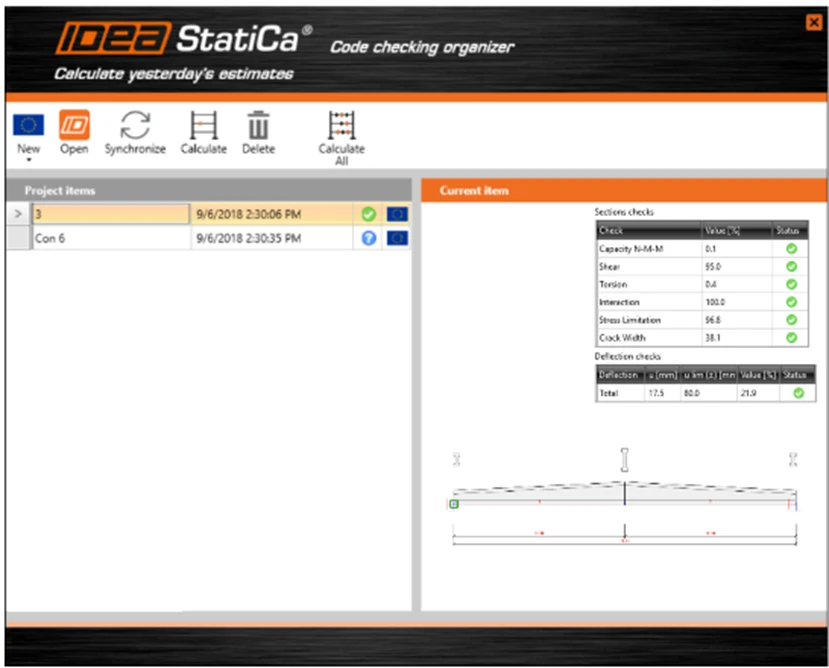
All the necessary information about the exported projects is available in the Code-check manager, and we can identify members, check the results, and explore the model presentation, etc. This information is printed for all exported items in one dialogue.

We can repeat this several times to optimize the design while making sure that all the data is correctly inputted into both the FEA application and IDEA StatiCa.