
Idea Statica
Steel
Concrete
BIM & Workflows
Support & Learning
Pricing
Company
14-Day Trial
Support CenterKnowledge BaseRegional-based item order in the cross-section library
Cross-section library favorites
Cross-section searchbox
How to create and use a custom cross-section
Saving of user-defined cross-sections to MPRL
Limiting short lines in DXF imports
Regional-based item order in the cross-section library
Improved Cross-section Conversion
Regional-based item order in the cross-section library
SteelConnection designKnowledge baseConnectionEN (Eurocode)

Regional-based item order in the cross-section library

This article is also available in
ENCSDEESFRITPTNLHURO

IDEA StatiCa automatically reorganizes the order of cross-section items based on the design code selected when launching IDEA StatiCa Connection. Thanks to this feature, e.g., engineers from the USA using AISC code will have the AISC relevant cross-sections in the first rows of the library. These settings can be set by all users individually across the organization to speed up the work of every engineer.
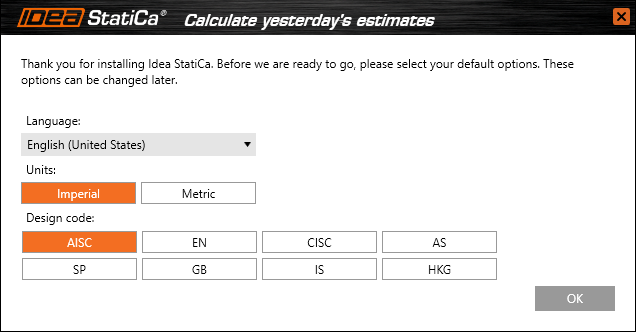
User preferences options which are available during the first start of IDEA StatiCa Connection.

This feature is available for the Expert and Enhanced version of IDEA StatiCa Steel.

Subscribe to our newsletter

Company

  • About us
  • Partnerships
  • Job openings
  • Patented technology for structural engineers

Resources

  • Customer projects
  • Case studies
  • IDEA StatiCa Connection Library
  • Concrete verifications

Legal

  • IDEA StatiCa END USER LICENSE AGREEMENT
  • Privacy policy
  • Terms of Services – IDEA StatiCa Viewer
  • Licensing

Help

  • Contact
  • Get price quote
  • IDEA StatiCa Specialists
  • Download the latest version
FacebookInstagramLinkedInYouTube

© IDEA StatiCa 2009-2026

Trusted and used worldwide by engineers, fabricators & consultants.