
Idea Statica
Steel
Concrete
BIM & Workflows
Support & Learning
Pricing
Company
14-Day Trial
Support CenterKnowledge BaseNew Launcher application
New Launcher application
LicensingSteelConcreteKnowledge basev25.0

New Launcher application

This article is also available in
ENCSDEESFRITPTNLHURO

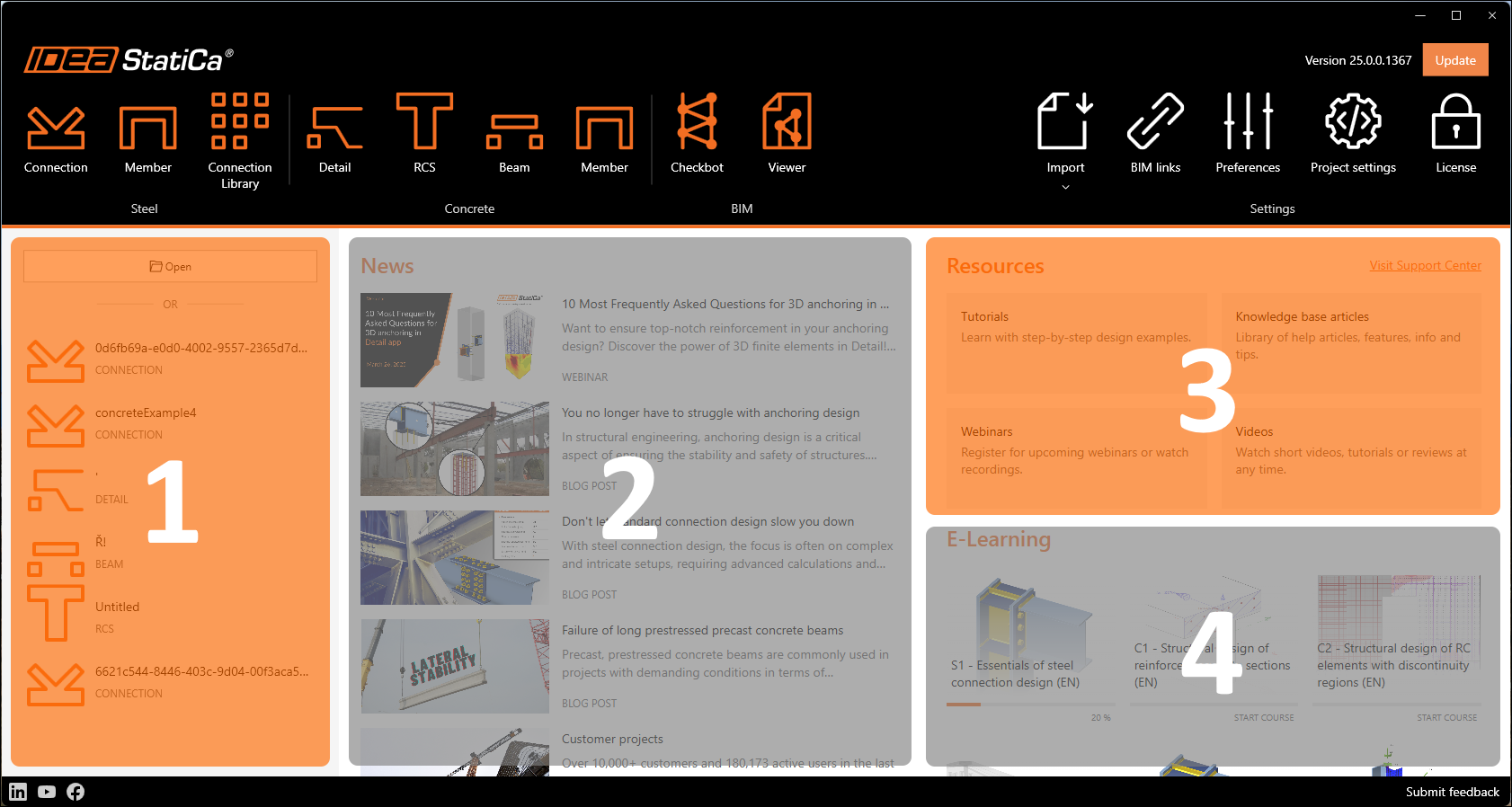
The Launcher application provides a simplified overview of the user's options, relevant news content and their progress in e-learning courses.

Replacement of the original start-up window brings both visual and functional upgrades. 

All IDEA StatiCa tools are listed in the top ribbon simply categorized under Steel, Concrete, and BIM groups, with new application icons.

IDEA StatiCa software settings are placed in the right part of the main ribbon. 

An information block in the top right corner provides the currently installed version number, together with a button for possible updates when a new version becomes available.

The main window space is divided into four areas: 

  • a list of recently opened projects
  • news-feed from current online content 
  • direct links to support center with different categories
  • an overview of progress in e-learning courses
Check out IDEA StatiCa for free

Subscribe to our newsletter

Company

  • About us
  • Partnerships
  • Job openings
  • Patented technology for structural engineers

Resources

  • Customer projects
  • Case studies
  • IDEA StatiCa Connection Library
  • Concrete verifications

Legal

  • IDEA StatiCa END USER LICENSE AGREEMENT
  • Privacy policy
  • Terms of Services – IDEA StatiCa Viewer
  • Licensing

Help

  • Contact
  • Get price quote
  • IDEA StatiCa Specialists
  • Download the latest version
FacebookInstagramLinkedInYouTube

© IDEA StatiCa 2009-2026

Trusted and used worldwide by engineers, fabricators & consultants.