


Concrete BIM link limitations
The following outlines the current limitations and considerations when using the ETABS/SAP2000 BIM link with IDEA StatiCa Checkbot and Detail 2D, highlighting potential constraints, common issues, and recommended practices to ensure accurate analysis and design.
Limitation: Import
If an ETABS load case contains analysis steps, IDEA StatiCa Checkbot will not be able to consider all of them.
- It is recommended to separate stepped load cases into individual load cases before import.
Limitation: Sync functionality
When syncing the model, load combination types are reset.
- The user must reassign the correct load combination types after each synchronization.
Limitation: Detail element creation
The following limitations apply when creating a Detail in Checkbot:
- Details can only be created for wall elements lying in the same plane.
- If the selected elements are not coplanar, an error will occur, and a different set of members must be selected.
Limitation: Detail Export
When exporting a Detail, the following limitations apply (a warning will be displayed in Checkbot when relevant):
- Out-of-plane uniform loads applied to 2D members are not transferred to Detail 2D.
- 2D members will not be merged if they have different thicknesses, materials, or in-plane loading values.
- Out-of-plane loading cannot be exported. A warning will appear if the total edge loading for a load case exceeds ±1 kN.
- Non-vertical 2D members should not be transferred to Detail 2D; the application is not suitable for such members.
Common issues with the workflow
- Concentrated point loads may cause nonlinear analysis failure. Add a transfer device (e.g., bearing plate) to distribute the load.
- A coarse ETABS or SAP2000 mesh (typical for global models) may cause stress peaks and produce unrealistic concentrated forces in both value and position for reinforcement design.
- Recommendation: Modify the mesh to 100 mm x 100 mm of imported wall elements.
- A coarse mesh can also cause significant in-plane moments that cannot be accurately captured in IDEA StatiCa.
- Recommendation: Set the out-of-plane stiffness of imported wall elements to a low value so that the surrounding structural elements in the global model can appropriately carry and transfer out-of-plane forces.
- If an edge point load creates tension on the edge (e.g., from lateral load), nonlinear analysis may fail.
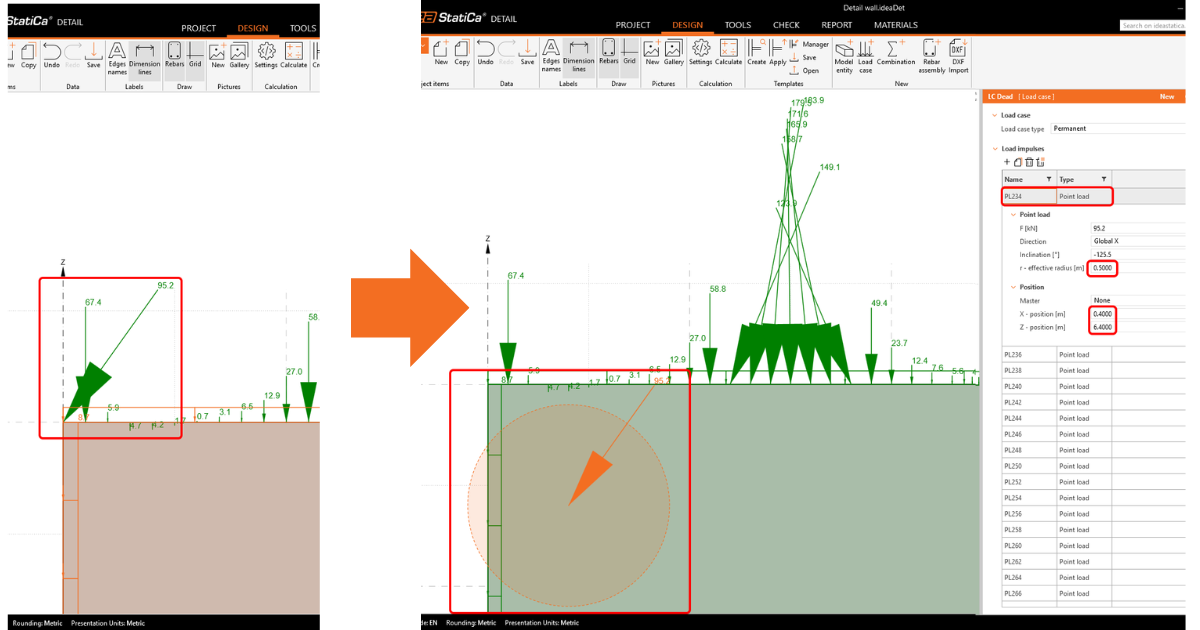
- Recommendation: Move the point load slightly inward to ensure proper concrete engagement.
Steel BIM link limitations
The link now works for a wide variety of connections/joints. However, please take into account the yet unsupported functionality:
Limitation: Loads import
We do not support the import of load-combination which contains load-combination adding other than linear.
We do not support referencing of a load-combination inside another load combination.
Limitation: How to run SAP2000 and ETABS links with IDEA StatiCa 22.1.
Problematic versions:
- SAP2000 24.1.0
- ETABS 20.3.0
Problem description:
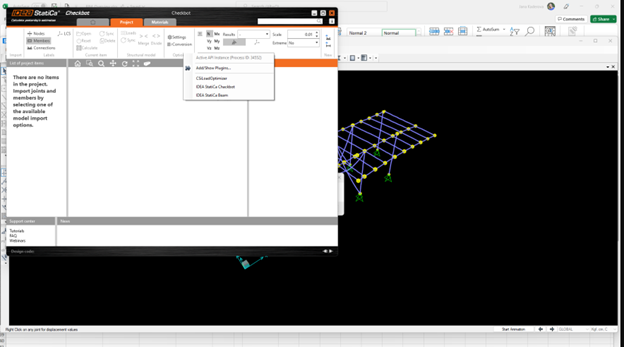
The new patch of SAP2000 24.1.0 does not work with the latest IDEA 22.1. Once you start Checkbot from the menu, it looks like this, and nothing can be done/clicked.
Solution:
This goes for SAP2000 and ETABS as well (latest versions). The workaround is to:
1. Locate the config file (either SAP2000.exe.config or ETABS.exe.config) in
C:\Program Files\Computers and Structures\SAP2000 24\
or
C:\Program Files\Computers and Structures\ETABS 20\
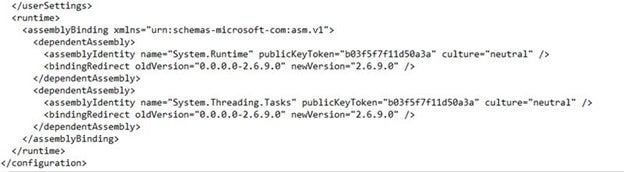
2. Delete the following lines from the bottom of the file and save it (requires admin rights).

Alternatively, copy the file to the desktop, edit it there, and copy it back to the original folder.
This is what the file should look like (its bottom part) after the assembly binding is properly deleted:
3. Then, it is possible to run Checkbot.
Limitation: Equilibrium
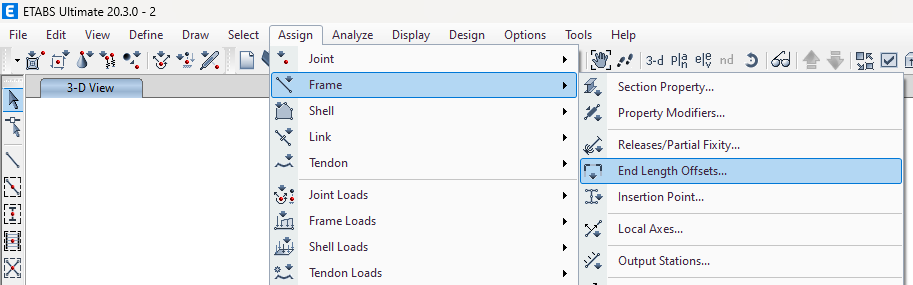
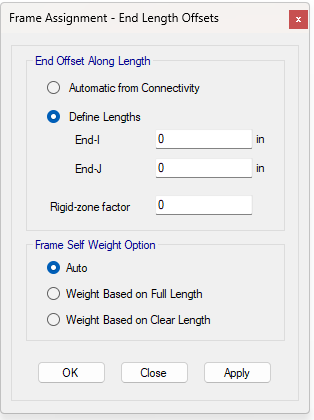
To ensure the equilibrium in the nodes, please set the End Length Offsets to 0:
Limitation: Sign convention for internal forces
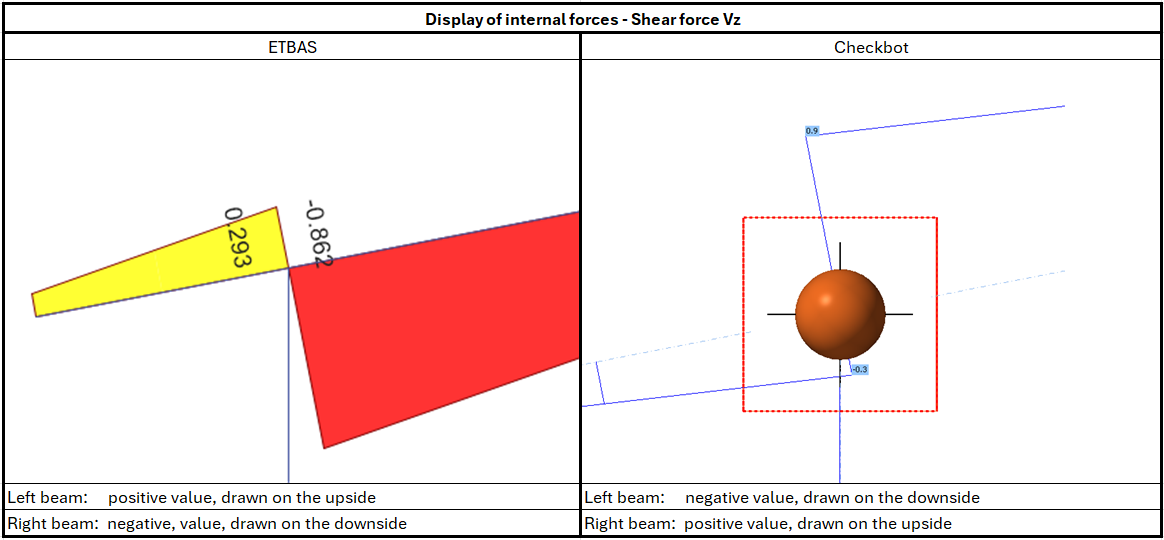
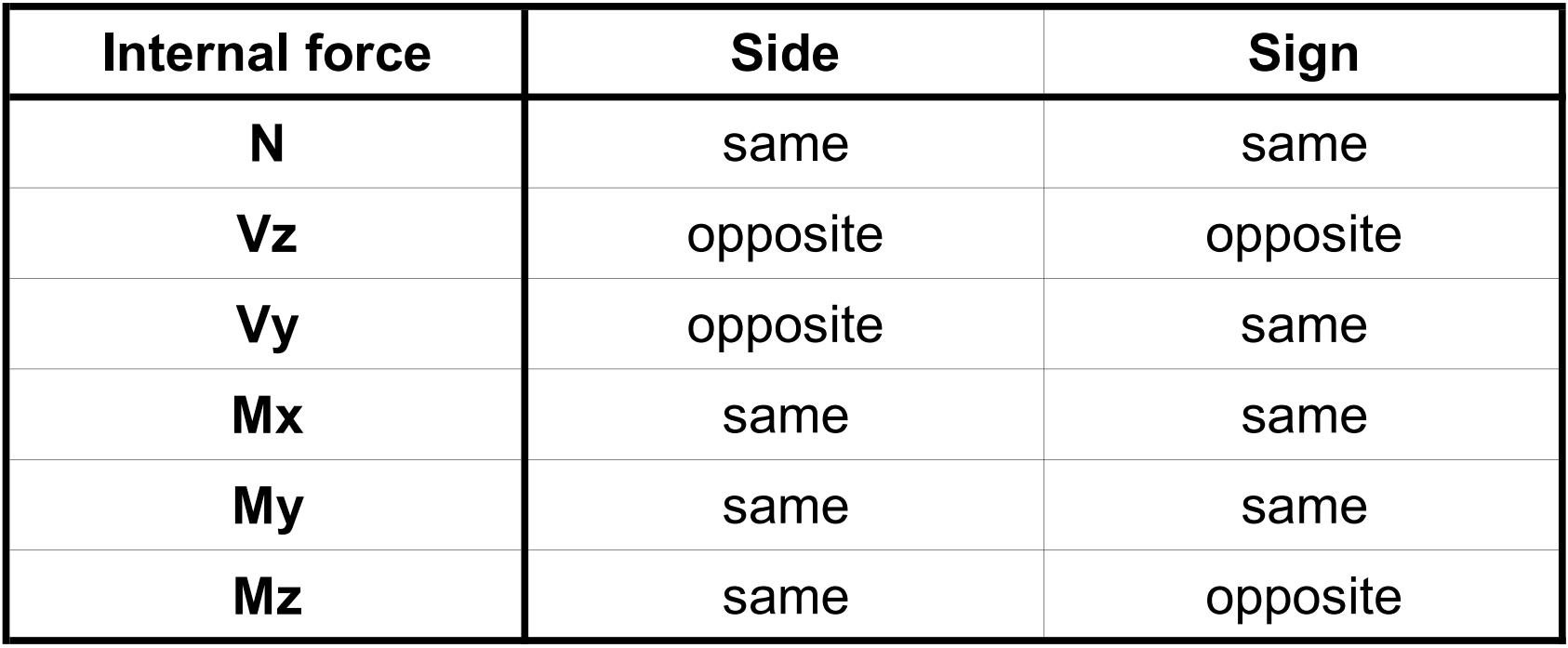
Due to different sign conventions in ETABS and in Checkbot, the internal forces are displayed differently. The load effects are applied correctly, but the internal forces may be displayed with the opposite sign and be drawn on the other side of the beam.
Limitation: More versions of SAP2000 or ETABS installed on the computer
ETABS and SAP2000 API uses COM library, which needs to be registered in registry. When you install new version, during the installation COM for this version is registered automatically. So when you then try to run the Checkbot link for older version, it doesn't work.
If you want to switch between those two versions, you have to:
1) Run as administrator the "UnregisterSAP2000.exe" or "UnregisterETABS.exe" in the folder with newer version.
2) Then Run as administrator the "RegisterSAP2000.exe" or "RegisterETABS.exe" in the folder with the older version.